> ## Documentation Index
> Fetch the complete documentation index at: https://syteca.com/docs/llms.txt
> Use this file to discover all available pages before exploring further.
# Audit Log
> View, filter, sort, and protect the Syteca Audit log — a tamper-evident record of every administrator action performed in the Management Tool, grouped by category.
The **Audit log** (previously known as the Management Tool log) records every action performed by administrators, supervisors in the Management Tool — alert configuration changes, secrets created or edited, licenses assigned, scheduled reports edited, and so on. Administrators use it to monitor what other administrators do in the system, investigate incidents, and meet compliance requirements.
The Audit log can only be viewed by users with the [User Management administrative permission](/docs/administration/users/administrative-permissions).
## View the Audit log
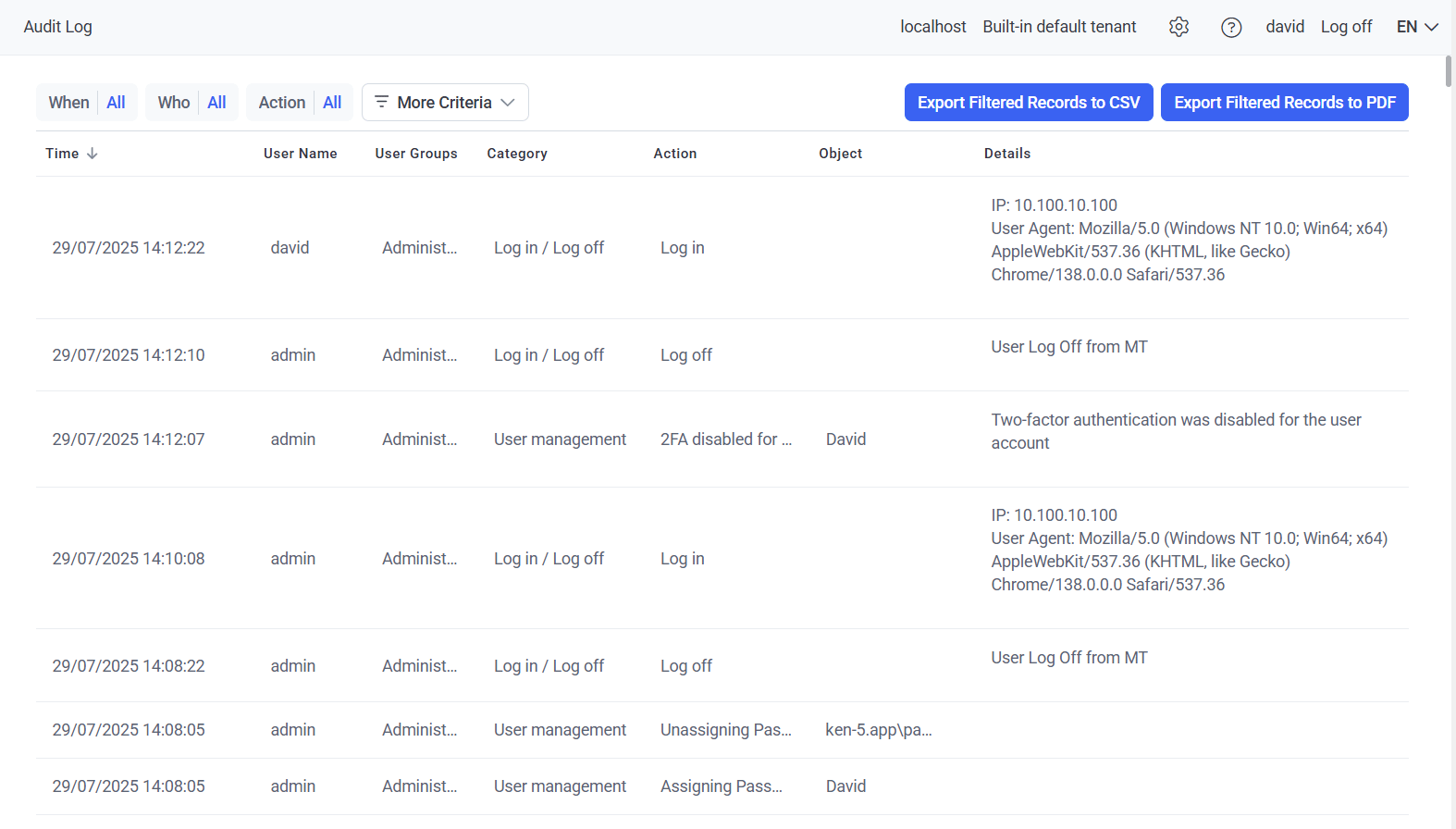
Sign in to the Management Tool and click the **Audit Log** navigation link on the left.
The page shows a transaction-log grid with one row per action and the following columns:
| Column | Shows |
| --------------- | -------------------------------------------------------------------------------- |
| **Time** | When the action was performed. |
| **User Name** | The administrator who performed the action. |
| **User Groups** | The groups that administrator belongs to. |
| **Category** | The category the action belongs to (see [reference below](#category-reference)). |
| **Action** | The specific action performed. |
| **Object** | The objects the action affected. |
| **Details** | Additional information about the action. |
Click **10 / 50 / 100 / 200** at the bottom right to change records per page, and use the page numbers at the bottom left to navigate.
 ## Filter, sort, and export
The grid supports filtering, sorting, column reordering, and export to CSV or PDF.
### Filter
By default the grid shows three filters. Click a filter and select values to narrow the results — multiple filters can be applied at the same time.
| Default filter | What it does |
| -------------- | ------------------------------------------------------------------------------------------------------------------------------------------------------------------ |
| **When** | Filter by time period — select either **Within the last** *(number of hours, days, weeks, or months)* or **Between** *(start and end date)*, then click **Apply**. |
| **Who** | Filter by the administrator who performed the action. |
| **Action** | Filter by the specific action performed. |
Click **More criteria** (to the right of the filters) to add:
* **User Groups** — filter by the groups the administrator belongs to.
* **Category** — filter by the category of action ([see reference below](#category-reference)).
* **Object** — filter by the objects the action affected.
### Sort and reorder
* **Sort** — click a column header. Click it again to switch ascending/descending. The up/down arrow icon in the header shows the current sort direction.
* **Reorder columns** — drag a column header to a new position.
If the data is not sorted by a column, the sort arrow is not shown in that column header.
### Export
Click **Export Filtered Records to CSV** or **Export Filtered Records to PDF** at the top right of the page to download the currently filtered view.
## Audit log protection
The Audit log is protected against tampering with an integrity check, and the data is encrypted in the database — with unique database encryption for each Application Server.
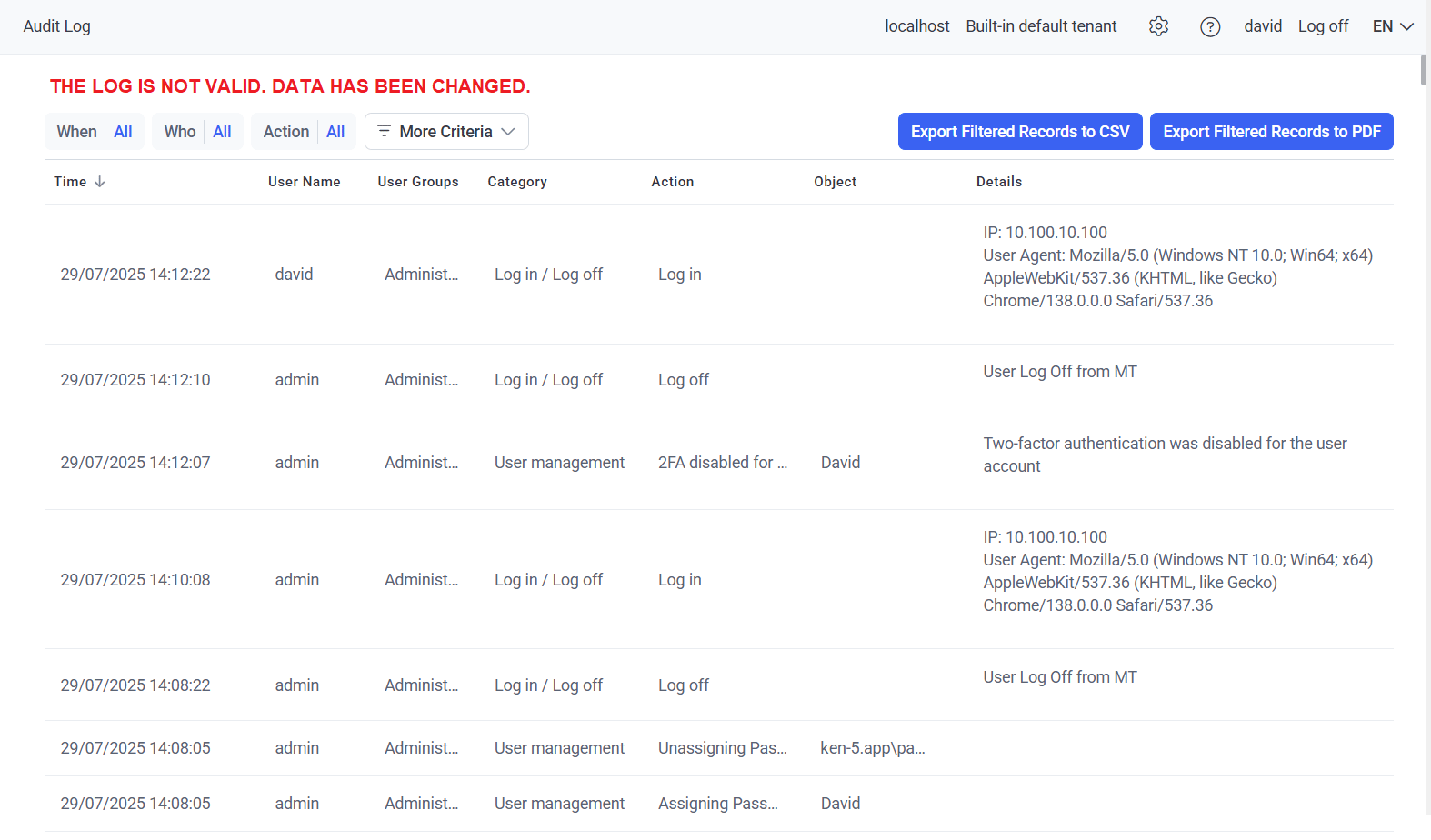
If the log has been modified, a red warning appears at the top of the page:
> **THE LOG IS NOT VALID. DATA HAS BEEN CHANGED.**
All invalid log entries are highlighted in red in the grid so you can identify which records were altered.
## Filter, sort, and export
The grid supports filtering, sorting, column reordering, and export to CSV or PDF.
### Filter
By default the grid shows three filters. Click a filter and select values to narrow the results — multiple filters can be applied at the same time.
| Default filter | What it does |
| -------------- | ------------------------------------------------------------------------------------------------------------------------------------------------------------------ |
| **When** | Filter by time period — select either **Within the last** *(number of hours, days, weeks, or months)* or **Between** *(start and end date)*, then click **Apply**. |
| **Who** | Filter by the administrator who performed the action. |
| **Action** | Filter by the specific action performed. |
Click **More criteria** (to the right of the filters) to add:
* **User Groups** — filter by the groups the administrator belongs to.
* **Category** — filter by the category of action ([see reference below](#category-reference)).
* **Object** — filter by the objects the action affected.
### Sort and reorder
* **Sort** — click a column header. Click it again to switch ascending/descending. The up/down arrow icon in the header shows the current sort direction.
* **Reorder columns** — drag a column header to a new position.
If the data is not sorted by a column, the sort arrow is not shown in that column header.
### Export
Click **Export Filtered Records to CSV** or **Export Filtered Records to PDF** at the top right of the page to download the currently filtered view.
## Audit log protection
The Audit log is protected against tampering with an integrity check, and the data is encrypted in the database — with unique database encryption for each Application Server.
If the log has been modified, a red warning appears at the top of the page:
> **THE LOG IS NOT VALID. DATA HAS BEEN CHANGED.**
All invalid log entries are highlighted in red in the grid so you can identify which records were altered.
 ## Category reference
Every action is grouped into a category. The list below covers the main categories and what information each one captures.
| Category | What it captures |
| ---------------------------------------- | ----------------------------------------------------------------------------------------------------------------------------------------------------------------------------- |
| **Alert management** | Alert configuration changes, alert export/import/deletion, new alert creation, and changes to Global Alert settings. |
| **Archived sessions viewing** | Archived sessions opened in the Session Viewer or exported via Forensic Export. |
| **Client editing** | Changes to Client configuration. *(Multiple changes are combined into a single log entry.)* |
| **Client group management** | Client Group configuration changes, deletion, and creation. |
| **Client installation / uninstallation** | Client installs, uninstalls, and Client Uninstallation key changes. |
| **Dashboards** | The Clients, users, and date range used to generate the user-activity charts on the [User Activity Dashboards](/docs/session-monitoring/dashboards/user-activity-dashboards) page. |
| **Database cleanup** | Manual and scheduled cleanup, and changes to Archive & Cleanup settings. |
| **Database management** | Database shrinking, archive & cleanup, and statistics updates. |
| **Date & time format** | Changes to the Date & Time Format settings. |
| **Diagnostics** | Application Server and Management Tool log file downloads. |
| **Email sending settings** | Changes to Email Sending settings. |
| **Forensic export** | Forensic Export runs, result downloads and deletions, and result validation. |
| **Health monitoring** | Error events deleted from the System State grid on the [System Health Dashboards](/docs/administration/dashboards/system-health-dashboards) page. |
| **LDAP targets** | LDAP target additions, edits, and deletions. |
| **Log in / Log off** | Administrator logins, logoffs, Management Tool closures, and session expirations. |
| **Log settings** | Changes to log settings *(see [SIEM integration](/docs/administration/integrations/siem))*. |
| **One-time passwords** | One-time passwords generated, used, expired, and manually terminated. |
| **Report generation** | Reports generated by the Report Generator and Scheduled Report rules, plus report downloads. |
| **Scheduled report management** | Scheduled Report rule changes, deletions, and creations. |
| **Secret manager** | Actions on secrets and their folders on the [Password Management](/docs/pam/overview) page, including using them. |
| **Serial key management** | Serial key additions, activations, and deactivations. |
| **Session viewing** | Sessions opened in the Session Viewer by Management Tool users. |
| **Ticketing system integration** | [Ticketing system integration](/docs/administration/integrations/ticketing-system) enable/disable and access parameter edits. |
| **Two-factor authentication** | Users added or deleted on the [Two-Factor Authentication](/docs/administration/access/two-factor-authentication) tab, and 2FA key edits. |
| **USB monitoring** | USB Monitoring & Blocking rule changes, deletions, and creations. |
| **User blocking** | Users added to and removed from the Blocked Users list. |
| **User group management** | User group configuration changes, deletions, creations, and permission changes. |
| **User management** | User configuration changes, deletions, creations, and permission changes. |
The **Alert player viewing** category was deprecated in Syteca version 6.58.1 — these actions are no longer added to the log.
## Related
Charts of endpoint user activity, application use, and session patterns.
Storage, CPU, memory, database, and Client status.
Forward audit log events to Splunk, ArcSight, or QRadar.
The User Management permission required to view this log.
## Category reference
Every action is grouped into a category. The list below covers the main categories and what information each one captures.
| Category | What it captures |
| ---------------------------------------- | ----------------------------------------------------------------------------------------------------------------------------------------------------------------------------- |
| **Alert management** | Alert configuration changes, alert export/import/deletion, new alert creation, and changes to Global Alert settings. |
| **Archived sessions viewing** | Archived sessions opened in the Session Viewer or exported via Forensic Export. |
| **Client editing** | Changes to Client configuration. *(Multiple changes are combined into a single log entry.)* |
| **Client group management** | Client Group configuration changes, deletion, and creation. |
| **Client installation / uninstallation** | Client installs, uninstalls, and Client Uninstallation key changes. |
| **Dashboards** | The Clients, users, and date range used to generate the user-activity charts on the [User Activity Dashboards](/docs/session-monitoring/dashboards/user-activity-dashboards) page. |
| **Database cleanup** | Manual and scheduled cleanup, and changes to Archive & Cleanup settings. |
| **Database management** | Database shrinking, archive & cleanup, and statistics updates. |
| **Date & time format** | Changes to the Date & Time Format settings. |
| **Diagnostics** | Application Server and Management Tool log file downloads. |
| **Email sending settings** | Changes to Email Sending settings. |
| **Forensic export** | Forensic Export runs, result downloads and deletions, and result validation. |
| **Health monitoring** | Error events deleted from the System State grid on the [System Health Dashboards](/docs/administration/dashboards/system-health-dashboards) page. |
| **LDAP targets** | LDAP target additions, edits, and deletions. |
| **Log in / Log off** | Administrator logins, logoffs, Management Tool closures, and session expirations. |
| **Log settings** | Changes to log settings *(see [SIEM integration](/docs/administration/integrations/siem))*. |
| **One-time passwords** | One-time passwords generated, used, expired, and manually terminated. |
| **Report generation** | Reports generated by the Report Generator and Scheduled Report rules, plus report downloads. |
| **Scheduled report management** | Scheduled Report rule changes, deletions, and creations. |
| **Secret manager** | Actions on secrets and their folders on the [Password Management](/docs/pam/overview) page, including using them. |
| **Serial key management** | Serial key additions, activations, and deactivations. |
| **Session viewing** | Sessions opened in the Session Viewer by Management Tool users. |
| **Ticketing system integration** | [Ticketing system integration](/docs/administration/integrations/ticketing-system) enable/disable and access parameter edits. |
| **Two-factor authentication** | Users added or deleted on the [Two-Factor Authentication](/docs/administration/access/two-factor-authentication) tab, and 2FA key edits. |
| **USB monitoring** | USB Monitoring & Blocking rule changes, deletions, and creations. |
| **User blocking** | Users added to and removed from the Blocked Users list. |
| **User group management** | User group configuration changes, deletions, creations, and permission changes. |
| **User management** | User configuration changes, deletions, creations, and permission changes. |
The **Alert player viewing** category was deprecated in Syteca version 6.58.1 — these actions are no longer added to the log.
## Related
Charts of endpoint user activity, application use, and session patterns.
Storage, CPU, memory, database, and Client status.
Forward audit log events to Splunk, ArcSight, or QRadar.
The User Management permission required to view this log.