> ## Documentation Index
> Fetch the complete documentation index at: https://syteca.com/docs/llms.txt
> Use this file to discover all available pages before exploring further.
# MS SQL Database Maintenance: Index Rebuilding
> Check index fragmentation and set up a recurring SQL Server Maintenance Plan to rebuild or reorganize indexes for better database performance.
This method of rebuilding indexes with SQL Server Maintenance Plans only works on the Standard and Enterprise editions of MS SQL Server — the Express edition doesn't support it.
Indexes speed up MS SQL Server database queries, but fragment over time as data is inserted, updated, and deleted. Regular maintenance keeps performance from degrading.
**Reorganizing** an index is the lighter-weight option — it's always an online operation, so queries and updates can continue against the table while it runs. Prefer it unless you have a specific reason to rebuild instead.
**Rebuilding** an index drops and recreates it. Depending on the index type and MS SQL Database Engine version, this can run offline (faster, but holds object-level locks that block queries for its duration) or online (no locks until a brief one at the very end, and — on supported Engine versions — resumable, so it can be paused and continued later).
While an online index rebuild is running, every write to the indexed columns has to update an extra copy of the index, which can slightly slow down writes. If you pause a resumable rebuild, that slowdown persists until you either finish or abort it — so if you don't plan to finish, abort rather than leaving it paused.
## Check whether to reorganize or rebuild
Select the database containing activity data — typically named `.EkranActivityDB`.
Right-click the database, select **Reports > Standard Reports**, and run **Index Physical Statistics**.
The report lists every index, its current fragmentation level, and a recommended action.
As a general rule: reorganize indexes fragmented below 30%, and rebuild indexes fragmented at 30% or higher.
## Create a scheduled maintenance plan
In Object Explorer, expand **Management**, right-click **Maintenance Plans**, and select **New Maintenance Plan**. Name it.
Drag a **Rebuild Index Task** from the Maintenance Plan Tasks toolbox onto the plan, and rename it (for example, "Nightly Index Maintenance").
Edit the task: for a local SQL Server, select **Local server connection** and choose `EkranActivityDB` under **Database(s)**. Leave the task's other defaults unchanged.
For large deployments, disable **Keep index online**. This disconnects the database from the server during the rebuild — Clients continue buffering data locally and send it once the rebuild finishes.
Click the calendar icon to open **New Job Schedule**, and set a recurrence (for example, nightly at 1 AM).
Running it every night isn't necessary — every six months is a reasonable default.
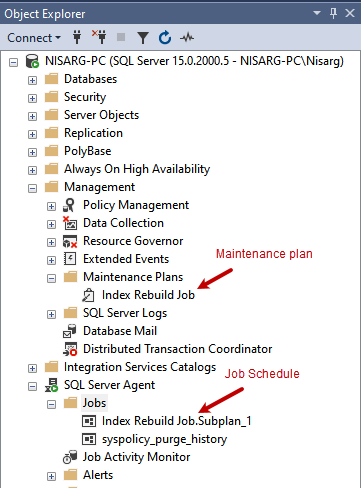
Save the schedule, then save the maintenance plan itself. It appears under **Management**, alongside its automated job in **SQL Server Agent**.
Right-click the job and select **Execute** to confirm it runs correctly.
 ## Related
Archive, cleanup, and other database maintenance.
Common MS SQL Server connection issues.
## Related
Archive, cleanup, and other database maintenance.
Common MS SQL Server connection issues.