> ## Documentation Index
> Fetch the complete documentation index at: https://syteca.com/docs/llms.txt
> Use this file to discover all available pages before exploring further.
# Configure Windows Authentication for Use with NTLM
> Prevent authentication errors when Windows Authentication uses the NTLM security protocol to connect to an MS SQL Server database with NTLM restrictions in place.
**NOT AVAILABLE IN SAAS.**
Syteca Application Server uses the NTLM security protocol for Windows Authentication when connecting to an MS SQL Server database. Authentication needs Active Directory accounts with the required database permissions. If the environment has NTLM restrictions, the system may fail to verify domain membership, causing an authentication error.
The **Use process credentials** option resolves this: it makes the Application Server automatically use the credentials of the account running the **EkranServer** service. These credentials are already "integrated," so no additional verification is needed when connecting to the database — bypassing NTLM restrictions entirely.
On the computer running Syteca Application Server, right-click the **Syteca Server** tray icon and select **Database Parameters**.
On the **Metadata Storage** sub-tab, with **Windows Authentication** selected under **Authentication**, select the **Use process credentials** checkbox.
Click **OK**.
Restart the **EkranServer** service.
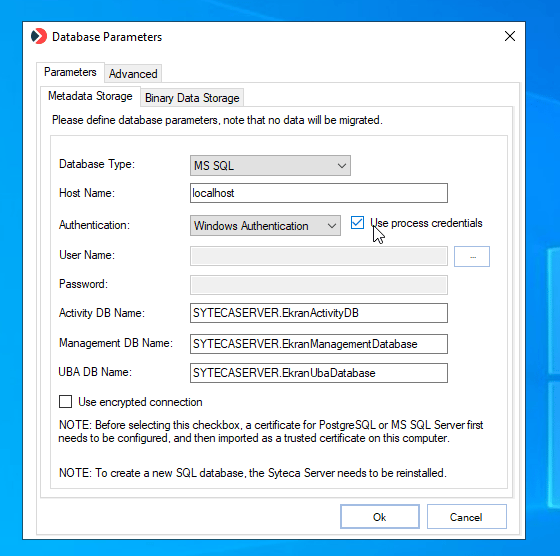 Enabling this option disables the Database Parameters tool's own credential verification step, which avoids authentication errors caused by NTLM restrictions in the environment.
## Related
All database connection and binary storage options.
An alternative, more restrictive approach using a Managed Service Account.
Enabling this option disables the Database Parameters tool's own credential verification step, which avoids authentication errors caused by NTLM restrictions in the environment.
## Related
All database connection and binary storage options.
An alternative, more restrictive approach using a Managed Service Account.