> ## Documentation Index
> Fetch the complete documentation index at: https://syteca.com/docs/llms.txt
> Use this file to discover all available pages before exploring further.
# High Availability, Load Balancing, and Disaster Recovery
> Scale Syteca beyond a single Application Server — High Availability mode using Microsoft Failover Clustering, automatic load balancing across nodes, and disaster recovery via Storage Replica.
## Scaling Syteca past one server, without a vendor SOAR product
A single Application Server handles up to \~10,000 concurrent Client sessions comfortably. Past that, every PAM/UAM vendor has the same story: scale out across multiple instances, load balance the traffic, replicate the storage, support failover when a node dies. The implementations differ wildly. Some vendors require a separate cluster product (PAS HA Cluster) on top of Vault Server, others want you to set up an indexer cluster, a search head cluster, and a deployment server. The complexity tax for "highly available" is usually a second product, a second license, and a second runbook.
**Syteca's HA model is simpler**: multiple Application Server instances on different nodes in a **Microsoft Failover Cluster** — using the failover clustering capability already in Windows Server. Add a network load balancer in front, optionally enable **Storage Replica** for cross-storage disaster recovery, and you have a fully redundant deployment with automatic load distribution. The same Syteca product, the same licensing, the same Management Tool — just more instances behind a load balancer.
**Use Syteca HA when you need to:**
* **Scale beyond 10,000 concurrent Clients** without saturating a single Application Server. The platform itself recommends HA at this scale.
* **Eliminate Application Server downtime** during upgrades — instances can be updated one at a time, with Clients automatically reconnecting to other nodes.
* **Survive a storage failure** by failing over to a replicated storage endpoint without data loss.
* **Continuously redistribute load** across nodes as Client populations shift — no manual sharding, no per-Client routing rules to maintain.
* **Aggregate sessions across geographically-distributed deployments** by pairing HA with the [Master Panel](/docs/release-notes/components/master-panel) for a single-pane-of-glass view.
**Pair it with [Multi-Tenant mode](/docs/administration/multi-tenant/overview)** when MSSP-style isolation is required on top of HA — tenants are independent, but each tenant benefits from the same underlying HA infrastructure.
**NOT AVAILABLE IN SAAS.** SaaS deployments are HA by construction — your vendor manages the underlying topology. This procedure applies to **on-premises** deployments only.
## How HA mode works
HA mode runs **multiple Application Server instances** in a Microsoft failover cluster, sharing the same database and Master Certificate. Clients connect to the load balancer fronting the cluster, which routes their traffic to the least-busy node. If a node fails — or you take it down for maintenance — its Clients automatically reconnect through the load balancer to other surviving nodes, with no manual intervention.
| Capability | Mechanism |
| ---------------------------------- | ---------------------------------------------------------------------------------------------------------------------------------------------------------------------------------------------------------------------------------------------------------------------------------------------- |
| **Load balancing** | Network load balancer redistributes Client traffic across all healthy Application Server nodes automatically. |
| **Failover for application logic** | Microsoft Failover Clustering manages which Application Server instances are active and routes around failed nodes. |
| **Failover for storage** | *(Optional)* Microsoft Storage Replica mirrors the database storage to a second endpoint; Failover Cluster Manager fails over to the replica when the primary fails. |
| **Single management interface** | All Application Servers in the cluster share the same database, so a single Management Tool instance manages the whole cluster. For viewing sessions across **multiple** independent Application Servers (different clusters), use the [Master Panel](/docs/release-notes/components/master-panel). |
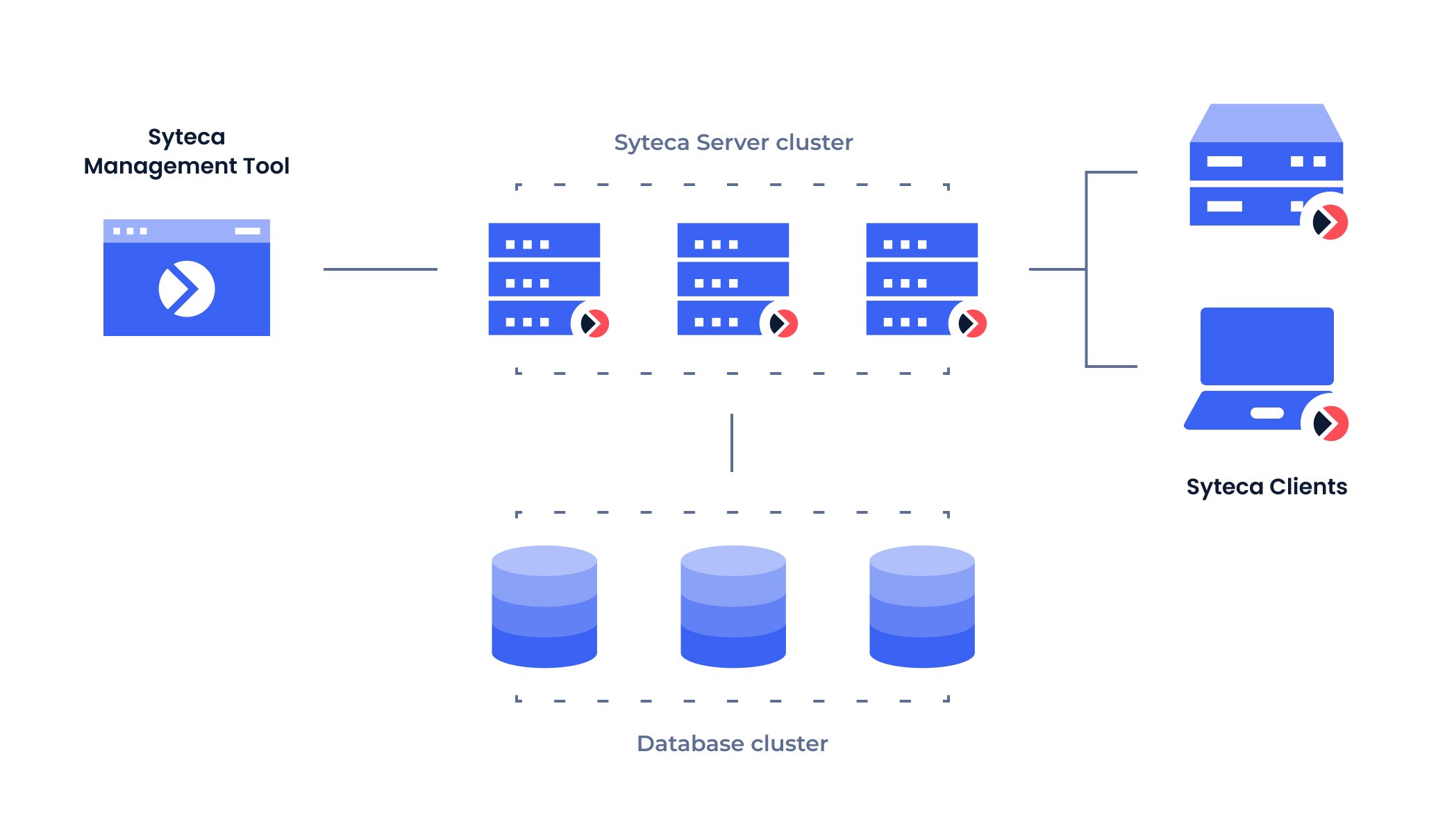 For the operational differences between standard (single-Application-Server) mode and HA mode — including feature availability and configuration locations — see [Comparison of Standard and HA modes](/docs/administration/deployment/standard-vs-ha-modes).
## Load balancing
Load balancing is automatic in HA mode — once you have multiple Application Servers in a cluster behind a load balancer, **load is continuously redistributed across them** based on the load balancer's algorithm (typically least-connections or round-robin). There's no manual session routing to maintain, no per-Client affinity rules, and no per-tenant sharding.
**When is load balancing worth setting up?** For deployments approaching 10,000 concurrent Client sessions, or where the Application Server's CPU or network bandwidth becomes the operational bottleneck. The recommendation in [System requirements](/docs/get-started/system-requirements#deployment-sizing) is to enable HA for **Large** deployments (1,000–10,000 concurrent sessions) and consider it for **Medium** (200–1,000) deployments approaching the upper bound.
For the operational procedure to manage the cluster — adding nodes, monitoring node health, taking nodes offline for maintenance — see [Manage the Application Server cluster](/docs/administration/deployment/high-availability).
## Disaster recovery
For deployments where a storage failure would be unacceptable — most production deployments at scale — Syteca's disaster recovery model uses **Microsoft Failover Clustering** combined with **Storage Replica**.
| Component | Role |
| --------------------------------- | --------------------------------------------------------------------------------------------- |
| **Microsoft Failover Clustering** | Manages the Application Server instances and detects node and storage failures. |
| **Microsoft Storage Replica** | Continuously mirrors the database storage volume to a second endpoint at a separate location. |
| **Shared storage endpoints** | Two storage volumes — primary and replica — both visible to the Application Server cluster. |
**On a storage failure**, the Failover Cluster Manager automatically switches the Application Server connection from the failed storage to the replicated storage. Data continues to be served from the replica with **no data loss** for properly-replicated transactions. Once the primary storage is restored, Storage Replica synchronizes back the changes that occurred during the failover.
For the operational differences between standard (single-Application-Server) mode and HA mode — including feature availability and configuration locations — see [Comparison of Standard and HA modes](/docs/administration/deployment/standard-vs-ha-modes).
## Load balancing
Load balancing is automatic in HA mode — once you have multiple Application Servers in a cluster behind a load balancer, **load is continuously redistributed across them** based on the load balancer's algorithm (typically least-connections or round-robin). There's no manual session routing to maintain, no per-Client affinity rules, and no per-tenant sharding.
**When is load balancing worth setting up?** For deployments approaching 10,000 concurrent Client sessions, or where the Application Server's CPU or network bandwidth becomes the operational bottleneck. The recommendation in [System requirements](/docs/get-started/system-requirements#deployment-sizing) is to enable HA for **Large** deployments (1,000–10,000 concurrent sessions) and consider it for **Medium** (200–1,000) deployments approaching the upper bound.
For the operational procedure to manage the cluster — adding nodes, monitoring node health, taking nodes offline for maintenance — see [Manage the Application Server cluster](/docs/administration/deployment/high-availability).
## Disaster recovery
For deployments where a storage failure would be unacceptable — most production deployments at scale — Syteca's disaster recovery model uses **Microsoft Failover Clustering** combined with **Storage Replica**.
| Component | Role |
| --------------------------------- | --------------------------------------------------------------------------------------------- |
| **Microsoft Failover Clustering** | Manages the Application Server instances and detects node and storage failures. |
| **Microsoft Storage Replica** | Continuously mirrors the database storage volume to a second endpoint at a separate location. |
| **Shared storage endpoints** | Two storage volumes — primary and replica — both visible to the Application Server cluster. |
**On a storage failure**, the Failover Cluster Manager automatically switches the Application Server connection from the failed storage to the replicated storage. Data continues to be served from the replica with **no data loss** for properly-replicated transactions. Once the primary storage is restored, Storage Replica synchronizes back the changes that occurred during the failover.
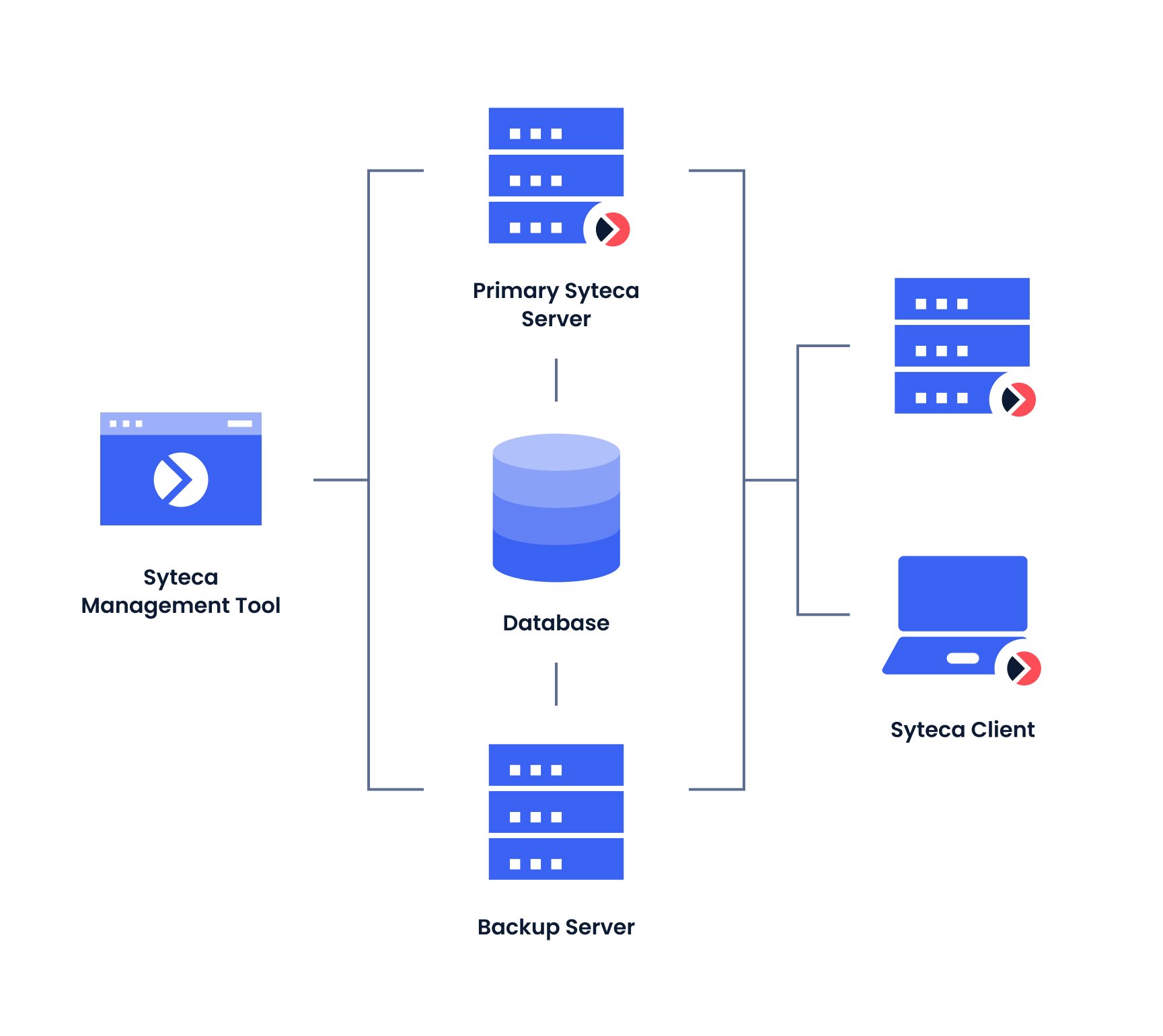 For the full step-by-step deployment procedure with Storage Replica setup, cluster validation, and failover testing, see [Shared Storage High Availability Deployment Guide](/docs/administration/deployment/shared-storage-ha).
## Update strategy in HA deployments
HA mode changes the upgrade workflow in one important way: **Application Server and Management Tool instances must be updated one node at a time**, not all at once. During each instance's update, Clients connected to it are automatically reconnected to other surviving instances by the load balancer — so the deployment as a whole remains operational throughout the upgrade.
Before updating each node, **check the current version of every Application Server instance** on the Cluster Settings tab of the Management Tool's Configuration page. Updating against a partially-upgraded cluster can cause version mismatches that the system rejects.
See [Update Syteca](/docs/administration/deployment/update-syteca) for the full upgrade procedure, including pre-update Isolation Mode and Data Migration steps.
## Related
Components of a Syteca deployment — what HA mode multiplies.
Sizing recommendations including when HA becomes strongly recommended.
Pair HA with tenant isolation for MSSP-style deployments.
Aggregate multiple Application Server clusters into a single view.
For the full step-by-step deployment procedure with Storage Replica setup, cluster validation, and failover testing, see [Shared Storage High Availability Deployment Guide](/docs/administration/deployment/shared-storage-ha).
## Update strategy in HA deployments
HA mode changes the upgrade workflow in one important way: **Application Server and Management Tool instances must be updated one node at a time**, not all at once. During each instance's update, Clients connected to it are automatically reconnected to other surviving instances by the load balancer — so the deployment as a whole remains operational throughout the upgrade.
Before updating each node, **check the current version of every Application Server instance** on the Cluster Settings tab of the Management Tool's Configuration page. Updating against a partially-upgraded cluster can cause version mismatches that the system rejects.
See [Update Syteca](/docs/administration/deployment/update-syteca) for the full upgrade procedure, including pre-update Isolation Mode and Data Migration steps.
## Related
Components of a Syteca deployment — what HA mode multiplies.
Sizing recommendations including when HA becomes strongly recommended.
Pair HA with tenant isolation for MSSP-style deployments.
Aggregate multiple Application Server clusters into a single view.