> ## Documentation Index
> Fetch the complete documentation index at: https://syteca.com/docs/llms.txt
> Use this file to discover all available pages before exploring further.
# The Syteca Server Tray Application
> Start, stop, and monitor the Application Server, and access the Database Parameters tool, from the Windows notification area.
**NOT AVAILABLE IN SAAS.**
The **Syteca Server** tray application shows the current state of the Application Server from the Windows notification area, on the computer where the Application Server is installed.
If the Application Server fails, the tray application restarts it automatically — for the first three failures. A fourth failure isn't restarted automatically, and the user is notified in the notification area.
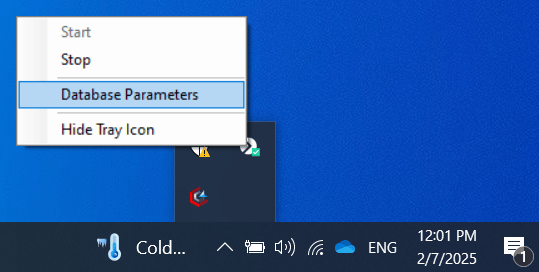 From the tray icon's context menu, you can:
* **Start** or **Stop** the Application Server.
* Open **Database Parameters** to [edit the database connection or binary storage location](/docs/administration/database/database-parameters).
* Hide the **Syteca Server** icon from the notification area.
## Related
Change database connection settings and binary storage location.
Back up, export, import, and reissue the master certificate.
Diagnose Application Server issues and error messages.
Where the Application Server fits into the overall system.
From the tray icon's context menu, you can:
* **Start** or **Stop** the Application Server.
* Open **Database Parameters** to [edit the database connection or binary storage location](/docs/administration/database/database-parameters).
* Hide the **Syteca Server** icon from the notification area.
## Related
Change database connection settings and binary storage location.
Back up, export, import, and reissue the master certificate.
Diagnose Application Server issues and error messages.
Where the Application Server fits into the overall system.