> ## Documentation Index
> Fetch the complete documentation index at: https://syteca.com/docs/llms.txt
> Use this file to discover all available pages before exploring further.
# Assign PAM Seat Licenses
> Assign and unassign Syteca PAM seat licenses (Password Management seat licenses) to users individually or by user group, so they can use PAM features.
A **PAM seat license** (also called a Password Management seat license) lets a user access Syteca's [Password Management](/docs/pam/overview) and [Account Discovery](/docs/pam/discovery/overview) functionality. PAM seat licenses are assigned manually — there's no automatic assignment for them. This page covers assigning them per user and per user group.
This task requires both the [License Management](/docs/administration/users/administrative-permissions) and [User Management](/docs/administration/users/administrative-permissions) administrative permissions.
See [the licensing overview](/docs/administration/licensing/overview) for how PAM seat licenses fit alongside endpoint licenses, and [Manage the serial key](/docs/administration/licensing/manage-serial-key#view-the-serial-key-and-licenses) for how many seat licenses your serial key includes.
## Assign or unassign PAM seat licenses
Sign in to the Management Tool with the required permissions, then click **Users** in the left navigation.
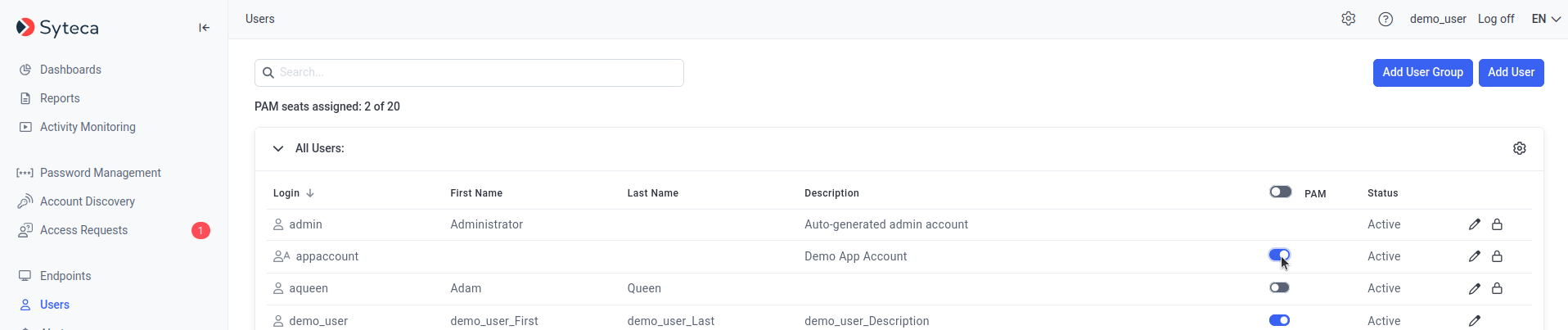
On the **Users** page, in the **PAM** column, move the toggle for a user **right** to assign a license, or **left** to unassign.
To assign PAM seat licenses to every user in a user group at once, use the toggle in the **PAM** column header. Individual user toggles still control each user's license afterward — you can use the header toggle to assign in bulk and then unassign specific users.
Click **Save** in the floating bar at the bottom of the page.
Users with PAM seat licenses can now use Password Management and Account Discovery.
 ## Restrictions and exceptions
Two important exceptions:
* The built-in default **admin** user (and in Multi-Tenant mode, the admin user of any tenant) **cannot be assigned** a PAM seat license — and doesn't need one to use PAM.
* Users who only belong to an added Active Directory user group **cannot currently be assigned** PAM seat licenses. To grant a license to such a user, add them as an individual user as well.
## Related
Serial key types, contents, and the Update & Support period.
Manual and automatic endpoint license assignment for Clients.
What PAM seat licenses unlock.
The other PAM feature requiring a seat license.
## Restrictions and exceptions
Two important exceptions:
* The built-in default **admin** user (and in Multi-Tenant mode, the admin user of any tenant) **cannot be assigned** a PAM seat license — and doesn't need one to use PAM.
* Users who only belong to an added Active Directory user group **cannot currently be assigned** PAM seat licenses. To grant a license to such a user, add them as an individual user as well.
## Related
Serial key types, contents, and the Update & Support period.
Manual and automatic endpoint license assignment for Clients.
What PAM seat licenses unlock.
The other PAM feature requiring a seat license.