> ## Documentation Index
> Fetch the complete documentation index at: https://syteca.com/docs/llms.txt
> Use this file to discover all available pages before exploring further.
# Licensing Overview
> Understand Syteca product license serial keys, the types available, what they contain, and the Update & Support period that governs new versions and support.
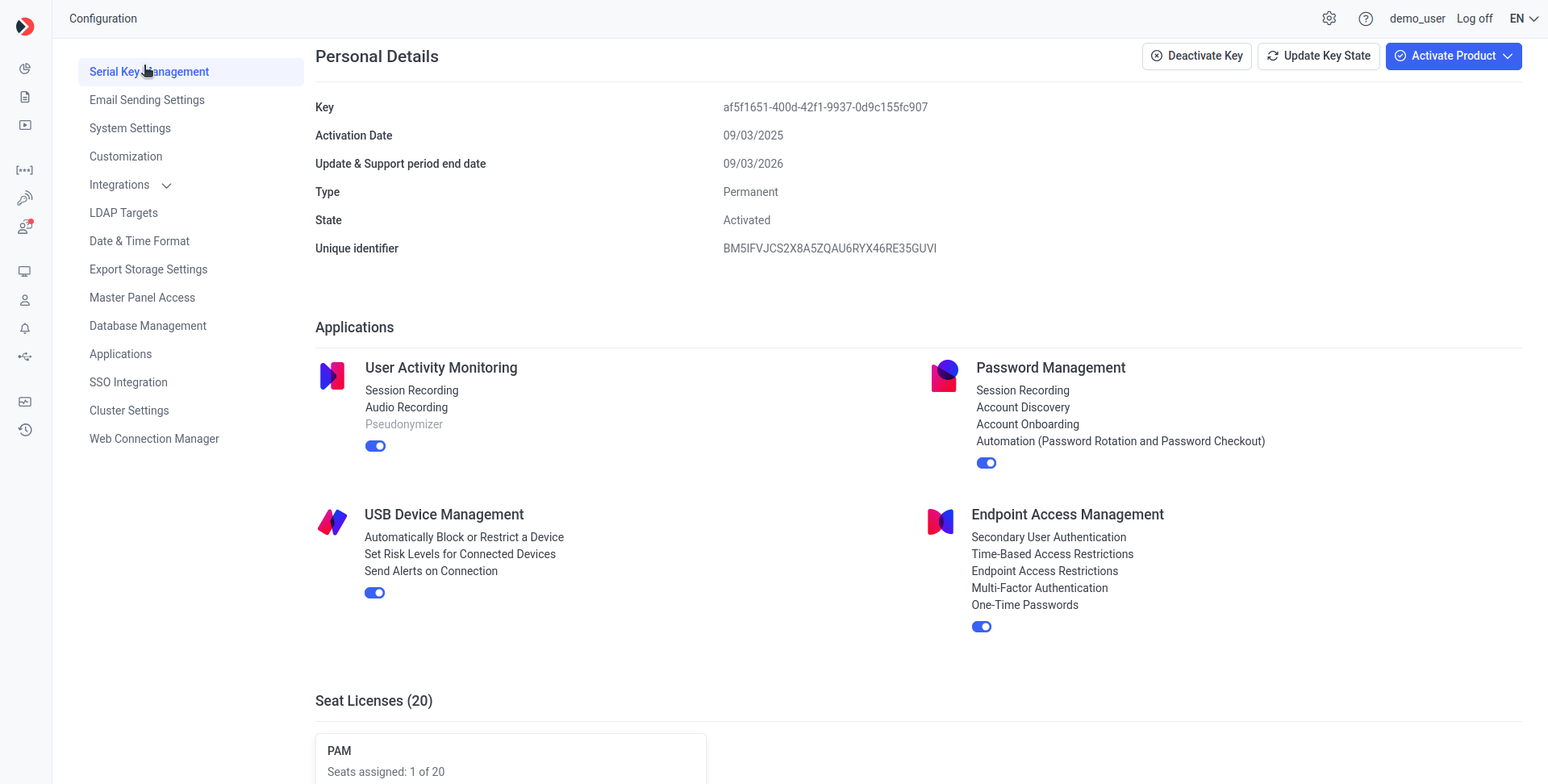
A **product license serial key** is required to use Syteca. It contains the applications and features your organization purchased — User Activity Monitoring, Password Management (PAM), USB Device Management, and Endpoint Access Management — along with the licenses needed to apply them: **PAM seat licenses** for PAM users and **endpoint licenses** for monitored Client computers.
This page explains the kinds of serial keys available, what's inside one, and the Update & Support period. Once you've read this, see [Manage the serial key](/docs/administration/licensing/manage-serial-key) for activation, [Assign PAM seat licenses](/docs/administration/licensing/assign-pam-seat-licenses) for PAM users, and [Assign endpoint licenses](/docs/administration/licensing/assign-endpoint-licenses) for Clients.
## Getting started in three steps
[Activate online or offline](/docs/administration/licensing/manage-serial-key#activate-or-update-the-serial-key) — choose the tab that matches your environment.
[View the serial key and its licenses](/docs/administration/licensing/manage-serial-key#view-the-serial-key-and-licenses) on the Serial Key Management tab — applications, features, PAM seat licenses, and endpoint license types.
* [Assign PAM seat licenses](/docs/administration/licensing/assign-pam-seat-licenses) to PAM users — manual only.
* [Assign endpoint licenses](/docs/administration/licensing/assign-endpoint-licenses) to Clients — manually or automatically.
 ## Serial key types
| Type | Use | Period | Update & Support |
| ------------------------------------------------- | ---------------------------- | ------------------------------------ | --------------------------------------------------------------- |
| **Permanent** *(also known as Perpetual)* | Production use, indefinitely | Unlimited | Included for an initial period (typically 12 months); renewable |
| **Subscription** | Production use, time-limited | Typically 12 months | Included for the subscription period |
| **Trial** | Evaluation | 30 days from activation *(may vary)* | Included for the trial period |
| **Not-for-Resale** | Partner demonstration only | — | — |
| **SaaS** *(SaaS deployments only)* | Production SaaS use | Subscription length varies | Included for the subscription period |
| **SaaS Trial** *(SaaS deployments only)* | SaaS evaluation | 30 days from issue *(may vary)* | — |
| **SaaS Not-for-Resale** *(SaaS deployments only)* | Partner demonstration only | — | — |
To request or update a serial key, contact your vendor or the Syteca Sales team. To start evaluating Syteca, [request a Trial serial key on the Syteca website](https://www.syteca.com) — it will be emailed to the address you provide.
Activating any purchased serial key automatically expires any Trial serial key.
After activation, a serial key is bound to the specific computer where the Application Server is installed and cannot be used on any other computer. If the hardware ID of that computer changes, contact the Support team to associate your serial key with the new hardware ID.
## What a serial key contains
A serial key can include any combination of four applications, each with its own features:
* **User Activity Monitoring (UAM)** — endpoint session recording and analysis.
* **Password Management (PAM)** — secrets, secret sharing, and Account Discovery.
* **USB Device Management**.
* **Endpoint Access Management**.
It also contains a count of two distinct license types:
| License type | Assigned to | Assignment |
| ----------------------------------------------------------------------- | ---------------- | ----------------------------------------------------------------------------------------------------------------------------------------------------------------------------- |
| **PAM seat licenses** *(also called Password Management seat licenses)* | PAM users | Manual only — see [Assign PAM seat licenses](/docs/administration/licensing/assign-pam-seat-licenses). |
| **Endpoint licenses** | Client computers | Manual or automatic — see [Assign endpoint licenses](/docs/administration/licensing/assign-endpoint-licenses). One license per Client; type matches the Client's operating system. |
Application toggles and features displayed in gray on the Serial Key Management tab can only be changed by your Syteca vendor updating your serial key. You enable them by purchasing them — they're not toggled on inside the product.
## The Update & Support period
The **Update & Support period** is the window during which your Syteca deployment can be updated to new product versions and receive Syteca Support team assistance. Treat it as the runway for your deployment — when it ends, behavior depends on the serial key type:
Syteca continues to function normally, but you can no longer install product updates released after the expiry date or receive priority Support. To resume updates and priority Support, renew the serial key to extend the Update & Support period.
You'll be notified **14 days before** the serial key expires. If it's not renewed in time, you can no longer use PAM functionality, monitor Clients, or use the other application features after expiry.
You'll be notified **14 days, 5 days, and 1 day before** the serial key expires. If it's not renewed in time, you can no longer use PAM, monitor Clients, or use the other application features **7 days after the expiration date**.
## Permissions required
| Task | Permission |
| ----------------------------------------------- | ------------------------------------------------------------------------------------------------------------------------------------------------------------------- |
| Activate / deactivate / update the serial key | [Tenant Management and System Configuration](/docs/administration/users/administrative-permissions) — must belong to the built-in default tenant |
| Grant licenses to tenants *(Multi-Tenant only)* | [Tenant Management and System Configuration](/docs/administration/users/administrative-permissions) — built-in default tenant |
| Assign / unassign PAM seat licenses | [License Management](/docs/administration/users/administrative-permissions) **+** [User Management](/docs/administration/users/administrative-permissions) |
| Assign / unassign endpoint licenses | [License Management](/docs/administration/users/administrative-permissions) **+** [Client Installation and Management](/docs/administration/users/administrative-permissions) |
In **Multi-Tenant mode**, after a serial key is activated, the administrator of the built-in default tenant (the technician) must first grant licenses to each tenant. The administrator of each tenant then assigns those granted licenses to their own PAM users and Clients. See [Granting licenses to tenants](/docs/administration/licensing/assign-endpoint-licenses#multi-tenant-mode-—-granting-licenses-to-tenants).
## Common licensing questions
One license monitors one workstation at a time. Floating endpoint licensing is a core part of Syteca's licensing model — it lets you [reassign licenses between Clients](/docs/administration/licensing/assign-endpoint-licenses) in a couple of clicks, either manually or automatically, without a fixed limit on how often licenses move.
Neither. License types are assigned either to PAM users or to physical endpoint computers. Depending on the endpoint license type, a single Client can monitor an unlimited number of sessions on that computer. See [license types](/docs/administration/licensing/overview#serial-key-types) for the available options.
## Related
View, activate (online or offline), deactivate, and proxy-configure.
Assign and unassign PAM seat licenses to users.
Manual and floating (automatic) endpoint license assignment.
Monitor licensed Client status (Online / Offline / Disconnected).
## Serial key types
| Type | Use | Period | Update & Support |
| ------------------------------------------------- | ---------------------------- | ------------------------------------ | --------------------------------------------------------------- |
| **Permanent** *(also known as Perpetual)* | Production use, indefinitely | Unlimited | Included for an initial period (typically 12 months); renewable |
| **Subscription** | Production use, time-limited | Typically 12 months | Included for the subscription period |
| **Trial** | Evaluation | 30 days from activation *(may vary)* | Included for the trial period |
| **Not-for-Resale** | Partner demonstration only | — | — |
| **SaaS** *(SaaS deployments only)* | Production SaaS use | Subscription length varies | Included for the subscription period |
| **SaaS Trial** *(SaaS deployments only)* | SaaS evaluation | 30 days from issue *(may vary)* | — |
| **SaaS Not-for-Resale** *(SaaS deployments only)* | Partner demonstration only | — | — |
To request or update a serial key, contact your vendor or the Syteca Sales team. To start evaluating Syteca, [request a Trial serial key on the Syteca website](https://www.syteca.com) — it will be emailed to the address you provide.
Activating any purchased serial key automatically expires any Trial serial key.
After activation, a serial key is bound to the specific computer where the Application Server is installed and cannot be used on any other computer. If the hardware ID of that computer changes, contact the Support team to associate your serial key with the new hardware ID.
## What a serial key contains
A serial key can include any combination of four applications, each with its own features:
* **User Activity Monitoring (UAM)** — endpoint session recording and analysis.
* **Password Management (PAM)** — secrets, secret sharing, and Account Discovery.
* **USB Device Management**.
* **Endpoint Access Management**.
It also contains a count of two distinct license types:
| License type | Assigned to | Assignment |
| ----------------------------------------------------------------------- | ---------------- | ----------------------------------------------------------------------------------------------------------------------------------------------------------------------------- |
| **PAM seat licenses** *(also called Password Management seat licenses)* | PAM users | Manual only — see [Assign PAM seat licenses](/docs/administration/licensing/assign-pam-seat-licenses). |
| **Endpoint licenses** | Client computers | Manual or automatic — see [Assign endpoint licenses](/docs/administration/licensing/assign-endpoint-licenses). One license per Client; type matches the Client's operating system. |
Application toggles and features displayed in gray on the Serial Key Management tab can only be changed by your Syteca vendor updating your serial key. You enable them by purchasing them — they're not toggled on inside the product.
## The Update & Support period
The **Update & Support period** is the window during which your Syteca deployment can be updated to new product versions and receive Syteca Support team assistance. Treat it as the runway for your deployment — when it ends, behavior depends on the serial key type:
Syteca continues to function normally, but you can no longer install product updates released after the expiry date or receive priority Support. To resume updates and priority Support, renew the serial key to extend the Update & Support period.
You'll be notified **14 days before** the serial key expires. If it's not renewed in time, you can no longer use PAM functionality, monitor Clients, or use the other application features after expiry.
You'll be notified **14 days, 5 days, and 1 day before** the serial key expires. If it's not renewed in time, you can no longer use PAM, monitor Clients, or use the other application features **7 days after the expiration date**.
## Permissions required
| Task | Permission |
| ----------------------------------------------- | ------------------------------------------------------------------------------------------------------------------------------------------------------------------- |
| Activate / deactivate / update the serial key | [Tenant Management and System Configuration](/docs/administration/users/administrative-permissions) — must belong to the built-in default tenant |
| Grant licenses to tenants *(Multi-Tenant only)* | [Tenant Management and System Configuration](/docs/administration/users/administrative-permissions) — built-in default tenant |
| Assign / unassign PAM seat licenses | [License Management](/docs/administration/users/administrative-permissions) **+** [User Management](/docs/administration/users/administrative-permissions) |
| Assign / unassign endpoint licenses | [License Management](/docs/administration/users/administrative-permissions) **+** [Client Installation and Management](/docs/administration/users/administrative-permissions) |
In **Multi-Tenant mode**, after a serial key is activated, the administrator of the built-in default tenant (the technician) must first grant licenses to each tenant. The administrator of each tenant then assigns those granted licenses to their own PAM users and Clients. See [Granting licenses to tenants](/docs/administration/licensing/assign-endpoint-licenses#multi-tenant-mode-—-granting-licenses-to-tenants).
## Common licensing questions
One license monitors one workstation at a time. Floating endpoint licensing is a core part of Syteca's licensing model — it lets you [reassign licenses between Clients](/docs/administration/licensing/assign-endpoint-licenses) in a couple of clicks, either manually or automatically, without a fixed limit on how often licenses move.
Neither. License types are assigned either to PAM users or to physical endpoint computers. Depending on the endpoint license type, a single Client can monitor an unlimited number of sessions on that computer. See [license types](/docs/administration/licensing/overview#serial-key-types) for the available options.
## Related
View, activate (online or offline), deactivate, and proxy-configure.
Assign and unassign PAM seat licenses to users.
Manual and floating (automatic) endpoint license assignment.
Monitor licensed Client status (Online / Offline / Disconnected).