> ## Documentation Index
> Fetch the complete documentation index at: https://syteca.com/docs/llms.txt
> Use this file to discover all available pages before exploring further.
# Edit Secret and Folder Permissions for ACB
> Configure role-based permissions on Syteca secrets and folders so the ACB API consumer can access them — Owner / Editor / PAM User roles, the Permissions tab, and where to find Secret IDs and Folder IDs.
After [setting up a user account](/docs/api/acb/setup-user-account) with a Refresh Token, the account needs to be granted **role-based permissions** on the specific secrets and folders it will manage through the API. This page covers the three role types, how to assign them, and where to find the **Secret ID** and **Folder ID** values your API consumer will need.
**NOT AVAILABLE IN SAAS.** This procedure applies to **on-premises** deployments only.
## Role types
Syteca exposes three role types for secret/folder access through the ACB API. Each role has a defined set of permitted endpoints:
| Role | What the account can do via API |
| ------------ | ----------------------------------------------------------------------------------------------------------------------------------------- |
| **Owner** | Full control — get / add / update / delete secret or folder, rotate password, force check-in, manage permissions on the resource |
| **Editor** | Read and modify — get / update secret or folder, rotate password, force check-in, but **cannot delete** and **cannot change permissions** |
| **PAM User** | Retrieve only — get secret / get folder, get secret credentials |
Roles apply per-resource — a user can be **Owner** of one folder, **Editor** of another, and **PAM User** of a third. Permissions also cascade down folder hierarchies: a permission set on a parent folder applies to its child folders and secrets unless overridden at the child level.
## Edit permissions on a Folder
In the Management Tool, navigate to **PAM → Secrets**. Click the folder you want to edit.
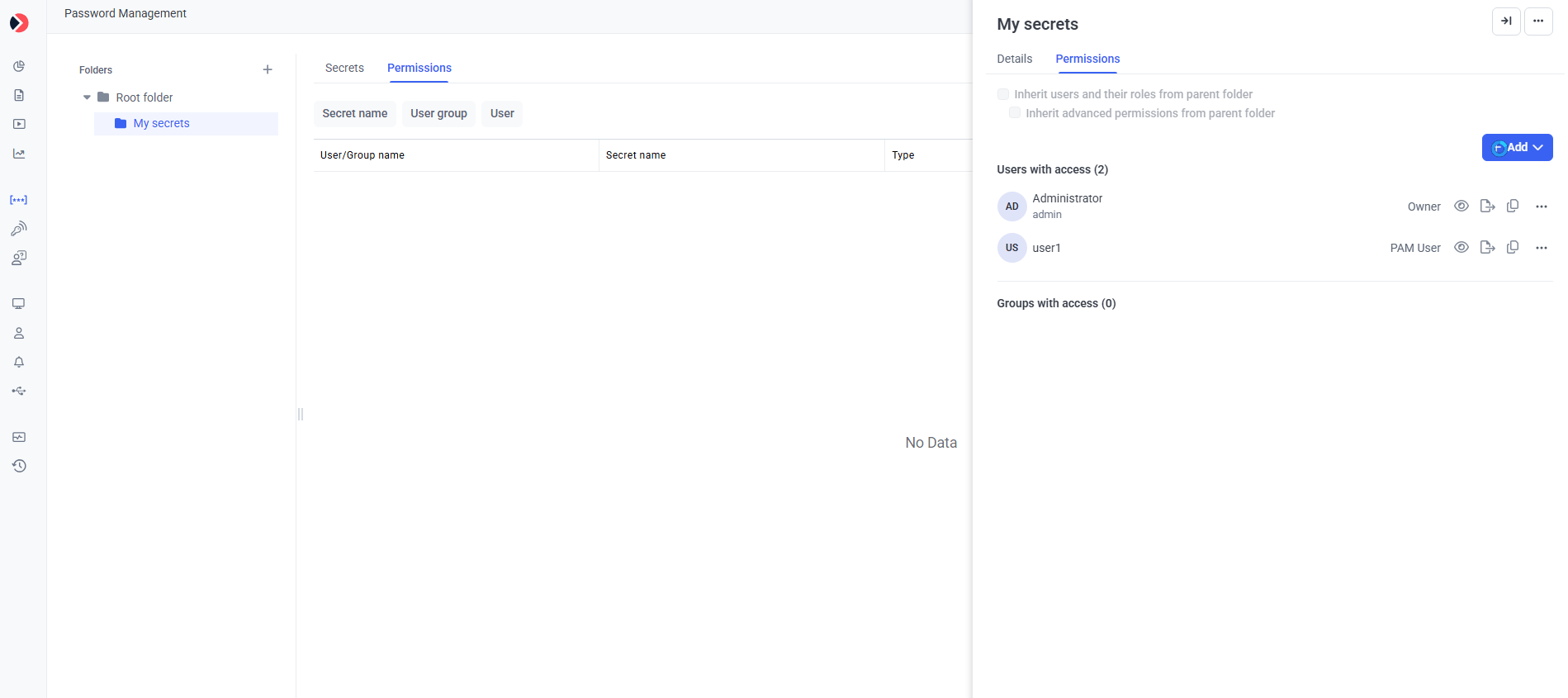
On the **Edit Folder** page, click the **Permissions** tab.
Click **Add** to grant a new permission, or click the role next to an existing user to modify it. Pick the appropriate role (**Owner**, **Editor**, or **PAM User**) and save.
 ## Edit permissions on a Secret
The procedure for secrets mirrors the one for folders:
In the Management Tool, navigate to **PAM → Secrets**. Click the secret you want to edit.
On the **Edit Secret** page, click the **Permissions** tab.
Click **Add** to grant a new permission, or modify an existing one. Save.
**For bulk onboarding scenarios**, set permissions at the **folder level** rather than per-secret. Granting an API consumer **Editor** on a folder means it can manage every secret within — much more maintainable than editing permissions on each individual secret.
## Find the Secret ID and Folder ID
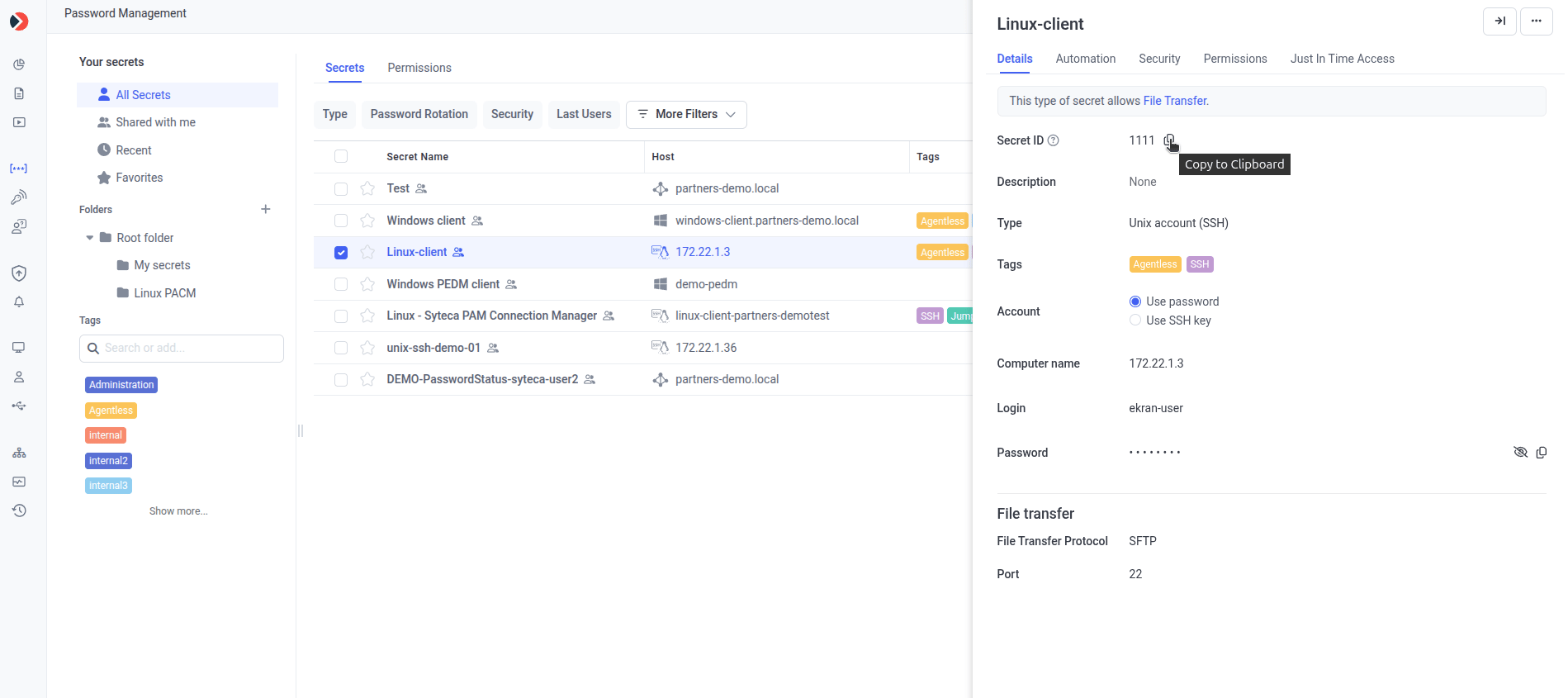
The ACB API references secrets and folders by their **ID** (integer). These IDs are visible on the **Automation** tab of the Edit Secret or Edit Folder page — but the Automation tab only appears when the user opening the page has the [administrative Privileged Accounts Management permission](/docs/administration/users/administrative-permissions) and the deployment's product license enables the **Password Management** application with the **Automation** feature.
Navigate to **PAM → Secrets** and open the secret or folder.
Click the **Automation** tab.
The **Secret ID** (for a secret) or **Folder ID** (for a folder) is displayed. Click the **Copy** icon to copy it to your clipboard.
## Edit permissions on a Secret
The procedure for secrets mirrors the one for folders:
In the Management Tool, navigate to **PAM → Secrets**. Click the secret you want to edit.
On the **Edit Secret** page, click the **Permissions** tab.
Click **Add** to grant a new permission, or modify an existing one. Save.
**For bulk onboarding scenarios**, set permissions at the **folder level** rather than per-secret. Granting an API consumer **Editor** on a folder means it can manage every secret within — much more maintainable than editing permissions on each individual secret.
## Find the Secret ID and Folder ID
The ACB API references secrets and folders by their **ID** (integer). These IDs are visible on the **Automation** tab of the Edit Secret or Edit Folder page — but the Automation tab only appears when the user opening the page has the [administrative Privileged Accounts Management permission](/docs/administration/users/administrative-permissions) and the deployment's product license enables the **Password Management** application with the **Automation** feature.
Navigate to **PAM → Secrets** and open the secret or folder.
Click the **Automation** tab.
The **Secret ID** (for a secret) or **Folder ID** (for a folder) is displayed. Click the **Copy** icon to copy it to your clipboard.
 ## Permissions in the API itself
ACB endpoints that **modify** permissions (e.g. `AddFolder`, `AddSecret`, `UpdateFolder`, `UpdateSecret`, `BulkAdd`) accept a `permissions` object in the request body. See [Data models → Permissions](/docs/api/acb/data-models#permissions) for the schema.
## Related
Configure Application Account Settings with the Refresh Token.
Permissions, Permission, and related schemas used in request bodies.
Base URL, authentication, status codes, rate limiting.
The most-called endpoint — typically requires PAM User role at minimum.
## Permissions in the API itself
ACB endpoints that **modify** permissions (e.g. `AddFolder`, `AddSecret`, `UpdateFolder`, `UpdateSecret`, `BulkAdd`) accept a `permissions` object in the request body. See [Data models → Permissions](/docs/api/acb/data-models#permissions) for the schema.
## Related
Configure Application Account Settings with the Refresh Token.
Permissions, Permission, and related schemas used in request bodies.
Base URL, authentication, status codes, rate limiting.
The most-called endpoint — typically requires PAM User role at minimum.