> ## Documentation Index
> Fetch the complete documentation index at: https://syteca.com/docs/llms.txt
> Use this file to discover all available pages before exploring further.
# Risk factors page
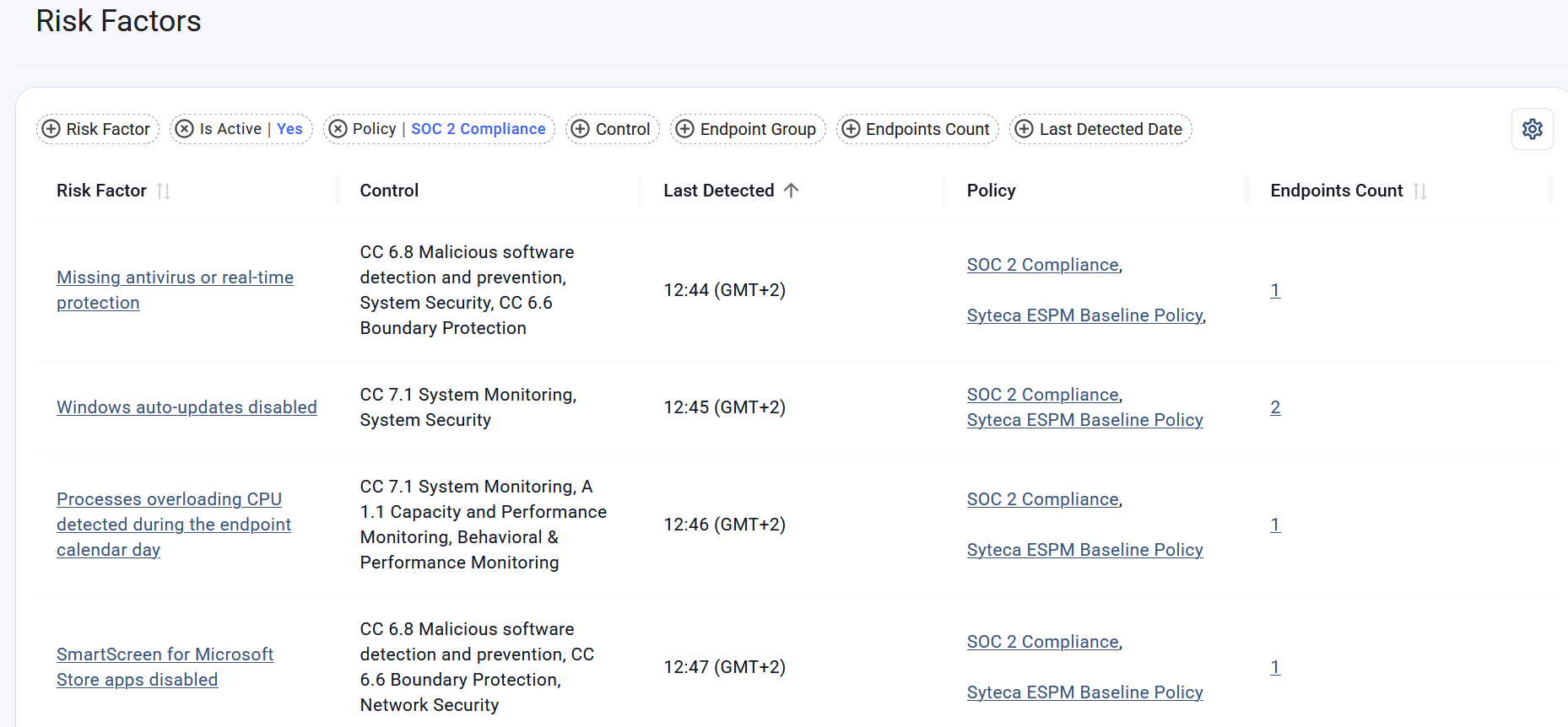
> Explore all risk factors defined across system policies to understand their usage, detection history, associated controls, and impact on managed endpoints.
## Risk Factors Grid
| Column | Shows |
| ------------------- | ------------------------------------------------------------------------------------------------------------------------------------------------------------------------------------------------------------------------- |
| **Risk Factor** | The name of the [risk factor](/docs/espm/about-risk-factors) . Clicking the risk factor name opens the corresponding [Risk factor details](/docs/espm/riskfactors/risk-factors-details) page. |
| **Control** | The [controls](/docs/espm/about-policies#controls) associated with the risk factor across all applicable policies. |
| **Last Detected** | The date and time when the risk factor was most recently detected in the system, displayed in the local browser time zone. If the risk factor has never been detected, the value is **Never**. |
| **Policy** | The [policies](/docs/espm/about-policies) that contain the risk factor. Policy names are displayed as links. Clicking a policy name opens the corresponding Policy page. |
| **Endpoints Count** | The number of endpoints, available to the current user, on which the risk factor is currently active. Clicking the value opens the [Endpoints page](/docs/espm/endpoints/endpoints-page) filtered by the selected risk factor. |
### Managing the Grid
Grid columns can be customized to improve visibility and accessibility of data.
* **To resize a column**, drag the border between column headers.
* **To show or hide columns**, click the **Settings** (gear) icon in the top-right corner of the grid and select or clear the corresponding column names.
* **To rearrange columns**, drag and drop column headers to the desired position.
* **To sort data**, click a column header. Click the header again to reverse the sort order.
### Grid Filters
You can use filters to find the required risk factors. The filters include:
* Risk Factor
* Active status (select only risk factors currently [active](/docs/espm/about-risk-factors#active) on at least one endpoint)
* Policy
* Control
* Endpoint Group (find risk factors active on specific endpoints belonging to the group)
* Endpoints Count (select risk factors affecting more than or fewer than a specified number of endpoints)
* Last Detected Date
 ## Related
Understand how risk factors and probes are evaluated on endpoints.
View detailed information about a risk factor, including its detection history, affected endpoints, associated policies and controls, and more.
View detailed remediation instructions and security recommendations for each risk factor to help resolve identified issues and reduce future risk.
Investigate risk factors affecting an endpoint, review available technical details, and understand the underlying conditions or activities that caused a risk to be detected.
## Related
Understand how risk factors and probes are evaluated on endpoints.
View detailed information about a risk factor, including its detection history, affected endpoints, associated policies and controls, and more.
View detailed remediation instructions and security recommendations for each risk factor to help resolve identified issues and reduce future risk.
Investigate risk factors affecting an endpoint, review available technical details, and understand the underlying conditions or activities that caused a risk to be detected.