> ## Documentation Index
> Fetch the complete documentation index at: https://syteca.com/docs/llms.txt
> Use this file to discover all available pages before exploring further.
# What Is Syteca?
> Syteca is an Inside Security Platform that secures what happens inside your trusted environment.
The platform is built from **integrated products that share one architecture, one console, and one deployment model.** You can start with the product you need today and activate others without redesigning your environment.
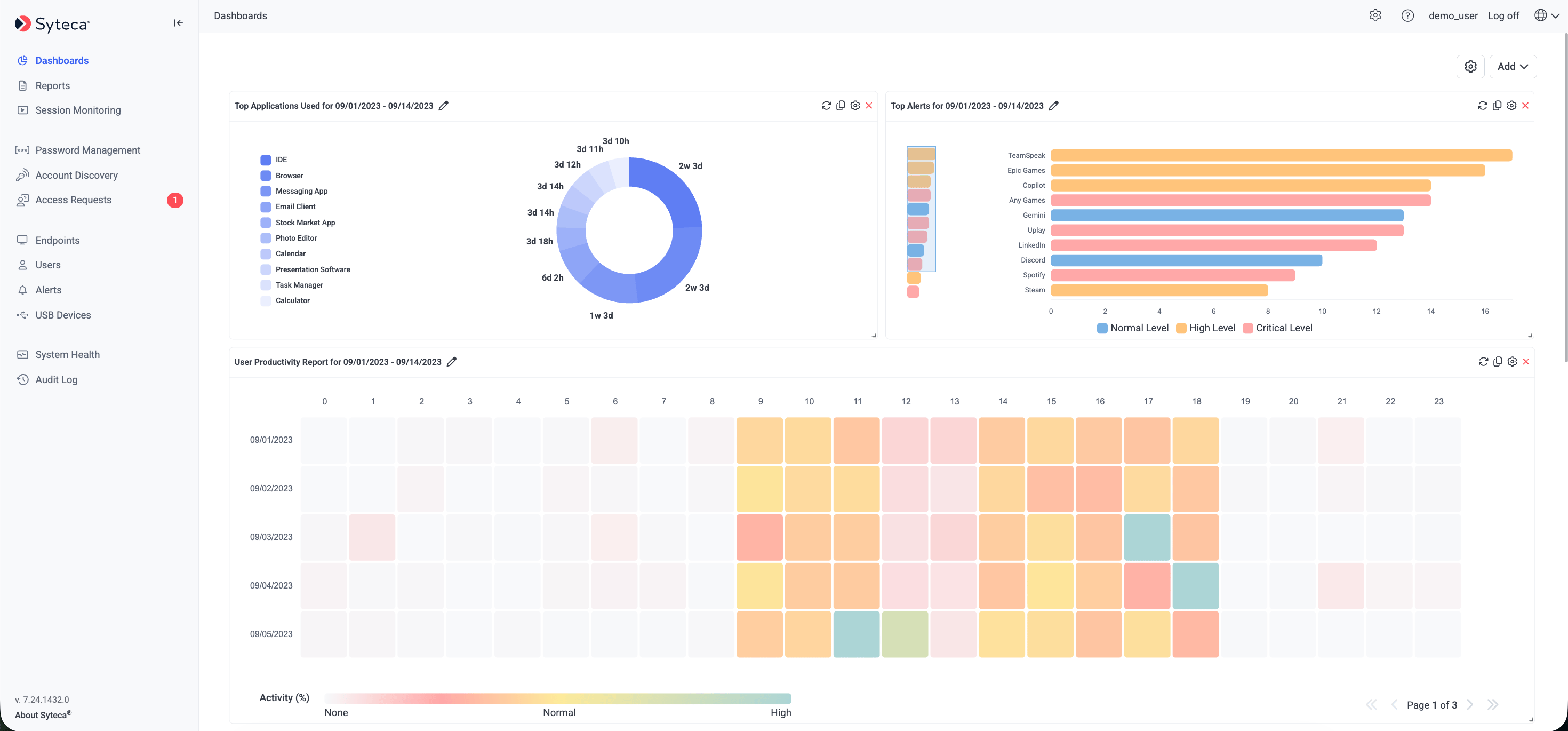 Products available today:
| Product | What it Does |
| ------------------------- | ---------------------------------------------------------------- |
| Syteca PAM | Secures and governs privileged access to your critical systems |
| Syteca Session Monitoring | Records and reconstructs what users do during their sessions |
| Syteca ITDR | Detects identity-based threats and responds to them in real time |
| Syteca ESPM | Assesses endpoint security posture before access is granted |
## Syteca Privileged Access Management
Syteca PAM helps you control access to sensitive resources across your organization.
**Account discovery** scans your network for privileged accounts, including ones you may not know exist, so nothing stays unmanaged. See [Account Discovery](/docs/pam/discovery/overview).
**Password management** stores credentials in an encrypted vault and enables secure sharing without exposing the underlying password. Includes [Workforce Password Management](/docs/pam/secrets/workforce-password-management), [Password Checkout](/docs/pam/secrets/password-checkout), scheduled and on-demand [Remote Password Rotation](/docs/pam/secrets/remote-password-rotation), and [File Transfer](/docs/pam/secrets/file-transfer).
**Just-in-time access** lets you approve access requests on demand, apply time-based restrictions, and issue one-time passwords — so privileged access exists only while it is needed.
**Two-factor authentication** adds a second verification step before users connect to protected resources. See [Two-Factor Authentication](/docs/administration/access/two-factor-authentication).
## Syteca Session Monitoring
Syteca Session Monitoring gives you a complete record of what happens during a session, and the tools to reconstruct it afterwards.
**Session recording** captures screen activity, keystrokes, application usage, visited websites, and clipboard activity on monitored endpoints. See [Session Recording Parameters](/docs/session-monitoring/recording/user-activity-recording).
**Session Player** lets investigators search recordings by keyword, jump to specific actions, and export evidence clips. See [Session Player](/docs/session-monitoring/player/overview).
**Sensitive data masking** keeps passwords and other confidential strings out of recordings. See [Sensitive Data Masking](/docs/session-monitoring/masking/sensitive-data).
**Audit trails** produce forensic-ready records of session activity for investigations and audits.
## Syteca Identity Threat Detection and Response
Syteca ITDR turns session and access activity into risk signals, and lets you act on them while the session is still open.
**Rule-based detection** raises an alert when user activity matches a defined risk condition — such as launching an unexpected application, accessing a restricted resource, or connecting a prohibited device. See[ ](https://www.syteca.com/documentation/session-monitoring/alerts)[Alerts](/docs/session-monitoring/alerts).
**Real-time response** notifies your team the moment a rule is triggered, and can block the session automatically. See [Block on Alert](/docs/session-monitoring/block-on-alert)..
**Activity context** links each detection back to the underlying session, so responders see what actually happened rather than an isolated event.
## Syteca Endpoint Security Posture Management
Syteca ESPM assesses the security posture of your endpoints so you can reduce risk before access is granted.
**Continuous posture monitoring** tracks endpoint configuration and security control state, surfacing drift as it happens rather than at the next audit. See [How to benchmark organizational security posture](/docs/espm/howto/how-to-benchmark-security-posture).
**Endpoint risk scoring** turns configuration data into a single score per endpoint, so you can prioritize remediation by security impact. See [How to identify high-risk endpoints](/docs/espm/howto/how-to-check-critical-endpoints).
**Remediation guidance** provides specific steps for each detected issue. See [Remediation and recommendations](/docs/espm/riskfactors/recommend-and-remedy).
**Compliance checks** compare endpoint configurations against frameworks including SOC 2, CIS, ISO standards, NIST, DORA, and NIS2, plus custom rules you define. See [How to assess and improve policy compliance](/docs/espm/howto/how-to-check-and-improve-policy-compliance).
## Deployment options
Syteca is available as a **SaaS** service or as an **on-premises** installation. Both options support the full PAM and UAM feature set; some advanced configuration options (such as database choice and High Availability mode) are available for on-premises deployments only.
| | SaaS | On-premises |
| ----------------------------- | ------- | --------------------------- |
| Deployment managed by Syteca | Yes | No |
| Database choice | — | MS SQL Server or PostgreSQL |
| High Availability mode | — | Optional |
| Custom infrastructure control | Limited | Full |
## Next steps
Get Syteca running in minutes with the hosted SaaS deployment.
Deploy Syteca on your own infrastructure with the on-premises guide.
Check hardware, OS, and network requirements before you deploy.
Understand how the Application Server, database, and clients fit together.
Products available today:
| Product | What it Does |
| ------------------------- | ---------------------------------------------------------------- |
| Syteca PAM | Secures and governs privileged access to your critical systems |
| Syteca Session Monitoring | Records and reconstructs what users do during their sessions |
| Syteca ITDR | Detects identity-based threats and responds to them in real time |
| Syteca ESPM | Assesses endpoint security posture before access is granted |
## Syteca Privileged Access Management
Syteca PAM helps you control access to sensitive resources across your organization.
**Account discovery** scans your network for privileged accounts, including ones you may not know exist, so nothing stays unmanaged. See [Account Discovery](/docs/pam/discovery/overview).
**Password management** stores credentials in an encrypted vault and enables secure sharing without exposing the underlying password. Includes [Workforce Password Management](/docs/pam/secrets/workforce-password-management), [Password Checkout](/docs/pam/secrets/password-checkout), scheduled and on-demand [Remote Password Rotation](/docs/pam/secrets/remote-password-rotation), and [File Transfer](/docs/pam/secrets/file-transfer).
**Just-in-time access** lets you approve access requests on demand, apply time-based restrictions, and issue one-time passwords — so privileged access exists only while it is needed.
**Two-factor authentication** adds a second verification step before users connect to protected resources. See [Two-Factor Authentication](/docs/administration/access/two-factor-authentication).
## Syteca Session Monitoring
Syteca Session Monitoring gives you a complete record of what happens during a session, and the tools to reconstruct it afterwards.
**Session recording** captures screen activity, keystrokes, application usage, visited websites, and clipboard activity on monitored endpoints. See [Session Recording Parameters](/docs/session-monitoring/recording/user-activity-recording).
**Session Player** lets investigators search recordings by keyword, jump to specific actions, and export evidence clips. See [Session Player](/docs/session-monitoring/player/overview).
**Sensitive data masking** keeps passwords and other confidential strings out of recordings. See [Sensitive Data Masking](/docs/session-monitoring/masking/sensitive-data).
**Audit trails** produce forensic-ready records of session activity for investigations and audits.
## Syteca Identity Threat Detection and Response
Syteca ITDR turns session and access activity into risk signals, and lets you act on them while the session is still open.
**Rule-based detection** raises an alert when user activity matches a defined risk condition — such as launching an unexpected application, accessing a restricted resource, or connecting a prohibited device. See[ ](https://www.syteca.com/documentation/session-monitoring/alerts)[Alerts](/docs/session-monitoring/alerts).
**Real-time response** notifies your team the moment a rule is triggered, and can block the session automatically. See [Block on Alert](/docs/session-monitoring/block-on-alert)..
**Activity context** links each detection back to the underlying session, so responders see what actually happened rather than an isolated event.
## Syteca Endpoint Security Posture Management
Syteca ESPM assesses the security posture of your endpoints so you can reduce risk before access is granted.
**Continuous posture monitoring** tracks endpoint configuration and security control state, surfacing drift as it happens rather than at the next audit. See [How to benchmark organizational security posture](/docs/espm/howto/how-to-benchmark-security-posture).
**Endpoint risk scoring** turns configuration data into a single score per endpoint, so you can prioritize remediation by security impact. See [How to identify high-risk endpoints](/docs/espm/howto/how-to-check-critical-endpoints).
**Remediation guidance** provides specific steps for each detected issue. See [Remediation and recommendations](/docs/espm/riskfactors/recommend-and-remedy).
**Compliance checks** compare endpoint configurations against frameworks including SOC 2, CIS, ISO standards, NIST, DORA, and NIS2, plus custom rules you define. See [How to assess and improve policy compliance](/docs/espm/howto/how-to-check-and-improve-policy-compliance).
## Deployment options
Syteca is available as a **SaaS** service or as an **on-premises** installation. Both options support the full PAM and UAM feature set; some advanced configuration options (such as database choice and High Availability mode) are available for on-premises deployments only.
| | SaaS | On-premises |
| ----------------------------- | ------- | --------------------------- |
| Deployment managed by Syteca | Yes | No |
| Database choice | — | MS SQL Server or PostgreSQL |
| High Availability mode | — | Optional |
| Custom infrastructure control | Limited | Full |
## Next steps
Get Syteca running in minutes with the hosted SaaS deployment.
Deploy Syteca on your own infrastructure with the on-premises guide.
Check hardware, OS, and network requirements before you deploy.
Understand how the Application Server, database, and clients fit together.