> ## Documentation Index
> Fetch the complete documentation index at: https://syteca.com/docs/llms.txt
> Use this file to discover all available pages before exploring further.
# Filtering Client Sessions
> Narrow the Client Sessions list by specific criteria like user, Client, or time period, or search directly within session content.
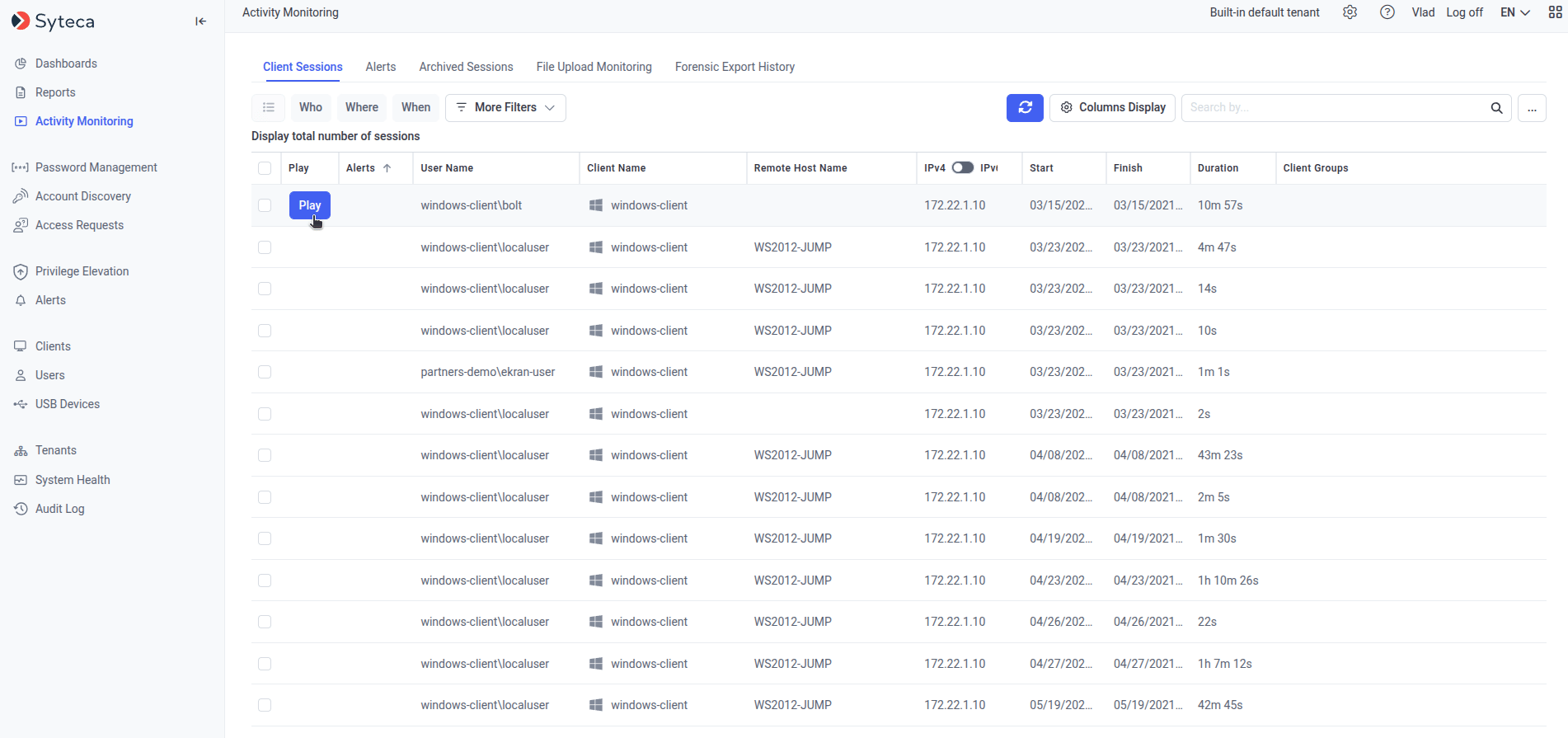
The [Client Sessions list](/docs/session-monitoring/sessions-list) can be narrowed in two ways: by applying structured filters for specific criteria, or by searching directly within the recorded session content.
## Filter by specific parameters
Filters are applied instantly, and multiple filters can be combined — for every filter except **When**, more than one value can be selected at once.
The following filters are shown by default:
| Filter | Narrows sessions by |
| --------- | ---------------------------------------------------------------------------------------------------------------------------------------- |
| **Who** | The user logged in to the Client computer. |
| **Where** | The specific Client. |
| **When** | A time period. Choose **Within the last** *N* hours/days/weeks/months, or a custom **Between** start and end date, then click **Apply**. |
Click **More Criteria** to add any of these additional filters:
| Filter | Narrows sessions by |
| ----------------------------------------------- | ------------------------------------------------------------------------------------------------------------------- |
| **Operating System** | Session platform: Linux Desktop, Linux X forwarded, Linux/Unix Terminal, macOS, or Windows. |
| **Start** | Session start date and time. |
| **Finish** | Session end date and time. Empty for **Live** sessions. |
| **Last Activity** | Date and time of the last screen capture or Linux command executed. |
| **Duration** | Session length. Empty for **Live** sessions. |
| **Type** | Session status: **Live** or **Finished**. |
| **Secret Usage** | The name of a [secret](/docs/pam/secrets/view-manage-secrets) used during the session. |
| **IPv4** / **IPv6** | The Client computer's IP address. |
| **Remote IPv4** / **Remote IPv6** | The local originating IP address. |
| **Remote Public IPv4** / **Remote Public IPv6** | The public originating IP address. |
| **Domain** | The domain the Client belongs to. |
| **User's Comments** | The user's login comment, or (for remote Linux X-forwarded sessions) the application name after `x-forwarded app:`. |
| **Client Description** | The Client's custom description. |
| **Client Groups** | The Client group the Client belongs to. |
| **Remote Host Name** | The name of the remote host computer. |
To remove an added filter, click the **X** next to its button.
 ## Search session data
The **Search** box (top right of the page) filters the session list by a keyword or partial keyword, searching across:
* Application names
* Activity titles
* Keystrokes
* Clipboard text data
* URLs
* Linux commands and parameters
* Alert names
* USB rule names
* Linux command output
Searching keystroke data, clipboard data, or Linux command output requires selecting the corresponding checkboxes from the drop-down next to the Search box (the **···** button, top right). The "Search in output (Linux)" checkbox only appears if at least one Linux session has been recorded.
### Search using a keyword list
Create a `.txt` file listing the keywords to search for, one per line or separated by spaces.
Click **Browse** next to the Search box and select the `.txt` file.
Click the search icon.
Searching a large number of keywords, or across a large number of sessions, can take considerable time and affect Application Server performance.
The search is performed on the sessions currently displayed in the Client Sessions list, in the current sort order — apply filters first to narrow the search scope if needed.
## Related
The full session list this page's filters and search apply to.
Trigger notifications on keyword or activity matches, instead of searching after the fact.
Filter sessions by which secret was used during them.
Group Clients to filter and manage sessions collectively.
## Search session data
The **Search** box (top right of the page) filters the session list by a keyword or partial keyword, searching across:
* Application names
* Activity titles
* Keystrokes
* Clipboard text data
* URLs
* Linux commands and parameters
* Alert names
* USB rule names
* Linux command output
Searching keystroke data, clipboard data, or Linux command output requires selecting the corresponding checkboxes from the drop-down next to the Search box (the **···** button, top right). The "Search in output (Linux)" checkbox only appears if at least one Linux session has been recorded.
### Search using a keyword list
Create a `.txt` file listing the keywords to search for, one per line or separated by spaces.
Click **Browse** next to the Search box and select the `.txt` file.
Click the search icon.
Searching a large number of keywords, or across a large number of sessions, can take considerable time and affect Application Server performance.
The search is performed on the sessions currently displayed in the Client Sessions list, in the current sort order — apply filters first to narrow the search scope if needed.
## Related
The full session list this page's filters and search apply to.
Trigger notifications on keyword or activity matches, instead of searching after the fact.
Filter sessions by which secret was used during them.
Group Clients to filter and manage sessions collectively.