> ## Documentation Index
> Fetch the complete documentation index at: https://syteca.com/docs/llms.txt
> Use this file to discover all available pages before exploring further.
# URL Monitoring Parameter
> Record the browser addresses visited on Windows and macOS Clients, alongside screen captures, to see which websites users have visited.
Applies to Windows and macOS Clients.
URL monitoring records the text entered in the browser address bar at the same time as a screen capture, so investigators can see which websites a Client's user visited. Combine it with an [alert](/docs/session-monitoring/alerts) to get notified whenever a user opens a forbidden URL.
## Enable it
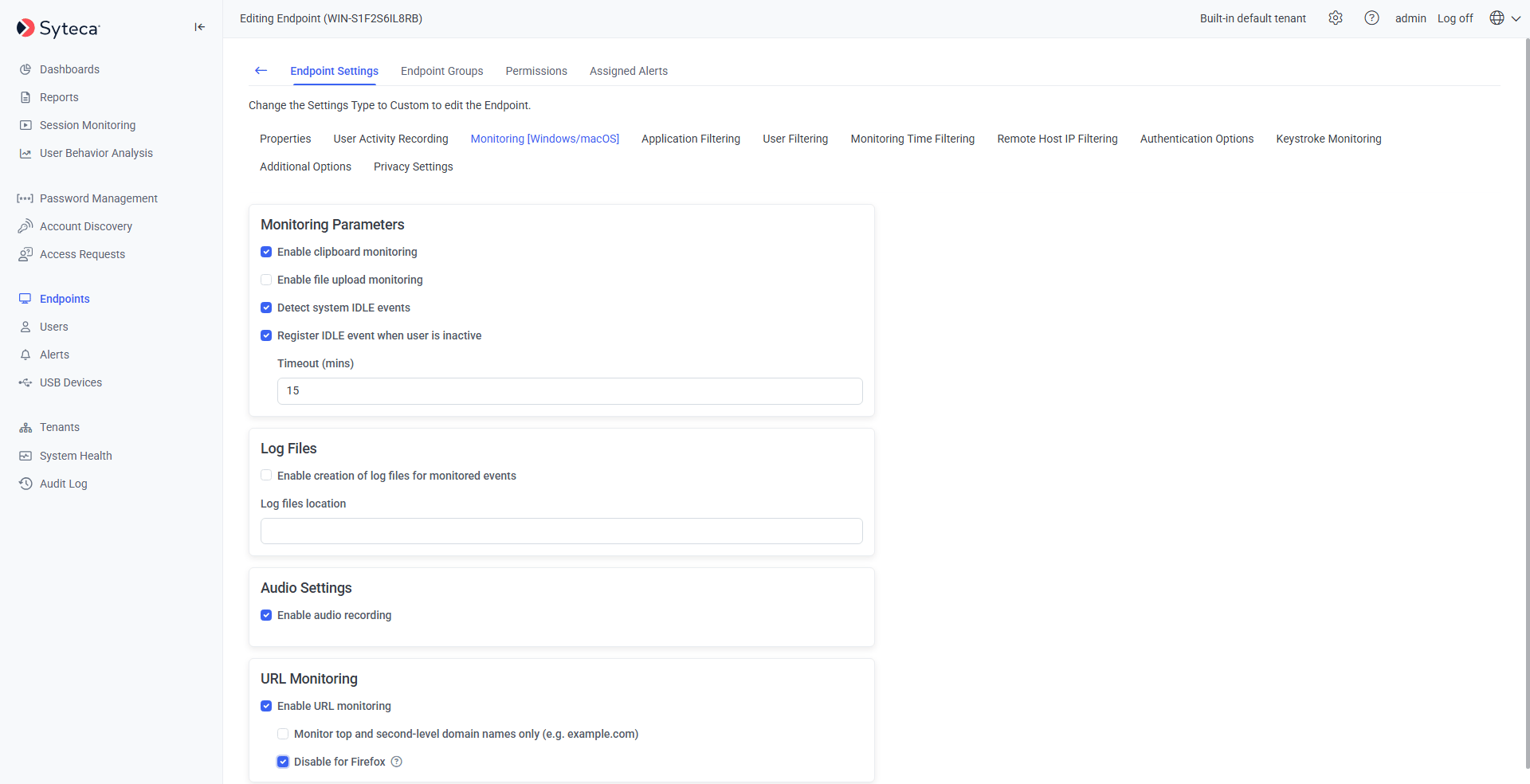
On the **Editing Client** / **Editing Client Group** page, select the **Monitoring \[Windows/macOS]** tab.
Scroll to the **URL Monitoring** section and select **Enable URL monitoring**.
Select **Monitor top and second-level domain names only** to record just the domain (for example `facebook.com`) instead of the full URL (for example `facebook.com/johndoe`).
If you notice performance issues or crashes in Firefox on monitored endpoints, select **Disable for Firefox**. URL monitoring will continue as normal in other supported browsers, such as Chrome, Edge, and Opera. *(Windows only.)*
Monitored URLs appear in the Session Player's **URL** column and **Details** area.
 ### Example behavior
| `.ini` file parameter | Result |
| ------------------------------------------- | -------------------------------------------------------------------------------------------------------------------------------------------------------------------------------------------------- |
| `URLMonitoring=0`
### Example behavior
| `.ini` file parameter | Result |
| ------------------------------------------- | -------------------------------------------------------------------------------------------------------------------------------------------------------------------------------------------------- |
| `URLMonitoring=0`
`MonitorTopDomain=0` | No URL recorded — activity title shows only the application, for example "John Doe - Google Chrome." |
| `URLMonitoring=1`
`MonitorTopDomain=0` | Full URL recorded, for example "John Doe - Google Chrome (URL: `https://facebook.com/john.doe`)." |
| `URLMonitoring=1`
`MonitorTopDomain=1` | Only the top/second-level domain recorded, for example "John Doe - Google Chrome (URL: `https://facebook.com`)." |
| `DisableURLMonitoringForFirefox=0` | URL monitoring in Firefox works as configured by `URLMonitoring` and `MonitorTopDomain` above (default). |
| `DisableURLMonitoringForFirefox=1` | URL monitoring in Firefox is disabled, regardless of the `URLMonitoring` and `MonitorTopDomain` settings. Other browsers, such as Chrome, Edge, and Opera, continue to be monitored as configured. |
## Limitations
* Only standard browsers are supported: Firefox, Chrome, Opera, and Internet Explorer.
* URLs from Metro versions of Chrome and Internet Explorer aren't monitored.
* URLs entered in web anonymizers aren't monitored (proxy server anonymizers are supported).
* URLs can't be monitored if the browser has no address bar (for example, due to user settings).
* Unicode symbols in domain names aren't monitored.
* The **Disable for Firefox** option isn't available for the **PAM Endpoints** group.
* Only standard browsers are supported: Chrome and Safari.
* URLs entered in web anonymizers aren't monitored (proxy server anonymizers are supported).
* URLs can't be monitored if the browser has no address bar (for example, due to user settings).
* The **Disable for Firefox** option for URL monitoring isn't currently supported on macOS.
## Related
Full Windows Client installation and configuration reference.
Full macOS Client installation and configuration reference.
Trigger notifications on visits to forbidden URLs.
Limit which applications, users, or time windows are monitored.