

Each capability below lists the version it first shipped in. To use all of them, update to 7.27 or later. Review the update best practice checklist and the changelog for every version between yours and your target before upgrading.
Privilege Elevation: control admin rights without removing them
Available in 7.27 and later Local administrator rights are how a contained incident becomes an uncontained one. The usual answer is to strip them, which breaks installers, IT scripts, and one-off admin tasks, and generates a ticket queue that quietly gets solved by handing the rights back. Privilege Elevation takes a different route. It replaces the native Windows UAC prompt with a Syteca policy check and applies one of three decisions to every elevation attempt: run it immediately, hold it for an approver, or block it. Users stay in the local Administrators group. What changes is that elevation now goes through a rule you wrote, and every attempt is recorded whether it was approved, denied, or automatic.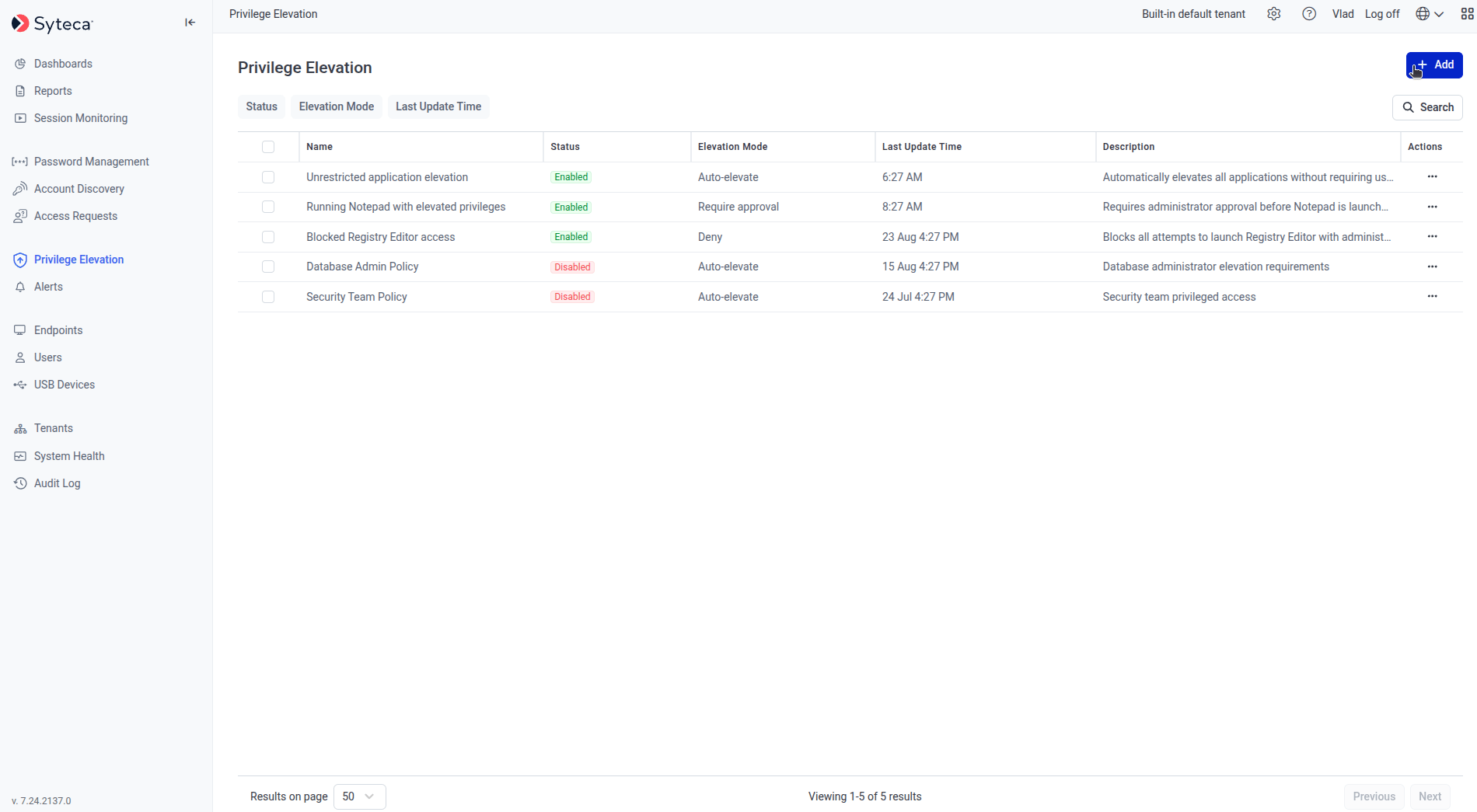
The Privilege Elevation Rules tab.
Use this when you are running a remove-local-admin initiative and need the legitimate work to keep flowing, when you want approved and time-boxed admin access instead of permanent membership in the Administrators group, or when you need to show an auditor a record of who elevated what and who approved it.Relevant to the least-privilege, change-approval, and auditability expectations in CIS benchmarks and ISO 27001.Pair it with Secrets and Password Management. Rules use a Secret’s credentials to perform the elevation, so the account granting admin rights is itself rotated, brokered, and audited like any other privileged credential.
Privileged access management
The largest block of Q3 work went into PAM. Together these changes shorten the path from “we think we know where our privileged accounts are used” to a verified, current inventory.Use this when you need to rotate a service account password but don’t know which services will break, when an audit asks you to prove that stored credentials are still valid, or when privileged access to network hardware is still being handled with a shared password in a spreadsheet.
Discover Windows account dependencies
Available in 7.24 and later Account Discovery now maps where Windows accounts are actually used, not just which accounts exist. It discovers dependencies across Windows Services, IIS Application Pools, and Scheduled Tasks for both Active Directory and local Windows accounts. gMSA accounts are discovered as well. The practical effect is that you can see what a password change will affect before you make it. You can also configure additional Account Discovery settings directly in the Management Tool rather than elsewhere. See Service account dependencies, WMI and PowerShell scanning, and Account discovery settings.Verify stored credentials with Heartbeat
Available in 7.24 and later Heartbeat checks that the credentials held in a secret still work, and flags accounts that have gone invalid. Instead of finding out that a stored password is stale at the moment someone needs it, you find out on a schedule. Supported for a defined set of secret types. See Secret heartbeat. The Application Credentials Broker 1.4, released alongside 7.24, also includes Heartbeat improvements. See the ACB changelog.Network device secrets
Available in 7.24 and later A new Network device secret type brings switches, routers, firewalls, and similar hardware under the same secret management as your servers and accounts. Access runs through Secrets rather than through credentials shared out of band. See Add a secret.Use secrets from the Linux PAM Connection Manager
Available in 7.24 and later Linux administrators can now work with secrets without leaving the terminal. The Linux Privileged Access Connection Manager lists available secrets, shows their details including access request and checkout requirements, and starts connections directly. Supported for SSH and Telnet secret types. See Linux PAM Connection Manager.A redesigned Password Management page
Available in 7.24 and later The Password Management page was rebuilt for usability, and now supports tags so you can organize secrets by team, environment, criticality, or any scheme that suits your deployment. Hostname search was also corrected, and now returns only matching hosts rather than the full list.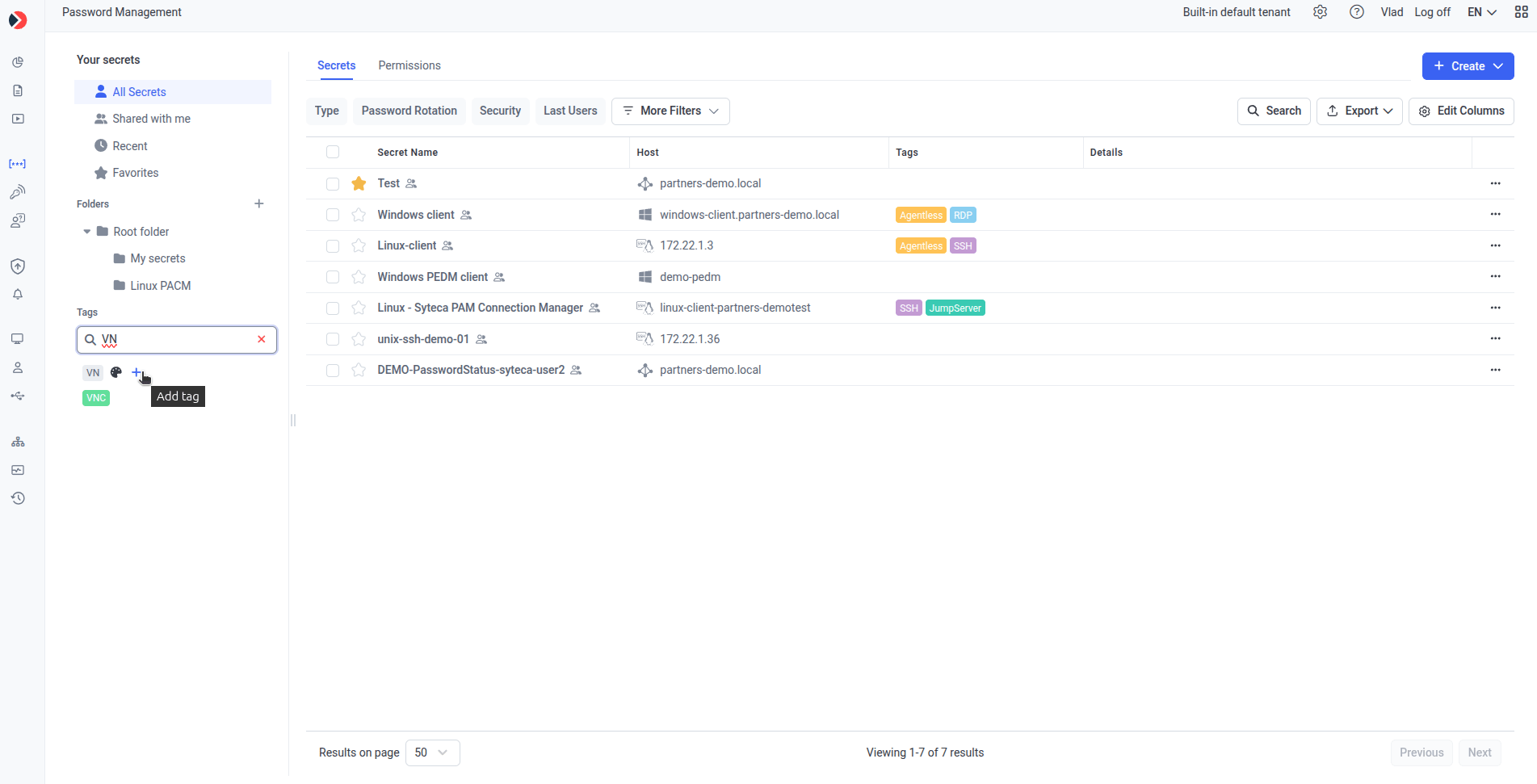
The redesigned Password Management page with tag support.
Session monitoring and recording
Exclude applications and websites from screen recording
Available in 7.25 and later You can now nominate specific applications and websites to be left out of screen recording, while still collecting metadata about them. Activity is still logged and auditable, but no video is captured. This matters where monitoring meets privacy obligations. Personal banking, HR self-service portals, and internal tools containing data your monitoring policy shouldn’t capture can be excluded without turning off recording for the endpoint as a whole.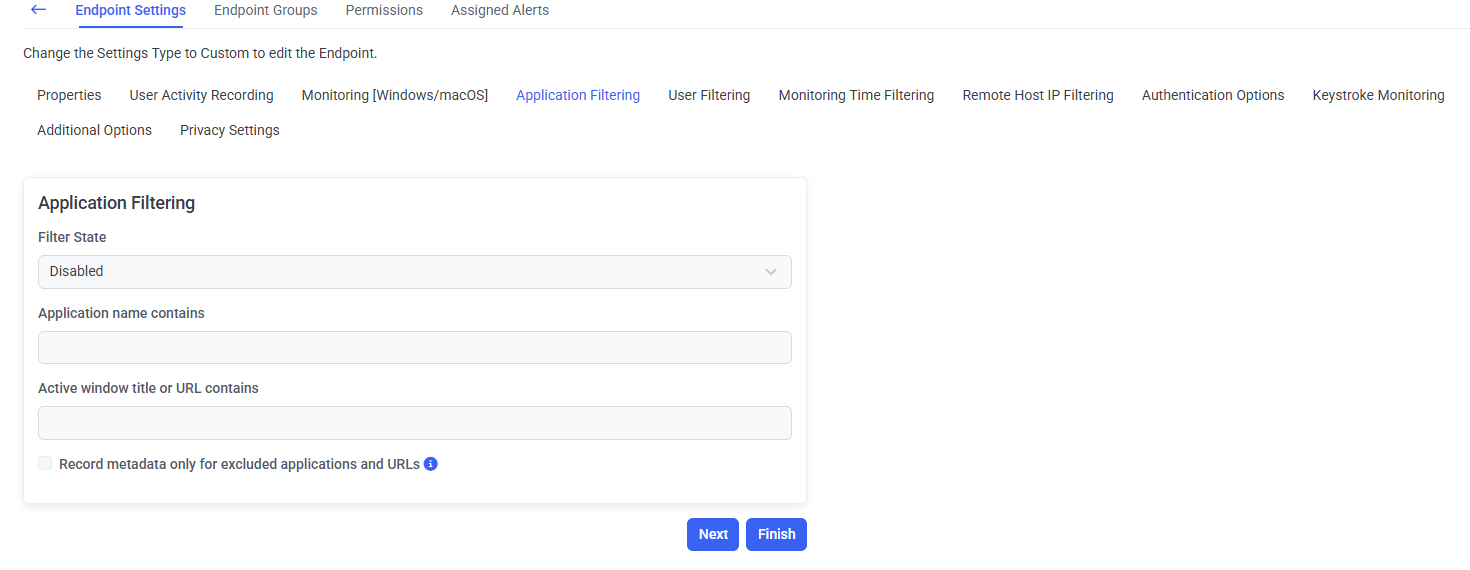
Excluding an application from screen recording while continuing to collect metadata.
New configuration options for full motion capture
Available in 7.26 and later Full motion capture recording gained new configuration options for video recordings.Alerts on Linux terminal input
Available in 7.24 and later Alert rules can now trigger on what a user types in a Linux terminal session, bringing Linux command activity into the same alerting model used elsewhere. See Alert rules.Endpoint configuration
Customize the text in the Client window
Available in 7.26.40 and later The text shown in the Client window on a monitored endpoint can now be changed. Organizations that need the on-screen monitoring notice to carry their own wording, match an internal policy, or use a specific language can set it themselves rather than living with the built-in text.Integrations and identification
SIEM logging for sequential special key presses
Available in 7.26 and later Sequential special key presses are now logged individually to your SIEM, giving your detection rules a finer-grained signal than before. See SIEM integration.Active Directory display names across the Management Tool and Reports
Available in 7.24 and later The Management Tool and Reports can now show Active Directory display names instead of raw usernames, and Endpoint Sessions gained First Name and Last Name columns from Active Directory. Reviewing a session or a report no longer means translating account names into people.Platform and performance
Lower resource consumption on Windows endpoints
Available in 7.26 and later Resource consumption was optimized on both Windows Server and Windows desktop operating systems. This follows the broader performance work in 7.24, which addressed resource consumption and screen lag reported after 7.23.Workstation licenses on Citrix VDI
Available in 7.26.40 and later Workstation licenses can now be assigned on Citrix VDI running Windows 10 LTSC, closing a gap for organizations standardized on that combination.SaaS deployments
Available in 7.24 and later Two changes for SaaS customers: AIX agents are now supported in the SaaS environment, and a one-month data retention period is available for deployments that don’t need longer retention. Management Tool login links were also updated for existing customers as part of the move from Ekran System to Syteca.Run on .NET 8 or .NET 10
Available in 7.26.60 and later The Management Tool and the Application Server both run on either .NET 8 or .NET 10, so you can align Syteca with your organization’s runtime standard rather than the other way round. The Application Credentials Broker moved to .NET 10 in version 1.4.2, released alongside 7.26.70.The Management Tool in ten more languages
Available in 7.24 and later Translations were updated across German, Spanish, Portuguese, French, Polish, Turkish, Japanese, Korean, Chinese, and Ukrainian, with a further Korean refresh in 7.26.30.Related
Syteca 7.27 changelog
Full fix list, build numbers, and hashes for 7.27.
Syteca 7.26 changelog
Full fix list, build numbers, and hashes for 7.26.
Syteca 7.25 changelog
Full fix list, build numbers, and hashes for 7.25.
Syteca 7.24 changelog
Full fix list, build numbers, and hashes for 7.24.
Update best practice
The checklist to follow before upgrading.
Privilege Elevation
Policy-driven control over administrator rights on Windows endpoints.
PAM overview
How privileged access management fits together in Syteca.
What's new in Q4 2026
Endpoint Risk & Compliance Control, and the rest of the current quarter.
All releases
Every Syteca version in one place.