In the Syteca 7.24 release, our team focused on making privileged access easier to operate in real environments. The update improves how teams manage credentials, helps verify password health, secures service accounts, and enables Linux-native workflows.
Read on to learn about each improvement in detail!
Why Syteca 7.24 matters:
- Improve operational resilience: Reduce failure points in privileged access workflows and avoid access disruptions.
- Strengthen credential governance: Improve visibility and control over privileged credentials and service accounts.
- Implement Linux-ready workflows: Bring privileged access into the native Linux terminal workflows without forcing a browser-based process.
- Lower admin friction: Make daily PAM administration simpler and more practical for operational teams.
Overview of 7.24 improvements
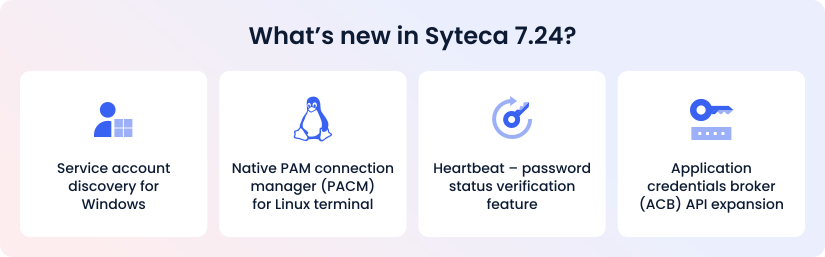
Syteca 7.24 expands the platform’s PAM capabilities with a stronger focus on operational reliability, credential governance, and native support for the environments security teams manage every day.
Service accounts discovery and onboarding for Windows

Secure hidden service accounts
Prevent service disruption
Syteca already detects privileged accounts across Active Directory and Linux environments. This release extends discovery to Windows service accounts — the local or domain accounts that run services, scheduled tasks, and IIS application pools on Windows hosts.
Service accounts often have elevated rights, unclear ownership, and static passwords, making them a serious blind spot in PAM programs. By combining discovery, dependency visibility, and automated onboarding into a single workflow, Syteca helps you reduce outage risk and simplify service account governance.
How it works:
Alongside Windows service accounts, Syteca discovers the systems that depend on them. Thus, admins can see which services, scheduled tasks, and IIS application pools are tied to service accounts before onboarding or password change.
When an admin onboards the detected account into the vault, Syteca takes over password management and handles password rotation. If the password change affects dependent services, Syteca restarts or stops them automatically so operations continue without disruption.
Syteca also detects and marks group Managed Service Accounts (gMSA), but they can’t be onboarded, as Active Directory manages their passwords by design.
Native PAM connection manager (PACM) for Linux terminal
Improve experience for DevOps and Linux teams
Reduce workflow friction
Syteca 7.24 brings privileged access management directly into the Linux terminal, giving Linux admins, DevOps, and SRE teams a native way to launch privileged sessions directly from the command line.
Instead of breaking the workflow by switching to a browser or relying on a Windows jump server, Linux users can now work with secrets where they already operate every day.
How it works:
Users run the pacm command from an SSH or local terminal session to open the Connection Manager. From there, they can list available secrets, filter them, and launch SSH or Telnet sessions to target systems directly from the terminal.
The experience stays identical to that under other Connection Manager methods and maintains the same level of governance controls, with access approvals, password checkout, working-hour restrictions, and session recording.
The release also introduces a unified Linux x64 agent with full SELinux support, strengthening Linux platform coverage without requiring a separate deployment path.
Heartbeat – password status verification feature
Detect password drift
Improve emergency access reliability
Heartbeat is a new feature that allows you to confirm whether vaulted credentials still work. It detects password drift rather than assuming the vault remains in sync with the target system.
This matters because even a well-managed vault can become outdated if a password is changed outside Syteca. With Heartbeat, admins can detect invalid credentials early, reducing the risk of failed access attempts in urgent situations.
How it works:
Heartbeat runs on a schedule or on demand, letting admins see one of the three statuses for each password:
- Valid – the vaulted password works
- Invalid – the password doesn’t work, and the account needs resync
- Failed – password check could not complete due to unreachable target, permission error, or other issue
Every check is logged for audit purposes. If a scheduled check finds that a password is invalid, Syteca stops automatic checks for that secret so an admin can decide whether to rotate it, reconnect, or investigate.
Application credentials broker (ACB) API expansion
Strengthen automation integrations
Support DevOps workflows
The Application Credentials Broker (ACB) is the integration point that enables external systems to retrieve secrets from Syteca for automation scripts and applications that need credentials at runtime.
Syteca 7.24 expands the ACB API capabilities to support stronger automation, improved secret lifecycle management, and a better fit for DevOps and platform workflows. It also helps reduce hard-coded credentials and improves runtime access to secrets.
How it works:
External systems can now use the expanded ACB API to manage not only secret values but also folders and users. The authentication model is also more flexible now, allowing any user type to generate tokens, with configurable token lifetime and optional IP restrictions.
The result is a stronger technical foundation that lets you integrate Syteca into infrastructure automation more naturally, while still keeping access governed.
Password manager with a fresh UI and improved UX
Simplify daily workflows
Improve navigation
7.24 release includes updates to the password management interface, introducing a cleaner layout and updated navigation:
The updated visual style makes the interface hierarchy easier to follow, reducing effort during routine administration and improving the learning curve for new users.
Get started with Syteca 7.24
See how Syteca 7.24 helps teams strengthen credential governance, improve operational reliability, and simplify privileged access across Windows and Linux environments.
Access the demo today to see Syteca in action and take a closer look at the 7.24 features.
Want to try Syteca?
Request access to the online demo!
See why clients from 70+ countries already use Syteca.