Linux environments are the backbone of many modern IT operations, but they are also highly vulnerable to attacks. Securing SSH connections, root and sudo privileges, and numerous other paths to critical systems is not easy.
Security teams need complete control and accountability, which is why they are increasingly deploying privileged access management (PAM) solutions. However, infrastructure teams may not be able to install and maintain PAM agents on every production server.
The choice between agentless and agent-based PAM depends on how your Linux systems are accessed, monitored, and managed. We’ll compare both deployment models and cover their strengths and limitations. You’ll also discover seven practical steps to protect privileged Linux access and a framework for selecting the model that best matches your security and operational needs.
Key takeaways:
- Agentless PAM can centralize SSH access, MFA, RBAC, credential vaulting, and password rotation without installing agents on every Linux endpoint.
- Agent-based PAM is required if your organization needs deep session monitoring, recording, and real-time alerts on Linux systems.
- The right architecture depends on your visibility needs, operational constraints, and the degree to which you must govern direct SSH access paths.
- Syteca supports both agentless and agent-based PAM, giving you the appropriate level of control and monitoring for Linux environments.
Why privileged access in Linux needs more than SSH keys and sudo
Securing privileged access in Linux requires more than protecting the login process.
Key privileged access challenges in Linux
A variety of access paths
Linux environments can have many privileged access paths, including:
- Root and sudo accounts
- SSH keys and remote administrator connections
- Service accounts and automation identities
- CI/CD pipelines and scheduled tasks
- Third-party vendor access
While necessary, these access paths can become security gaps when privileges are excessive, persistent, shared, or poorly audited.
It’s also important to understand that a legitimate SSH login does not always mean legitimate activity. Attackers can use compromised valid accounts to access remote services such as SSH and move deeper into your environment.
Native Linux logs, sudo policies, and SIEM tools provide an important security foundation. However, they can still leave teams with fragmented evidence and limited insight into who can access a server, their activity, and whether a suspicious session should be terminated.
Limitations of traditional approaches
❌ SSH keys and passwords can be shared, copied, forgotten, or remain active after access is no longer needed.
❌ Native SSH and sudo logs may not provide enough context to perform fast investigations.
❌ Sudo limits privilege elevation but does not automatically centralize access approvals, credential governance, session evidence collection, or response workflows.
❌ Manual log reviews become difficult when organizations are managing hundreds or thousands of Linux systems.
❌ A bastion host or jump server cannot guarantee control unless all privileged paths are routed through it and activity is monitored.
❌ Traditional controls rarely provide a unified way to monitor Linux privileged sessions, detect suspicious activity, and respond in real time.
Modern privileged access management (PAM) connects authentication, credential management, session control, activity monitoring, and response processes in a single security strategy.
How to secure your Linux environments with PAM: 7 best practices
A strong PAM strategy can help your organization reduce privileged access risks without slowing Linux administration workflows. NISTIR 7966 SSH key management requirements emphasize least privilege, privileged-key governance, continuous monitoring, and the automation of access management processes.
PAM best practices for Linux
1
Implement strong authentication
3
Eliminate standing privileges
4
Secure human and service accounts
5
Implement session monitoring and management
6
Automate threat response
7
Conduct regular access reviews
1. Implement strong authentication
Require users to verify their identities before accessing Linux systems. Require multi-factor authentication (MFA) for all accounts to reduce the risk of unauthorized access through stolen credentials. Even if an account is compromised, MFA will prevent attackers from misusing it.
In addition, avoid using root and other shared accounts. If this isn’t possible, implement secondary authentication to ensure every privileged action can be traced to a specific person or non-human identity.
2. Apply least privilege
The principle of least privilege states that users should only receive the permissions they need to complete a specific task. This includes limiting which Linux systems they can access, which accounts they can use, and which commands they can run with elevated privileges.
For example, a database administrator may need sudo access to database servers, but that doesn’t mean they should automatically receive privileged access to every production Linux server. Applying least privilege limits the impact of compromised accounts, configuration errors, and insider threats. It also makes privileged access policies easier to consistently review and enforce.
3. Eliminate standing privileges
Permanent privileged access exposes a larger attack surface. The more accounts that retain administrative privileges, the more opportunities attackers have to exploit stolen or compromised credentials.
Just-in-time (JIT) access control enables organizations to grant elevated privileges only when justified, thereby supporting the zero-standing-privileges principle. Access is approved for a specific task and automatically revoked after a defined period.

This approach is especially useful for contraаtwntors, external support teams, and employees who only need privileged access occasionally.
4. Secure human and service accounts
Linux environments may have more privileged identities than teams realize. In addition to root and sudo users, Linux environments may contain service accounts, automation identities, CI/CD credentials, and accounts used by scripts or scheduled jobs.
Use an account discovery tool to create and maintain an accurate inventory of all privileged accounts, and assign a clear owner to each one. Record why the account exists, which systems it can access, which privileges it requires, and whether it is still actively used.
NIST guidance also emphasizes managing SSH keys and access permissions throughout their lifecycle. Establish an account lifecycle management process to govern every stage of privileged access:
- Create accounts only after receiving an authorized request and approval.
- Grant access according to the user’s role and current responsibilities.
- Review permissions regularly and remove unnecessary privileges.
- Update or revoke access when users change teams, roles, or projects.
- Disable accounts immediately when employees or contractors leave.
- Remove obsolete service accounts and automation credentials.
Credential vaulting and password rotation can help protect privileged credentials from being shared, reused, or stored in insecure locations. These controls are particularly important for service accounts that require persistent access but do not have a human user responsible for manual sign-in.
5. Implement session monitoring and management
Authentication controls are important, but they do not provide insight into what users do after accessing your Linux system. Session monitoring provides visibility into privileged activity during SSH connections, local console sessions, and other administrative workflows.
Your security teams should be able to review session information to investigate incidents or verify compliance. Depending on the PAM deployment model, this may include session recordings, playback, searchable metadata, command visibility, and reports on user activity.
Privileged session management also helps organizations enforce accountability. When administrators know that privileged activity is governed and auditable, they are more likely to follow established access procedures.
Session management capability
Get evidence of privileged activity for investigations and audits
Quickly review how an incident occurred
Observe high-risk privileged activity in real time
Find Linux privileged sessions and specific session events by user, target system, date, or other relevant details
Automate the detection of potentially harmful activity before it escalates
Centralized session reports
Support access reviews, compliance reporting, and security assessments
The level of monitoring depends on your organization’s security requirements and the criticality of your Linux systems.
6. Automate threat response
Manual security investigations take time, especially in large Linux environments with multiple servers and privileged users. PAM can help your teams detect and respond to suspicious activity faster by automating alerting and response workflows.
For example, organizations can greatly benefit from configuring alerts for unusual access attempts, unexpected privileged activity, access outside approved hours, or policy violations. Verify whether alerts can be sent to your security specialists in real time or integrated with SIEM platforms for broader investigation.
Try to select a PAM solution that enables administrators to terminate suspicious Linux privileged sessions in real time. Fast response times can help contain a potential incident before an attacker escalates privileges, accesses sensitive data, or moves laterally across your environment.
7. Conduct regular access reviews
PAM requires continuous access reviews rather than a single assessment at the time of deployment. Linux environments change frequently as you add servers, onboard users, update applications, and introduce new automation workflows.
Regular assessments can help your organization identify inactive accounts, unnecessary privileges, outdated SSH keys, direct access paths, and systems that are not covered by privileged-access policies. They can also help validate whether access controls still match business and security requirements.
PAM helps centralize privileged access controls, but its deployment architecture affects what it can control and observe. Next, we compare agentless and agent-based PAM approaches for Linux environments.
Agentless vs. agent-based PAM for Linux
Both approaches to privileged access management for Linux can help your organization secure privileged access. However, they provide different levels of deployment flexibility, visibility, and control.
What is agentless privileged access management?
Agentless privileged access management allows users to access Linux systems through a centralized component, such as an SSH proxy or connection manager. Instead of installing an agent on every target Linux server, you control access at the connection layer.
Agentless PAM can help organizations with the following processes:
Common use cases for agentless PAM
Centralized SSH access routing
MFA and identity provider integration
An agentless PAM approach is especially useful when installing agents on production Linux systems is restricted, operationally difficult, or impractical. It can also simplify the onboarding of new servers and help teams apply consistent access policies across large or diverse Linux environments.
Where agentless PAM excels

Faster rollout and onboarding of new systems
Easier maintenance and administration
Lower endpoint performance impact
Better coverage
However, agentless PAM has an important limitation. It governs only the access paths that pass through the centralized connection layer. Direct SSH connections that bypass the proxy may fall outside these controls.
Furthermore, agentless deployment does not provide the same session monitoring capabilities as an agent-based approach.
What is agent-based PAM for Linux?
Agent-based privileged access management for Linux involves installing a software component on a managed Linux system to monitor and control privileged activity. Unlike an agentless model, where controls operate primarily at the connection layer, an agent creates a telemetry point closer to the endpoint itself.
This approach gives security teams deeper insight into what users do after accessing a Linux system. It can cover local and remote privileged activity, helping organizations capture the information they need for investigations, compliance audits, and incident response.
Additional capabilities agent-based PAM can provide
Thorough session monitoring and recording
The ability to terminate risky sessions
Real-time alerts on suspicious activity
Session playback for investigations
The agent-based model is a good fit for organizations that need deeper visibility into privileged user actions. Agent-based PAM is great for high-value systems, including production servers, databases, critical infrastructure, and systems that process sensitive or regulated data. It can also help security teams monitor access paths that may not always pass through a centralized SSH proxy.
Key benefits of agent-based PAM
Deeper user activity visibility
Real-time threat response
Resilience during outages and network issues
Another benefit is resilience. Depending on the deployment and policy configuration, an agent can continue collecting activity data or enforcing local controls even when connectivity to centralized management components is temporarily disrupted.
However, agent-based PAM requires more operational effort. Organizations must plan agent rollout, test compatibility with Linux distributions and workloads, manage regular updates, and maintain coverage as the infrastructure changes.
These requirements are not automatic disadvantages. Instead, they are deployment trade-offs that should be evaluated against the level of monitoring, visibility, and response capabilities your Linux systems require.
Which model to choose: Side-by-side comparison
The best deployment model depends on your organization’s security priorities, infrastructure constraints, and required level of session visibility. A general comparison of both deployment types’ capabilities is as follows:
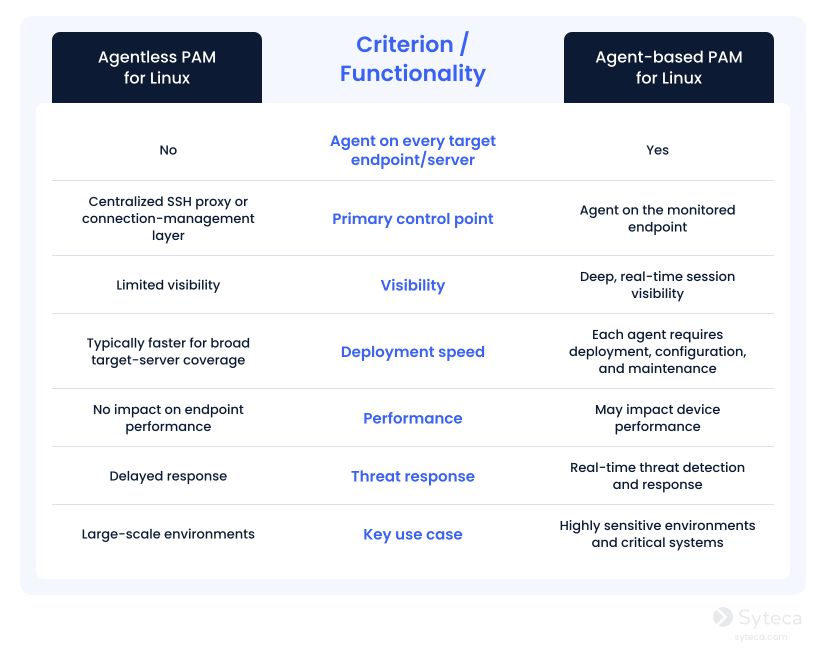
Agentless PAM can simplify privileged access management across large Linux environments, while agent-based PAM delivers deeper visibility and response capabilities.
However, your organization does not need to commit to just one model for every Linux system. You can follow a hybrid approach and combine the deployment simplicity of agentless PAM with the continuous endpoint-level control of agent-based PAM.
Choose agentless PAM deployment when
- Installing agents is prohibited, operationally difficult, or impractical across a broad Linux environment.
- Your goal is to centralize SSH access governance, RBAC, MFA, credential protection, and PAM audit trails.
- You need to onboard Linux servers quickly without modifying each target endpoint.
- Systems can reliably be accessed through an approved SSH proxy or connection-management path.
- Your organization does not require detailed session monitoring for every protected system.
Choose agent-based PAM deployment when
- Your organization requires session recording, live monitoring, playback, real-time alerts, or session termination.
- You have high-value systems that need stronger oversight and detailed investigation evidence.
- You need better visibility beyond the existing centrally proxied SSH connections.
- Your users access systems through local consoles or direct SSH paths.
- Your organization can support agent deployment, updates, compatibility testing, and ongoing lifecycle management.
How Syteca helps secure privileged access in Linux
Syteca is an inside security platform that can help your organization secure privileged access to Linux systems through both agentless and agent-based deployment models. This approach allows security and infrastructure teams to select the appropriate level of control for each environment rather than applying the same architecture to every server or endpoint.
Key benefits of agent-based PAM
Remote SSH & Telnet
Local console sessions
X Window System (X11)
Wayland sessions
X11 forwarding
Cloud & VDI sessions
With Syteca, your organization can centralize privileged access management (PAM), protect administrator credentials, enforce role-based access policies, and integrate access events with your SIEM system.
For Linux systems that require deeper oversight, Syteca’s agent-based model provides robust identity threat detection and response (ITDR) capabilities, including privileged user monitoring, session recording, and real-time response.
The table below shows the main functionalities available with each Syteca deployment model.
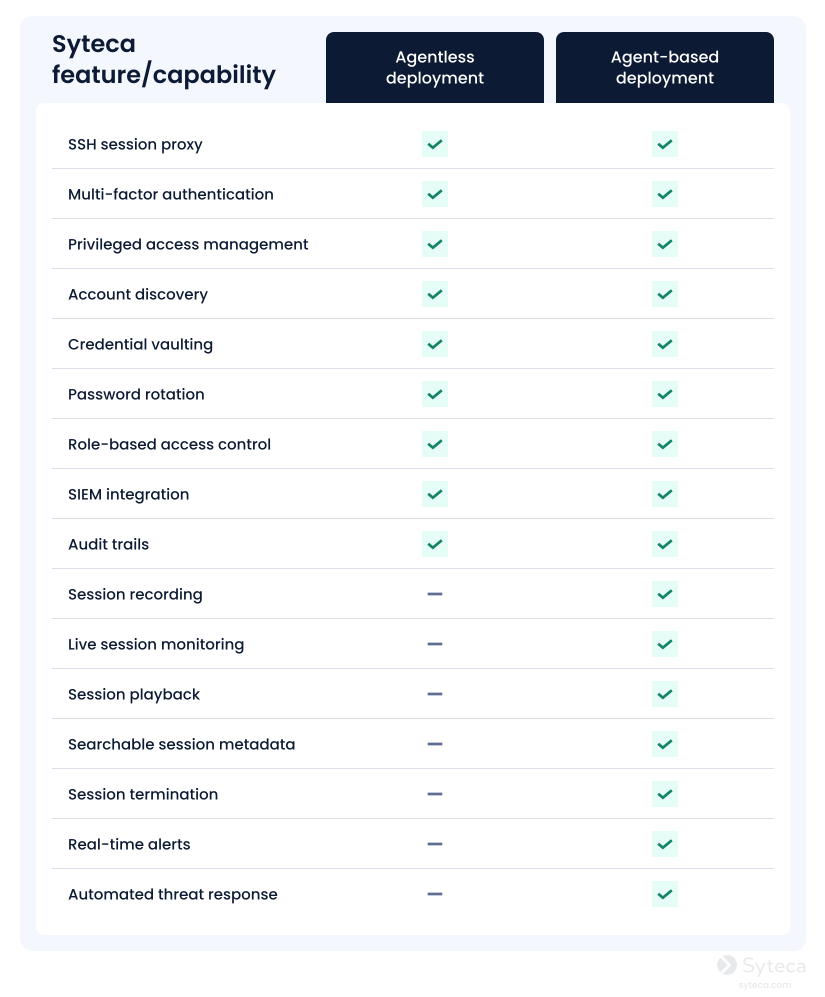
You can choose to deploy Syteca as follows:
- Agentless deployment model. Syteca’s Agentless Connection Manager routes approved SSH connections through a centralized access layer, where organizations can apply RBAC, MFA, credential vaulting, password rotation, audit trails, and SIEM integration. The key advantages are fewer changes to target Linux servers, faster onboarding, and more consistent privileged access governance across large or agent-restricted environments. However, it lacks the session visibility that the agent-based model provides.
- Agent-based deployment model. This model implies installing software agents on the target endpoints. Besides offering access control capabilities, it enables live session monitoring, recording, playback, real-time alerts, and session termination, giving security teams stronger evidence and faster response options. Its main trade-off is the operational effort required to deploy, update, and maintain agents across Linux endpoints.
- A hybrid model. Organizations can deploy one Syteca agent on a designated SSH jump server and route administrators’ and vendors’ privileged connections to Linux targets through that monitored system. This model can reduce the need to install agents on every Linux endpoint while retaining session visibility, recordings, and other monitoring functions. Its main limitation is coverage: direct SSH connections that bypass the jump server can create visibility gaps and must be restricted or governed separately.
Conclusion: You can secure Linux privileged access without sacrificing visibility
Agentless PAM is a practical option when infrastructure teams need to centralize SSH access, enforce credential controls, and apply consistent access policies without installing agents on every target Linux server. Agent-based PAM is the best choice when organizations require deeper visibility into privileged activity, including session monitoring, recording, playback, real-time alerts, and session termination.
Your choice of architecture should be driven by your required level of visibility, risk profile, and operational constraints, not deployment convenience alone. Syteca supports both agentless and agent-based PAM models, enabling your organization to protect privileged Linux access while applying stronger monitoring controls to your most critical systems.
Want to try Syteca?
Request access to the online demo!
See why clients from 70+ countries already use Syteca.
FAQ
Yes, Linux privileged access management can help your organization protect the accounts, credentials, and access paths that administrators, service accounts, and third parties use to manage Linux systems. It can centralize controls for SSH access, enforce MFA and least privilege, store privileged credentials, and maintain audit trails of administrative access.
PAM does not replace native Linux security features. Instead, it incorporates those access-related processes into a more governed workflow. By limiting excessive permissions, removing unnecessary persistent admin access, rotating credentials, and regularly reviewing who can access which systems, your team can reduce the likelihood and impact of compromised privileged accounts.
Agentless PAM controls privileged access primarily through a centralized connection layer, such as an SSH proxy or connection manager. Administrators connect through this managed path rather than directly to each server, allowing your organization to apply consistent authentication, authorization, credential vaulting, password rotation, and logging policies without installing software on every Linux endpoint.
Agent-based PAM places a software component directly on the Linux endpoints and servers being monitored. This can give your security team more visibility into activity on the endpoint itself. Agent-based PAM can support detailed session recording, live monitoring, and real-time alerts. The trade-off is that agents require deployment planning, compatibility testing, maintenance, and updates across the systems where they are installed.
Yes. Agentless PAM can route SSH connections through a centralized access layer that verifies identities, enforces MFA and RBAC, provides access to vaulted credentials, and records connection events. However, it only protects sessions that use the approved route, so organizations should restrict or separately govern direct SSH connections that could bypass the proxy or connection manager.
Choose agent-based PAM when critical Linux systems require detailed session visibility and a faster response to suspicious privileged activity and threats. It is particularly suitable for production servers, databases, regulated workloads, and other high-value assets where teams need session recordings, real-time alerts, activity evidence, and the ability to terminate risky sessions.