Privileged account and session management (PASM) is a subdivision of privileged access management (PAM) that involves vaulting and rotating privileged credentials and monitoring, recording, and controlling the related sessions.
PASM is also known as privileged session management and is sometimes referred to as privileged password management. Gartner identifies PASM as one of the core PAM pillars alongside privilege elevation and delegation management (PEDM).
How privileged account and session management works
Privileged account and session management protects the privileged identity lifecycle before, during, and after access is granted. First, it helps security teams discover privileged and service accounts across the environment. Credentials such as passwords, SSH keys, and certificates are stored in an encrypted password vault, rotated automatically, and released only after approval. Access can also be granted for a limited period, following the just-in-time model. Users can connect to a target system without seeing or handling the underlying password.
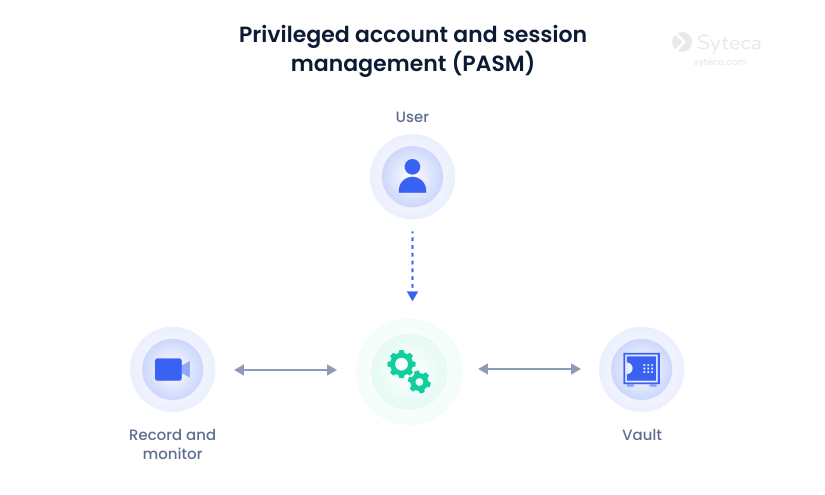
On the session-management side, PASM controls what happens after access is approved. Privileged session monitoring gives security teams real-time visibility, while session recording and playback support investigations and compliance reviews. If a session appears suspicious, an authorized administrator can pause or terminate it.
Automatic discovery of privileged, service, and orphaned accounts
Storing passwords, SSH keys, and certificates in an encrypted vault
Scheduled credential rotation and request workflows
Credential injection, so users start a session without seeing the password
Privileged session monitoring, recording, and playback
An immutable audit trail showing who did what, where, and when
PASM vs. PEDM vs. PAM
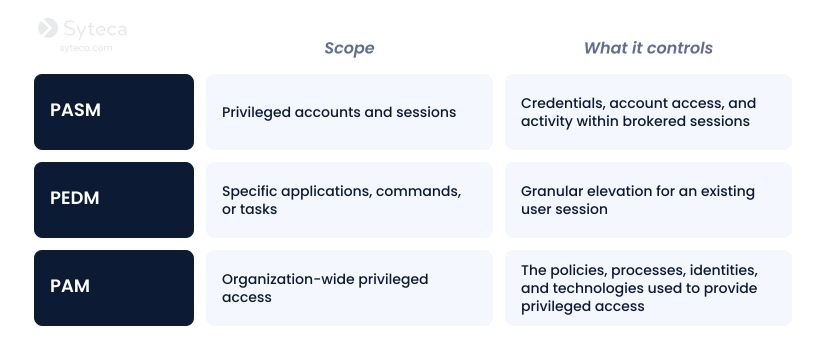
Privileged account and session management (PASM) is a core branch of PAM that is focused on privileged accounts and the sessions they open.
Privilege elevation and delegation management (PEDM) is also a part of PAM. It involves selectively elevating user permissions only for specific applications, commands, or tasks on an as-needed basis.
Privileged access management (PAM) is the broader discipline and framework that brings these capabilities together, focusing on securing, controlling, and monitoring elevated access across an organization.
Why privileged account and session management matters
Privileged credentials are high-value targets because they can give attackers access to sensitive assets, facilitate lateral movement, and enable changes to systems or security controls.
PASM also helps reduce risks stemming from malicious or negligent insiders, orphaned administrator accounts left after offboarding, and third-party vendors or contractors who retain standing access to sensitive environments. By connecting access to a specific person, time, system, and activity record, your organization gains accountability.
Privileged account and session management also provides audit evidence that can support requirements under the GDPR, PCI DSS, HIPAA, ISO 27001, NIS2, and DORA. Vault records, approval histories, authentication events, session recordings, and activity logs help demonstrate that privileged access is restricted, monitored, and reviewed. PASM does not guarantee compliance on its own, but it can provide important controls and evidence for an organization’s broader compliance program.
Privileged account and session management best practices
Privileged access should be limited, monitored, and reviewed throughout its lifecycle. The following best practices can help your organization secure privileged accounts, reduce standing access, and maintain visibility into every session.
PASM best practices
1
Discover and inventory every privileged account
2
Vault credentials and automate rotation
3
Grant privileged access just in time
4
Monitor and record privileged sessions
5
Enforce MFA for every privileged login
1. Discover and inventory every privileged account
Privileged account discovery can reveal unmanaged accounts that might otherwise fall outside security controls. Identify administrator, shared, service, machine, emergency, and orphaned accounts across servers, endpoints, databases, cloud platforms, and network devices.
Then compare the discovered accounts with the approved ownership records, disable accounts that are no longer needed, assign an accountable owner to each remaining account, and onboard credentials into a vault.
2. Vault credentials and automate rotation
Store passwords, SSH keys, certificates, and other secrets in an encrypted vault rather than sharing them through email, documents, or chats. Deploy a dedicated password management tool to automate and centralize secrets management, eliminating human error and the potential for credential misuse.
Rotate credentials after use, on a fixed schedule, and whenever an employee or vendor leaves the organization. Where possible, use credential injection so users can connect to your systems without having to view or copy the secret.
3. Grant privileged access just in time
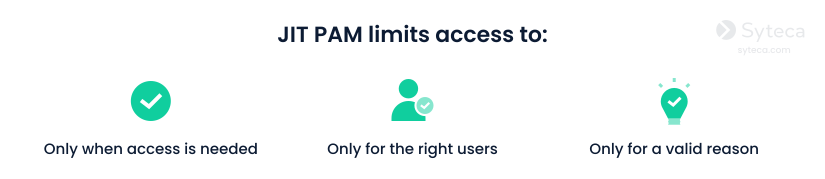
The just-in-time approach requires users to request access only for a specific system, task, and time period. Apply approval rules based on resource sensitivity and automatically revoke permissions when the approved period ends. Avoid permanent administrator rights and review recurring access requests to identify privileges that can be reduced or removed.
This way, even if an account or credentials are compromised, the exposure window and the blast radius are reduced.
4. Monitor and record privileged sessions
Monitor privileged user activity in real time and record sessions involving interaction with critical systems, remote access, and third-party users. Ensure recordings and logs are searchable, protected from tampering, and reviewed promptly.
To ensure fast response, configure alerts for unusual login times, access from unexpected locations, repeated failed login attempts, risky commands, privilege changes, and attempts to access non-task-related resources.
5. Enforce MFA for every privileged login
Require MFA for employees, administrators, contractors, and vendors. Combine MFA with network restrictions, approval workflows, and third-party vendor monitoring so that authentication alone does not provide uncontrolled access.
Syteca is an inside security platform with privileged access management (PAM) and identity threat detection and response (ITDR) capabilities that can help you implement all-around PASM in a single solution. Syteca combines privileged account discovery, credential vaulting, two-factor authentication, full session monitoring and recording, and automated threat response to govern privileged access and maintain visibility across your IT environment.
Want to try Syteca? Request access
to the online demo!
See why clients from 70+ countries already use Syteca.
FAQ
Traditional access control often assigns permissions based on a user’s role and leaves them active until Privileged session management is the process of controlling, monitoring, recording, and auditing sessions initiated by elevated accounts. It helps security teams verify who accessed which resource, what actions they performed, and whether the session is safe.
Privileged account and session management is a subdivision of PAM. PASM protects privileged credentials and the sessions they open, while PAM includes the wider policies, processes, and technologies used to manage and secure privileged access.