Unauthorized access puts your organization’s data, reputation, and compliance at risk. In this article, we explore the meaning of unauthorized access, the dangers behind unauthorized entry, and key attack vectors. We also discuss how to detect unauthorized access and share the top ten cybersecurity practices to fortify your organization’s defenses.
Key takeaways:
- Common attack vectors for gaining unauthorized access include social engineering, password stuffing, and exploits of third-party vendors’ vulnerabilities.
- Adopting the principle of least privilege, implementing strong policies, and using multi-factor authentication are among the top practices for the prevention of unauthorized access.
- It’s essential to go beyond access control and monitor user activity to detect threats as they happen.
- With a cybersecurity platform like Syteca, you can secure access to your IT infrastructure using robust access controls, session monitoring, and automated incident response.
What is unauthorized access? Risks and consequences
Unauthorized access in cybersecurity occurs when “a person gains logical or physical access without permission to a network, system, application, data, or other resource,” according to NIST. Unauthorized access involves bypassing security measures or exploiting vulnerabilities in the IT infrastructure to get access to systems that should be accessible only to authorized users.
If your organization suffers an unauthorized access attack, the consequences can range from data breaches and financial losses to service unavailability or even losing control of the entire network. Let’s look at a few notable unauthorized access examples.
Case#1: Salesforce data-theft campaign targeting enterprises
Multiple enterprises using Salesforce CRM.
In August 2025, cybersecurity agencies and threat intelligence researchers reported a large-scale campaign targeting Salesforce environments across hundreds of organizations, including global brands such as Adidas, Qantas, and Allianz Life. The activity was attributed to cybercrime groups tracked as UNC6040 and UNC6395.
The attackers gained access to corporate Salesforce environments and exported large volumes of data, including:
- customer contact records
- emails and phone numbers
- CRM support cases and internal communications
- business account data and operational records.
After exfiltrating the data, the attackers used this access for extortion and follow-on attacks, threatening to leak stolen datasets on cybercrime forums or data-leak sites if victims refused to pay ransom.
The attackers relied on social engineering techniques, including voice phishing, to obtain employee credentials or trick users into installing malicious versions of Salesforce tools. Once inside the Salesforce environment, the attackers used automated tools and scripts to extract large volumes of data. They bypassed traditional network security controls because they were operating through trusted, authenticated accounts.
What could have prevented it
- Discovery and monitoring of privileged SaaS accounts
- Monitoring for bulk data exports and unusual API queries
- Session recording and auditing of privileged account activity
- Enforcement of least-privilege access to sensitive data
This campaign highlights how attackers increasingly abuse legitimate credentials and use trusted admin accounts rather than exploiting software vulnerabilities.
Case#2: Telus Digital cloud data breach
In January 2026, Telus Digital confirmed a major cybersecurity incident involving unauthorized access to several internal systems after the hacker group ShinyHunters claimed responsibility for a massive data breach.
The attackers stated that they had extracted nearly one petabyte of data, including:
- customer and partner data belonging to dozens of companies
- internal operational datasets
- call records and customer support data
- internal source code and background check data.
The attackers obtained compromised cloud credentials from the Salesloft Drift breach and used these credentials to access Telus Digital’s Google Cloud infrastructure. Once inside the environment, they queried large datasets and searched for additional secrets that allowed them to expand access and exfiltrate significant volumes of data.
What could have prevented it
- Privileged access management for cloud accounts and service credentials
- Service-account activity monitoring in cloud environments
- Detection of abnormal database queries and large data exports
- Privileged session monitoring and recording for cloud administration
The breach illustrates the risks associated with compromised identities and the importance of monitoring privileged access.
Case #3: Jaguar Land Rover cyberattack
In August 2025, Jaguar Land Rover experienced a major cyberattack that forced the company to shut down several global IT systems and temporarily halt production across multiple manufacturing plants. The shutdown lasted several weeks, leading to an estimated £50 million in losses each week.
The attackers accessed internal development and operational systems and exfiltrated hundreds of gigabytes of sensitive corporate data, including:
- engineering documentation
- internal records.
Attackers used stolen credentials to access JLR’s Atlassian Jira system, which was used for software development and internal project management. Under a legitimate account, attackers accessed internal systems, discovered additional assets and credentials, and moved laterally through the company’s infrastructure.
What could have prevented it
- Multi-factor authentication (MFA)
- Privileged access management (PAM)
- Monitoring privileged and service accounts
- Automatic detection of unusual account activity
Analysts have described this incident as one of the most disruptive cyberattacks against a UK manufacturing company. This incident clearly demonstrates how a single compromised credential can enable attackers to gain deep access to enterprise infrastructure and disrupt critical business operations.
Unfortunately, these cases are only the tip of the iceberg. The cyber threat landscape continues to evolve, with cybercriminals using new, sophisticated methods to gain illegal access. Recent cybersecurity reports confirm that unauthorized access, credential abuse, and identity compromise remain among the most common causes of modern cyberattacks.
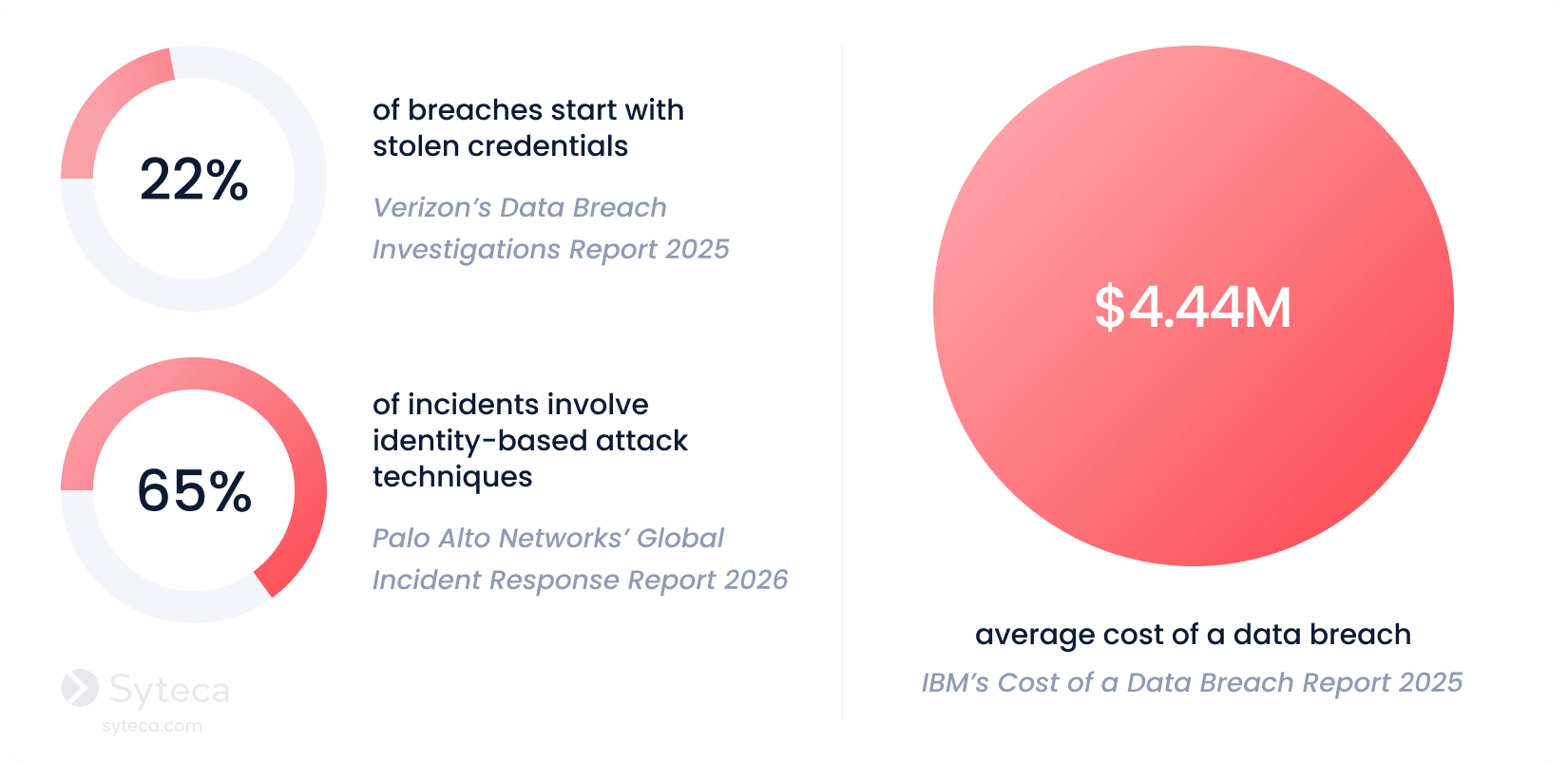
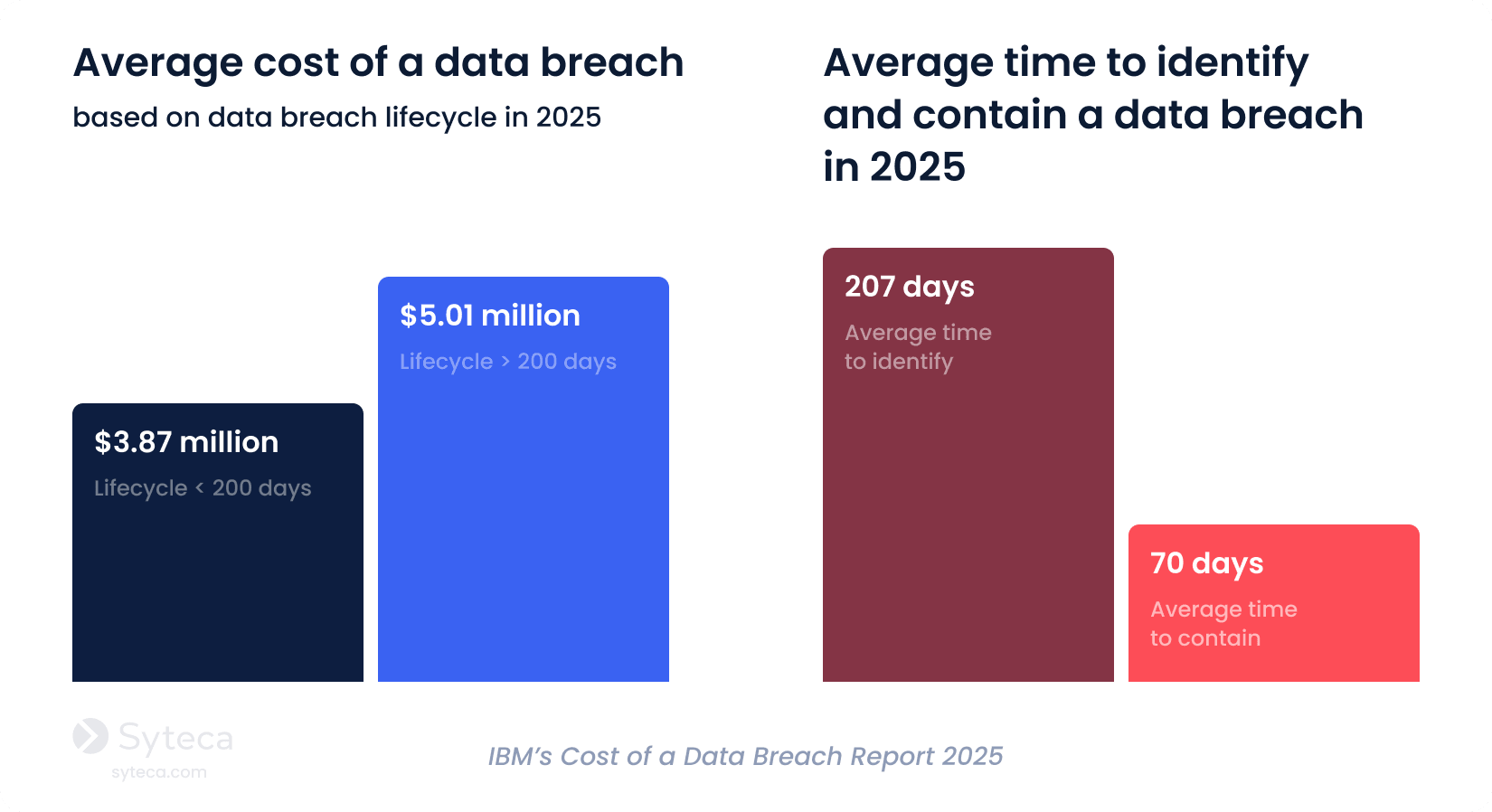
Cybercriminals often remain hidden on a network for a long time and even use anti-forensic techniques to hide their footprints. The Cost of a Data Breach Report 2025 by IBM states that it takes an average of 276 days to identify and contain a data breach. The earlier you can identify a data breach, the less it’ll cost your organization.
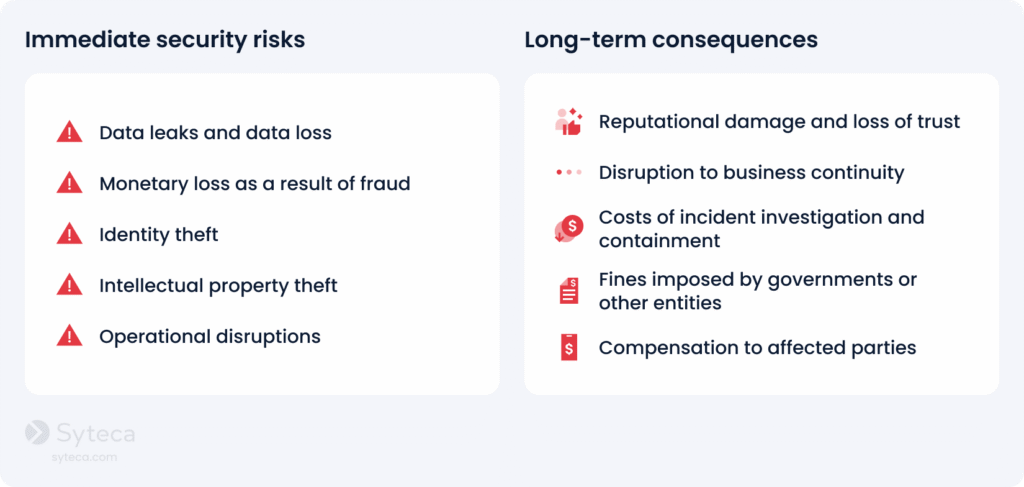
Besides financial losses, unauthorized use of information can damage an organization in a number of other ways. Unauthorized users can compromise your financial data, trade secrets, personal information, and other sensitive data, leading to identity theft, reputational damage, and legal consequences. Unauthorized access can also result in system downtime, loss of productivity, and disruption of your organization’s critical services.
From all this, it’s easy to conclude that organizations should detect and respond to unauthorized access as quickly as possible to remediate threats before severe damage occurs. And to detect unauthorized data access, it’s crucial to understand how malicious actors can intrude into your systems.
Try Syteca.
Explore how Syteca can protect your organization against unauthorized access.
Methods of unauthorized access
Before we dive into defence techniques, it’s important to understand the key methods malicious actors use to gain unauthorized access. In practice, attackers combine digital, physical, and human-centric methods to bypass security controls and gain entry to systems, applications, or sensitive data.
Physical unauthorized access tactics
While often overlooked in cybersecurity discussions, physical access remains a critical attack vector, especially in environments where endpoints, servers, or other network equipment are not fully secured physically.
Attackers may gain access by entering office premises or data centers, using stolen badges, tailgating techniques, or impersonation. Once inside, they can connect unauthorized USB drives to copy sensitive data from unattended devices. In modern hybrid environments, this risk extends to remote endpoints, where lost or stolen devices can serve as entry points into corporate systems.
Digital unauthorized access tactics
Digital tactics remain the most common way attackers gain unauthorized data access. Cybercriminals may exploit weaknesses in your authentication methods, software, configurations, and human behavior.
Notably, many digital attacks no longer rely on breaking in. They often log in as legitimate users. By abusing valid credentials and sessions, attackers can evade your traditional perimeter defenses and remain undetected for extended periods. To better understand how they act in practice, let’s explore the most common attack vectors used by cybercriminals today.
How unauthorized access happens: common attack vectors
There are several common scenarios for gaining unauthorized access, from hacking weak passwords to sophisticated social engineering schemes like phishing.
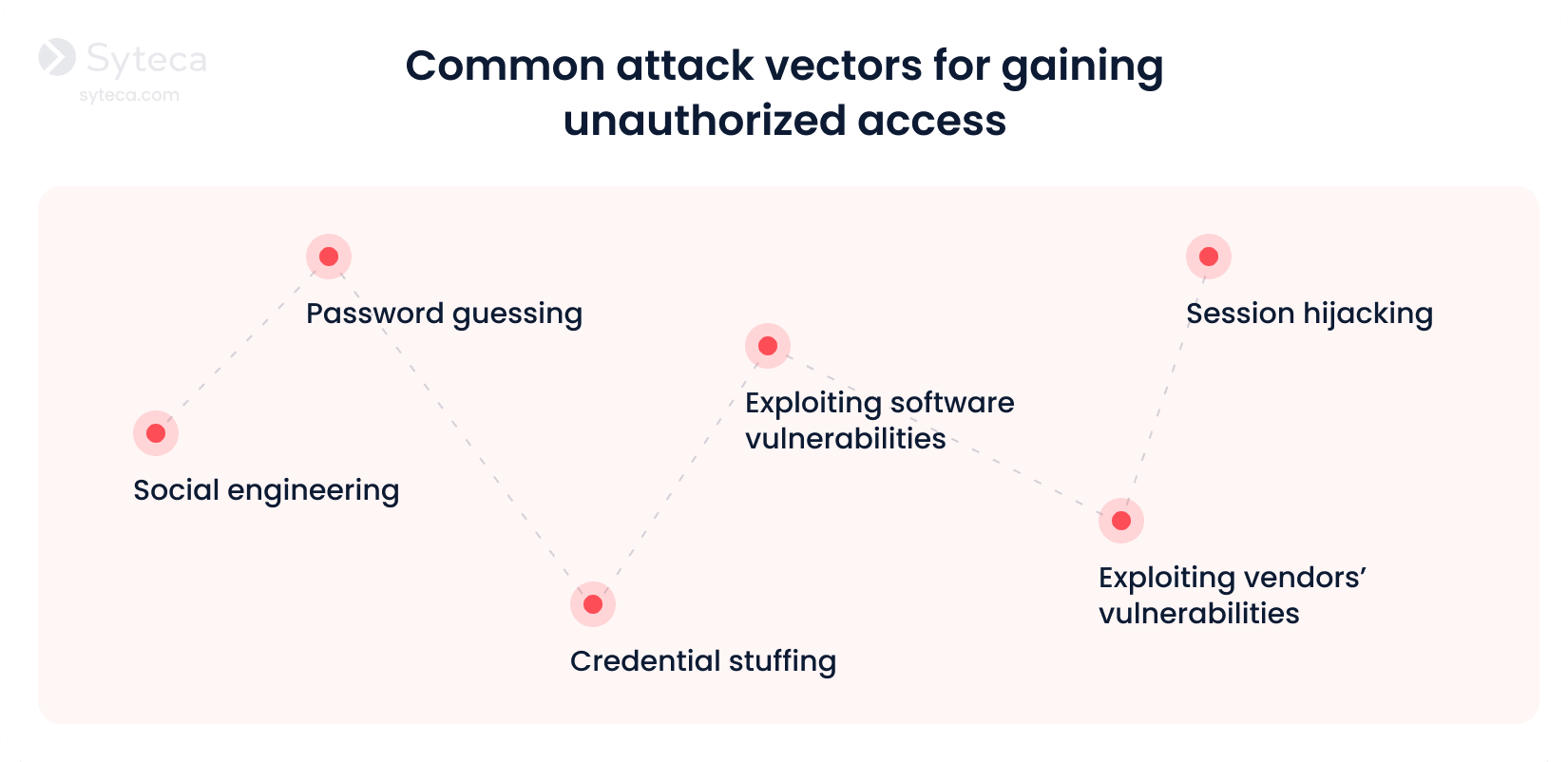
- Password guessing. Cybercriminals often employ specialized software to automate guessing by targeting information such as usernames, passwords, and PINs. These tools can run thousands or millions of combinations in a short period of time. Attackers may also use personal information gathered from social media or previous data breaches to make their guesses more accurate. According to Constella’s 2026 Identity Breach Report, nearly 60% of the breaches involve recycled credential compilations.
- Exploiting software vulnerabilities. Cyberattackers can exploit software flaws and vulnerabilities to gain unauthorized access to applications, networks, and operating systems. Unpatched software, misconfigured cloud environments, and outdated applications can all become entry points for attackers.
- Social engineering. Social engineering tactics rely on psychological manipulation to trick users into clicking on malicious links, pop-ups on websites, or attachments in emails. Phishing, smishing, spear phishing, and impersonation are the most common techniques to deceive employees into revealing their valid credentials.
- Exploiting vendors’ vulnerabilities. Some third-party vendors, suppliers, and partners may have access to your systems. Hackers exploit vulnerabilities in a vendor’s IT infrastructure, compromise a vendor’s privileged accounts, or employ other techniques to bypass your organization’s security controls.
- Credential stuffing. Attackers take advantage of people who reuse the same passwords across multiple accounts. Using automated tools, they test stolen username and password combinations obtained from previous breaches across multiple systems. If the same credentials are reused, attackers can gain unauthorized access without hacking the system directly.
- Session hijacking. Attackers intercept or steal active user sessions to gain unauthorized access without credentials. By capturing session cookies, authentication tokens, or exploiting insecure network connections, cybercriminals can impersonate legitimate users and bypass traditional security controls, including multi-factor authentication.
How should you respond to unauthorized access? Unfortunately, there’s no one-size-fits-all approach to detecting and responding to all types of unauthorized access attacks. The response largely depends on what assets are accessed, who accesses them, and what happens next.
A strong cybersecurity strategy is key to preventing unauthorized access, responding to threats, and quickly mitigating damage.
How to prevent unauthorized access: 10 best practices
Ensuring all-around security against unauthorized access involves a combination of proactive measures and responsive actions. By implementing the following best practices, you can significantly reduce the risk of unauthorized access and strengthen your overall security posture.
10 best practices to prevent unauthorized access
1
Limit access to critical systems
2
Protect employee credentials
3
Enforce multi-factor authentication
4
Enable identity threat detection and response (ITDR)
5
Promptly respond to cybersecurity incidents
7
Maintain a secure IT infrastructure
8
Audit third-party access
9
Conduct user access reviews
10
Provide security awareness training
1. Limit access to critical systems
Instead of providing broad or permanent access, grant permissions granularly. Follow the principle of least privilege to ensure users have minimal access to sensitive data and critical systems. Grant your employees just enough privileges to perform their core responsibilities.
With that, you can implement a just-in-time approach to grant them temporary additional access when needed. You can also align your access management with continuous adaptive trust principles, dynamically adjusting user permissions based on risk and context.
2. Implement a strong password management policy
Enforce a strong password management policy to help your employees create, manage, and safeguard their credentials. The right policy can also help members of your organization adopt healthy password habits and maintain adequate password complexity, length, and uniqueness, as well as to regularly rotate passwords. Implement the password policy compliance checklist provided by HIPAA, NIST, or PCI DSS, depending on the industry your organization operates in.
Organizations should also implement dedicated password management tools that securely store credentials, automate password rotation, and prevent direct access to plaintext passwords. This is especially critical considering that Costella’s 2026 Identity Breach Report highlights that 68.89% of all breached credentials were exposed in plaintext. Password management tools significantly reduce the risk of credential exposure and human error.
3. Enforce multi-factor authentication
Along with protecting your passwords, the next major step to protect your accounts is to apply two-factor authentication. Unauthorized access often occurs due to the exploitation of a single compromised account or user credentials. Enforcing multi-factor authentication is effective in preventing unauthorized access attempts. Requiring an additional identity verification step, such as sending a one-time passcode to a user’s mobile device, will prevent unauthorized actors from proceeding.
CISA emphasizes that MFA is a simple way to protect your organization against account compromise attacks. According to Microsoft, adopting MFA can prevent approximately 99.9% of account compromise cases, significantly bolstering security measures against unauthorized access.
4. Enable identity threat detection and response (ITDR)
Traditional access controls verify identities only at login, but attackers who obtain valid credentials often operate undetected inside your security perimeter. Identity threat detection and response solutions help organizations identify suspicious identity activity after access has been granted.
By detecting abnormal activity in real time, you can quickly investigate and respond to unauthorized access before it leads to data breaches or system compromise.
5. Promptly respond to cybersecurity incidents
Your security team needs to respond to security alerts in real time. For example, if you detect suspicious login attempts on an account or spot unusual activity after login, your security officers should be able to revoke access to the account immediately and block the session to prevent an intrusion.
Ideally, you should also have a well-structured incident response plan outlining the responsibilities of your incident response team members and providing clear steps to follow in case of an unauthorized access attempt or a security incident.
6. Record user sessions
Recording user sessions is essential for investigating incidents. Session recording provides you with 360-degree visibility into what users actually do after logging in, including commands executed, files accessed, and configuration changes made.
Recorded sessions provide forensic visibility that helps security teams reconstruct incidents, investigate unauthorized access attempts, and maintain detailed audit trails required by the GDPR, PCI DSS, HIPAA, and other standards, laws, and regulations.
See Syteca in action.
Find out how to leverage Syteca’s user activity monitoring capabilities.
7. Maintain a secure IT infrastructure
To enhance protection against unauthorized access, combine your monitoring software with a resilient firewall. Whereas monitoring software can detect insider threats in real time, a firewall can serve as a protective barrier, shielding networks, web applications, databases, and critical systems from unauthorized intrusions.
It’s also crucial that organizations conduct regular vulnerability assessments and penetration testing of corporate IT infrastructure. One of the most neglected security threats is failing to update protection systems regularly.
8. Audit third-party access
Many organizations grant external vendors, contractors, or partners access to internal systems for maintenance and integrations. However, third-party access can significantly expand the attack surface if it is not properly controlled.
Regularly audit third-party accounts and apply zero trust principles to external vendors. This means verifying identities continuously, limiting permissions to only what is required, and monitoring all third-party activity.
9. Conduct user access reviews
Access privileges tend to accumulate over time as employees change roles, join new projects, or temporarily receive elevated permissions. Without regular reviews, users may retain unnecessary privileges that can increase the risk of unauthorized access.
By conducting user access reviews, you can ensure that users maintain only the permissions required for their current responsibilities. Your security team should periodically evaluate user roles, revoke excessive privileges, and remove dormant or unused accounts. This process reduces the risk of privilege misuse, insider threats, and attackers exploiting overprivileged accounts.
10. Provide security awareness training
As attackers frequently target people rather than machines, you should shift from a technology-centric to a people-centric cybersecurity approach and make your employees your first line of defense. Regularly conduct security awareness training to keep employees up-to-date on the latest cybersecurity threats and educate them about security best practices, including how to identify suspicious activity.
How does Syteca help prevent unauthorized access?
Syteca is a comprehensive software solution for detecting and preventing unauthorized access. It’s an intelligent PAM platform with ITDR capabilities, which focuses on monitoring user activity, managing access, and responding to incidents. Syteca provides valuable insights into user actions and helps you maintain a secure IT environment. Here’s how:
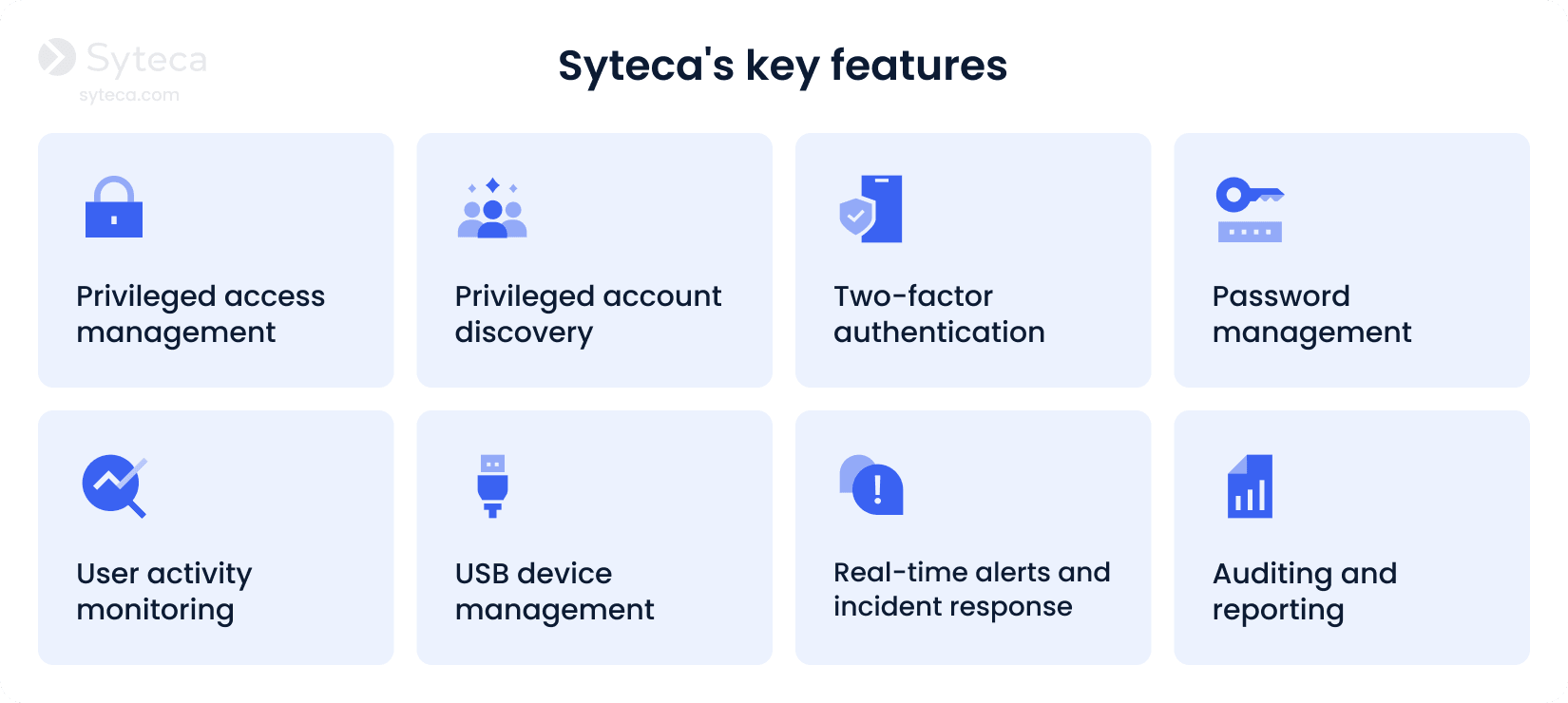
Privileged access management. With Syteca’s PAM capabilities, you can implement just-in-time access, grant permissions granularly, and validate access requests manually, ensuring that privileged access is granted only to authorized users, only when necessary for specific tasks.
Privileged account discovery. Automatically discover privileged accounts across your IT environment, identifying dormant accounts that may introduce security gaps. By continuously inventorying privileged identities, you can maintain stronger control over access to your sensitive systems.
Two-factor authentication. Leverage Syteca’s two-factor authentication to make sure that your users are who they claim to be. This extra layer of protection will help you secure your critical user accounts, preventing unauthorized access even if attackers manage to steal valid credentials.
Password management. Securely store privileged credentials in a vault and automatically rotate passwords to prevent credential reuse or compromise. By managing employee credentials, you reduce the risk of credential abuse and, consequently, unauthorized access.
User activity monitoring. Gain visibility into user activity, including commands executed, apps used, URLs visited, and keystrokes typed. Detailed screen recordings, combined with contextual metadata, enable you to investigate suspicious actions and collect forensic evidence for investigations and audits.
USB device management. Control and monitor the use of external devices across your organization’s endpoints. You can restrict the use of unauthorized USB devices, thereby preventing data exfiltration or malware intrusion via physical devices.
Real-time alerts and incident response.Detect and respond to unusual activity as it unfolds. Syteca generates real-time alerts based on predefined or custom security rules, allowing you to take immediate action. Automated or manual responses include terminating suspicious sessions, stopping malicious processes, or notifying users about policy violations.
Auditing and reporting. Generate 30+ types of comprehensive reports from information collected during user sessions. These reports can help you analyze user activity, conduct audits, and investigate security incidents. Customize any report to meet your specific needs.
Case study
How PECB Inc. Deploys Syteca to Manage Insider Threats

Take control of access and what happens after login
Unauthorized access incidents may not only be disruptive and costly for your organization; they can also erode customer trust, damage your company’s reputation, and result in non-compliance fines. Implementing the best practices described in this article will help you prevent, detect, and respond swiftly to cases of unauthorized access.
By deploying Syteca in your organization, you’ll get deep visibility into user activity and enhance your access management. With a robust set of features, Syteca can help you quickly detect and respond to identity threats and unauthorized access attempts.
Want to try Syteca? Request access
to the online demo!
See why clients from 70+ countries already use Syteca.