Establishing proper privileged account management (PAM) procedures is essential for protecting your sensitive systems against insider threats and cyberattacks. Yet many organizations still implement poor PAM practices, leaving critical systems exposed.
The Ponemon-Sullivan Privacy Report reveals that nearly half of organizations suffer from breaches due to internal misuse of privileges. In this article, we’ll explore ten of the most common poor practices of privileged account management, analyze why they are risky, and discuss how to correct them.
Key takeaways:
- A dedicated PAM solution can provide you with the essential controls you need to protect your organization against privilege-related incidents.
- Common mistakes in privileged access management programs include manual processes, excessive user privileges, shared credentials, and weak password controls.
- Organizations can mitigate access risks by adopting the principle of least privilege, monitoring admin activities, and taking control of all unmanaged accounts.
Common mistakes in privileged account management
What are the most common mistakes in privileged access management programs?
Below, we outline eight poor practices in PAM that undermine security, along with guidance on how to address each one.
1. Approving all access requests manually
Manual access approval is widely used in small and medium-sized businesses. This practice allows a security officer to review each request and provide access manually.
Approving access manually is sufficient in two cases:
- For companies with few employees. In this case, a security officer can keep up with access requests. However, it can take up a lot of security officers’ time to monitor whether employees are misusing their access permissions. Moreover, an administrator could mistakenly grant access to a user who doesn’t need it.
- For securing the most sensitive resources. Some types of corporate data and resources are highly valuable, so it’s necessary to manually examine any requests to access them. But when working with most ordinary resources, manual approval slows down the corporate workflow because employees have to wait for access permission.
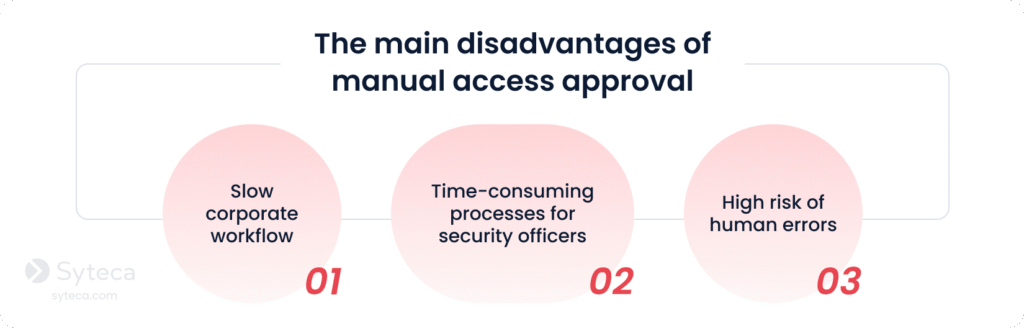
When applied outside of these use cases, manually approving all access requests can subject your organization to additional PAM risks. This poor account management practice leaves the door open for human error.
Here are the key drawbacks of requiring manual approval for all access requests:
The 2024 Change Healthcare breach, one of the most disruptive and costly incidents in US history, occurred because a single privileged access point lacked automated controls such as multi-factor authentication (MFA). Attackers initially infiltrated the systems using a single stolen credential and then gained extensive access within the network.
Instead of relying solely on manual access provisioning, you can leverage automated access control to help your security officers establish quick and reliable access approval procedures.
Top-tier PAM software lets you create custom access rules for privileged users and user groups. Based on the rules you set, access is automatically granted or blocked. PAM software can also alert security officers about suspicious access requests and possible security violations.
Many companies find it useful to combine automated and manual access approvals to configure different protection levels for different resources.
2. Granting excessive privileged access
Privileged access should be granted only to those who need it for their day-to-day duties. However, users often end up with unnecessary privileges assigned to their accounts.
Overprivileged accounts can appear for several reasons:
- The organization doesn’t have a strict privileged access policy, and each user is assigned the same set of access rights.
- A user requests one-time access to a sensitive resource, but the administrator doesn’t revoke privileges after the task is completed.
- An employee moves into a new position within the company, acquiring privileges for the new position while retaining those for the old one.
These pitfalls call for strengthening security measures, performing regular user access reviews, and implementing Active Directory auditing best practices — on top of deploying a privileged access management solution.
See Syteca in action!
Explore how the platform can help you manage privileges effectively.
3. Inadequate third-party privileged access management
Third-party users such as IT service providers, outsourcing partners, and auditors often require elevated privileges. Third parties are among the most dangerous types of insiders, as it’s difficult to ensure they pay attention to cybersecurity policies and don’t have malicious intentions. According to Verizon’s 2025 Data Breach Investigations Report, 30% of breaches involve third parties. The 2024 Snowflake data breach highlights how a single insecure third-party account let attackers access more than 100 organizations. During this incident, after compromising a Snowflake account that lacked MFA, hackers infiltrated Snowflake customer environments, stole large volumes of data, and attempted to sell it online.
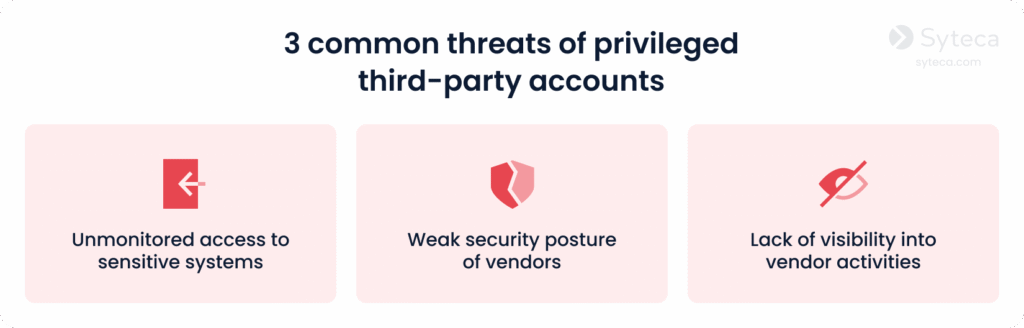
To mitigate these risks, organizations should:
- Enforce the principle of least privilege with all third-party users.
- Deploy time-based and approval-based access for vendor sessions.
- Regularly review your IT environment, checking for unnecessary or outdated vendor accounts.
4. Using an overcomplicated PAM policy
Even when well-intended, it’s easy to go overboard with a privileged access management policy. An overly complex cybersecurity policy is a typical PAM risk for large organizations with many types of sensitive resources requiring varying levels of privileged access.
As a result, resetting user passwords can take up to 30 minutes. Providing a new employee with all the necessary access permissions may take a few days or even weeks.
If users have to wait each time they need a request approved, they’ll try to obtain permanent access or find a loophole in your rules.
If this sounds familiar, it’s probably time to reexamine your company’s cybersecurity policies. Complicated procedures may lead to the appearance of shadow IT. Gartner predicts that by 2027, 75% of employees will use technology outside of IT oversight. To avoid problems with shadow IT, review your policies and identify areas that are overly complex.
You can simplify your security-related procedures by deploying automated privileged account and session management (PASM) and access management solutions. They enable security officers to track privileged accounts as well as automatically grant, revoke, and manage access rights. These solutions can also record privileged sessions, which is useful for investigating suspicious activity.
5. Sharing privileged accounts
In many companies, network administrators share admin and root accounts.
Such accounts are dangerous for several reasons. First, the more people who know the credentials of a privileged account, the higher the chance that a hacker will obtain them. Second, it’s not always clear which employee was logged into a shared privileged account at a particular time. Therefore, it can be difficult to link a security incident to any particular user.
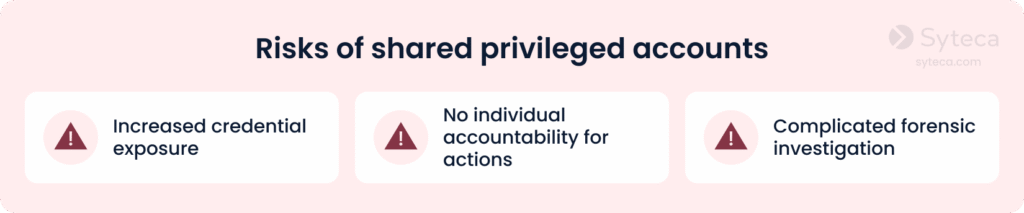
According to Verizon’s 2025 Data Breach Investigation Report, credential theft is the initial access vector in 31% of all data breaches.
How can organizations mitigate risks associated with shared privileged accounts? You can enforce multi-factor authentication (MFA) to verify user identities. Secondary authentication, in turn, can help you trace actions back to particular users under shared privileged accounts.
6. Mismanaging accounts of terminated employees
A fired or soon-to-be-terminated employee is one of the common types of malicious insiders. They know what sensitive data a company possesses, what security policies have been implemented, and which vulnerabilities may be abused.
While they still have their privileged account permissions, they may create:
- A backdoor. A privileged account with access to sensitive data won’t trigger a monitoring system alert. A hacker or a disgruntled ex-employee may use it to access an organization’s critical data.
- A way to blackmail the company. This is possible if the employee has had exclusive access to any resources.
IBM’s 2025 Cost of a Data Breach Report reveals that insider-related breaches take an average of 260 days to identify and contain — far longer than external attacks. This extended dwell time gives malicious insiders ample opportunity to exploit their access and harm your organization.
To avoid this risk, make deleting ex-employee accounts a routine task. It’s also critical to regularly scan your network for orphaned or dormant accounts and delete unnecessary privileged accounts discovered.
Another way to secure unused accounts is to automate user credential management. With dedicated software, you can automatically rotate credentials and ensure that no former employee retains the ability to access your sensitive systems after termination.
7. Overlooking cloud security gaps
Many organizations shift to cloud services without taking appropriate security measures. A lack of focus on cloud infrastructure security often leads to gaps in cloud protection in terms of:
- Identity governance
- Privileged access control
- Visibility into privileged cloud activity
In 2024, most breaches involved data distributed across multiple environments, such as public clouds and private clouds.
2025 Cost of a Data Breach Report by IBM Security
Furthermore, Surfshark’s “Global data breach statistics recap” for 2024 revealed a nearly 8-fold increase in breached accounts — from approximately 730 million in 2023 to over 5.5 billion in 2024 — meaning nearly 180 accounts were compromised every second.
Multi-cloud identity and access management (IAM) and cloud infrastructure entitlement management (CIEM) systems can help you close security gaps in the cloud. These solutions detect the accumulation of privileges, anomalies in entitlements, and other cloud access problems, mostly through analytics and machine learning.
You may also benefit from a privileged user activity monitoring system that can be deployed in the cloud. With it, your security officers can configure flexible access rights for privileged users, reconfigure overprivileged accounts, and secure connections to cloud services.
Discover Syteca’s cloud security capabilities!
Test the platform now.
8. Mismanaging privileged machine accounts
Many organizations leave default security settings for privileged machine accounts without realizing that privileged access isn’t limited to humans. Non-human accounts are used by:
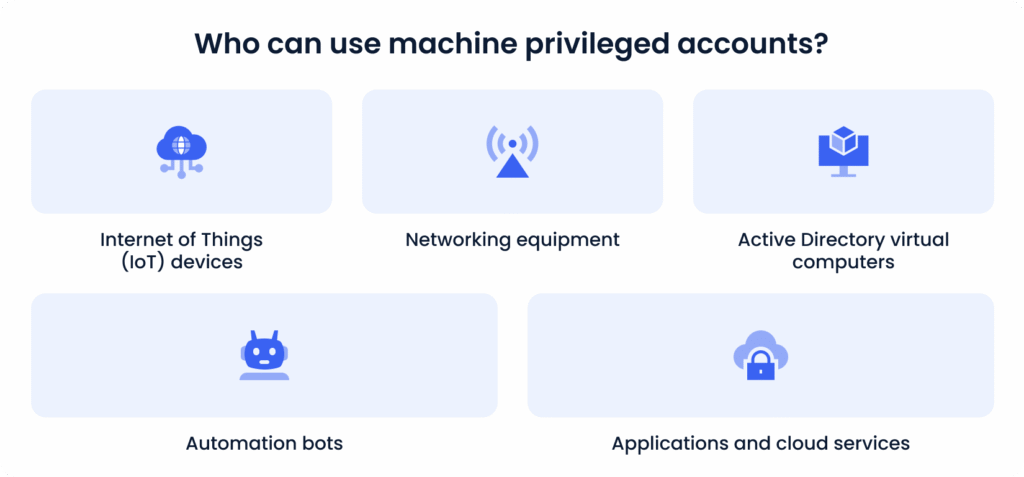
All these accounts can access an organization’s network and sensitive data, even if they aren’t assigned to a specific human user. Attackers can use non-human accounts to gain privileged access and get past security systems. To avoid this, implement the following best practices for service account protection:
- Limit machine access to only the specific purposes or functions the accounts were created for
- Include privileged machine account access rules in your corporate cybersecurity policy
- Investigate unusual machine account activity picked up by user and entity behavior analytics
- Implement activity monitoring for non-human activity
- Set up custom alerts on any abnormal machine activity
- Manage credentials for privileged machine accounts automatically
9. Letting users manage their own credentials
Privileged accounts belong to those who can make the biggest changes to your systems and access your most sensitive data. When you leave privileged credentials unmanaged, you leave the main door wide open.
What are the most common mistakes in privileged access management programs? Poor credential management tops the list. Here’s why:
- Privileged users can accidentally leak their credentials by falling for phishing attacks or leaving their passwords written on a piece of paper. This can expose your sensitive resources to hackers or malicious insiders.
- Employees may use weak passwords or reuse old ones that can be guessed or brute forced.
- Privileged users might share their credentials insecurely with other users, undermining transparency and increasing the risk of unauthorized access to sensitive data.
Risks of poor credential management
Brute forcing credentials
Insecure password sharing
With automated credential management, you can protect access to privileged accounts on your own. These solutions create, provide, rotate, and dispose of credentials securely, without any direct user involvement. They also encrypt the passwords they store, adding another level of protection.
10. Failing to monitor privileged activity
Many organizations underestimate the importance of ongoing visibility into privileged user actions. Even with strong access controls, credentials, and policies, you cannot ensure security if you don’t continuously monitor what happens after access is granted.
A lack of сontinuous monitoring may result in:
Undetected misuse of privileges
Inability to identify early indicators of compromise
Limited forensic visibility
Privileged users can intentionally or unintentionally modify configurations, exfiltrate sensitive data, or perform harmful actions — and without monitoring, such activity may go unnoticed for weeks or even months.
To close this gap in visibility, organizations should follow privileged user monitoring best practices, including:
- Implement continuous session monitoring for all privileged connections.
- Record privileged sessions, complete with context.
- Configure automated alerts and responses for suspicious activity.
How Syteca helps improve privileged account management
Overcoming the above challenges requires implementing best practices for privileged access monitoring and deploying the right cybersecurity solutions. The Syteca PAM platform, enhanced with insider threat detection and response (ITDR) capabilities, can help you implement robust privileged account management practices within your organization.
Syteca’s key capabilities

Privileged account discovery
Privileged access management
Endpoint access management
Password management
Identity threat detection and response
Comprehensive reporting
Privileged account discovery
Identify and manage all forgotten, orphaned, or hidden privileged accounts that may pose security risks:
- Run automatic scans within your network to detect all unmanaged privileged accounts.
- Onboard accounts individually or in bulk and activate password rotation.
- Get real-time notifications on newly detected accounts.
Privileged access management
Control and secure privileged access across your entire infrastructure:
- Grant users only the privileges they need to perform their job.
- Provide time-based access to specific endpoints.
- Manually approve requests for access to highly sensitive systems.
Endpoint access management
Verify the identities of users accessing privileged accounts with:
- Two-factor authentication (2FA) to make sure users are actually who they claim to be.
- Secondary authentication to identify user actions under shared accounts.
- One-time passwords (OTP) for specific endpoints.
Password management
Automate all credential-related procedures to eliminate human error and reduce exposure:
- Encrypted vault for secure storage of passwords and SSH keys
- Automated rotation to update passwords regularly
- Password check-out feature for ensuring secrets are used by only one user at a time
- Secure password sharing between teams
Identity threat detection and response
Identify suspicious activity by privileged users:
- Record user sessions to capture all privileged activity along with metadata (keystrokes, clipboard data, launched applications, visited URLs, etc).
- Receive predefined and custom alerts that instantly notify you of suspicious privileged activity.
- Use automated incident responses that allow for sending warning messages to users, terminating processes, and blocking users.
Comprehensive reporting
Generate comprehensive reports to investigate incidents and support audits:
- More than 30 types of user activity reports
- Exportable session records for forensic investigations
Adapt your PAM strategy to withstand modern threats
The eight mistakes outlined in this article create opportunities for both malicious insiders and external attackers. The good news is that every risk we’ve discussed has a clear solution. Building a stronger PAM strategy involves implementing effective policies and equipping your team with the right technology to automate and enforce those policies.
Syteca helps you enhance your privileged account management with advanced PAM and ITDR capabilities. It’s a proactive security platform that doesn’t just manage access — it actively hunts for and responds to identity threats. With Syteca, you can close the privilege gaps that attackers target and mitigate insider risks before they cause damage.
Ready to try Syteca? Access the Demo now!
Clients from 70+ countries already use Syteca.