

Two account types, two use cases
The ACB API can authenticate against two different account types in Syteca:
Application Accounts can’t have administrative permissions like User Management — that’s intentional. To rotate the
admin password, you need a regular Internal or AD user with that permission, and the same external-app toggle enabled.
Prerequisites
- An installed and registered ACB service.
- A Management Tool user with the administrative User Management permission to create or edit the API consumer account.
- For the API consumer to actually work with secrets, the user also needs:
- The administrative Privileged Accounts Management permission.
- A PAM seat license assigned.
- The Password Management application (with the Automation feature) enabled in the product license serial key.
Create the user
1
Open the Users page
Sign in to the Management Tool as a user with the administrative User Management permission. Click Users in the left navigation.
2
Click Add User
Click the Add User button in the top right.
3
Pick the user type
Either add an Internal user or an Application Account user, or edit an existing Active Directory user.
For rotating the default
admin user’s password, use an Internal or Active Directory user — Application Accounts can’t have the administrative User Management permission, which is required for the admin-password endpoints.4
Configure user properties
Fill in the standard user fields (Login, password, etc.) as per the Add a user procedure.
Configure Application Account Settings
After creating the user, the Application Account Settings section on the User Details tab is where the Refresh Token lives.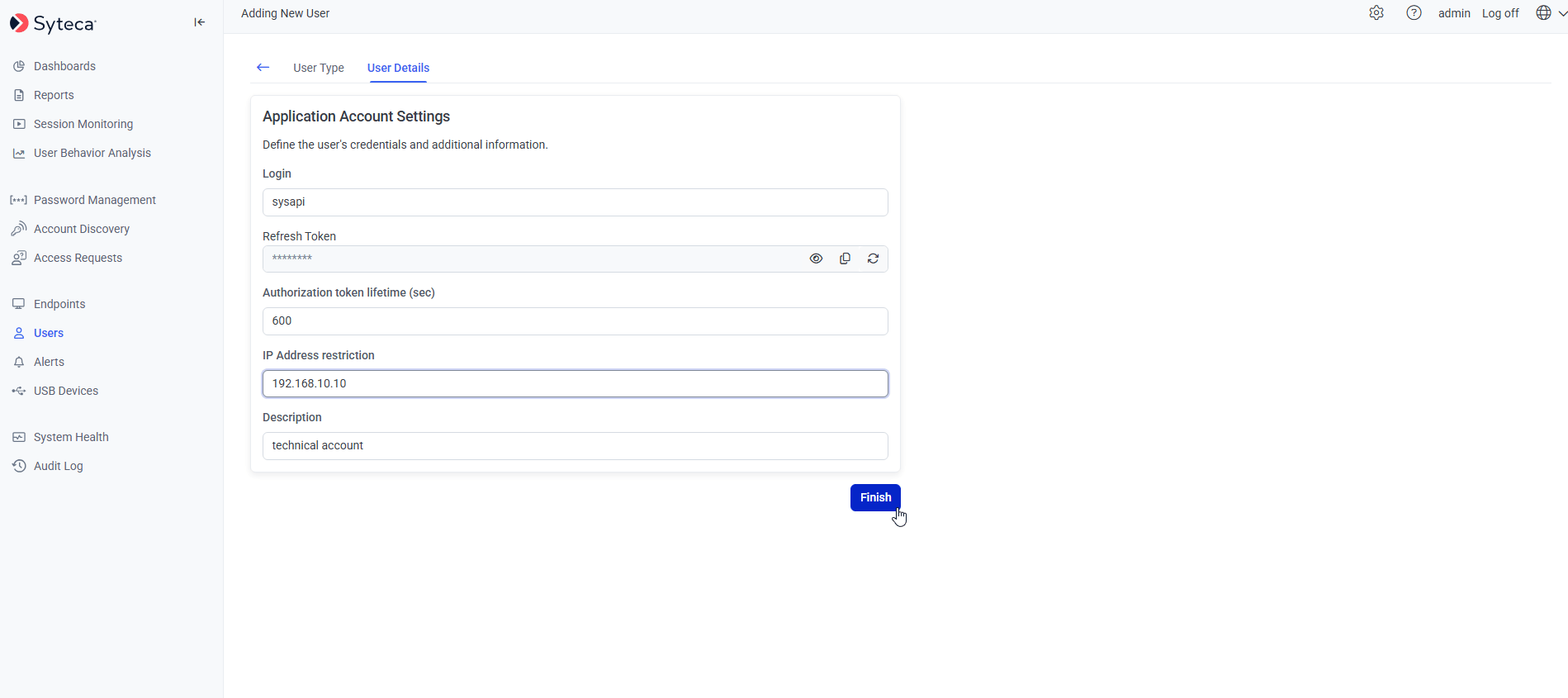
The Application Account Settings section — Refresh Token, token lifetime, and IP restriction become visible after enabling the external-app toggle.
1
Enable external application use
On the User Details tab, scroll to the Application Account Settings section. Move the Allow this user account to be used by external applications toggle to the right to enable.
2
Copy the Refresh Token
The Refresh Token field becomes visible after the toggle is enabled. Click the Copy icon next to it to copy the token to your clipboard.
3
(Optional) Set Authorization token lifetime
The Authorization token lifetime (sec) field controls how long Access Tokens are valid after they’re issued.
Long-lived Access Tokens reduce friction for automation, but increase the blast radius if a token is leaked. The default 600s is a reasonable balance for most workflows.
4
(Optional) Restrict by IP address
The IP Address restriction field limits the API consumer to a specific IP address. Requests from any other IP return 403 Forbidden.Use this for production deployments where the API caller’s IP is known and stable (e.g. a dedicated CI/CD runner, a CMDB host, a SOAR appliance).
5
Save the user
Click Save to commit the changes.
What happens when the toggle is disabled
Next steps
Related
Secret permissions
Grant the user Owner / Editor / PAM User roles on specific secrets and folders.
Users page
Full reference for adding and editing Syteca users.
Administrative permissions
The permissions required for ACB API access.
API reference
Base URL, authentication, status codes.