

Role Type permissions
Each user or user group gets exactly one Role Type, selected in the Role Type column.As a root user, the built-in default admin user has the Owner Role Type for all secrets and can edit and access every secret added by other users.
Advanced permissions
Advanced permissions are extra capabilities granted by selecting checkboxes in the matching columns. Each can only be granted to users who already have the Owner or Editor Role Type for the secret.If permissions are granted to a user group, every user in that group inherits them.
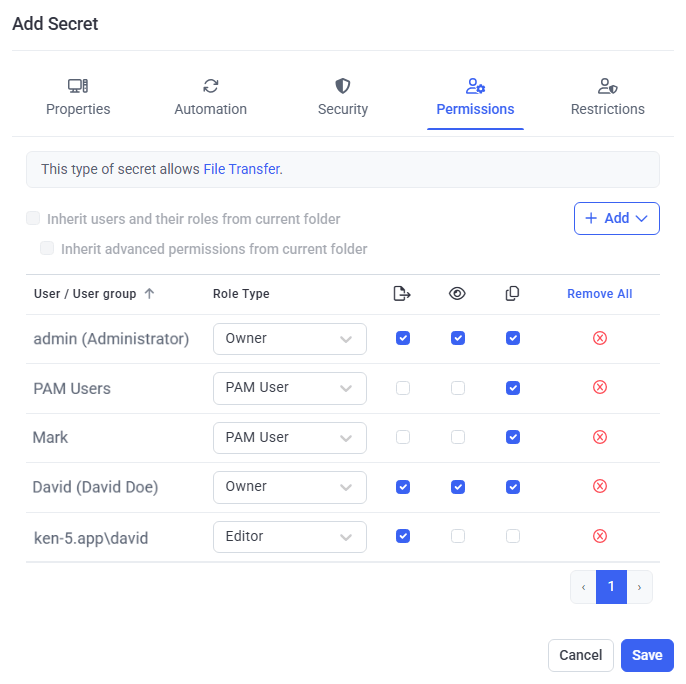
The Permissions tab, showing Role Type and advanced permissions for each user.
View the Role Type permissions that are granted
The Permissions tab of the Password Management page lists the Role Type permissions granted to users of the secrets in the selected folder, in a grid with these columns:
You can filter the grid by Secret Name, User group, or User, and sort any column by clicking its header (click again to reverse the order).
Related
View and copy a password
Grant and use the View Password and Copy Password permissions.
File transfer
Grant and use the File Transfer permission with WinSCP.
Add a secret
Create a secret and set its permissions from scratch.
View and manage secrets
Work with the secrets grid and folder structure.