

DbSetupToolUI).
1
Open the Database Parameters tool
Right-click the Syteca Server tray icon in the Windows notification area and select Database Parameters.
2
Set the database connection
On the Metadata Storage sub-tab, configure:
-
Database Type — the database engine to use for storing data.
Switching database types doesn’t migrate existing data.
- Host Name — the hostname or IP address of the database server.
-
Authentication (MS SQL Server only) — one of:
- SQL Server Authentication — enter the SQL Server User Name and Password.
- Windows Authentication — enter the user as
<domain>\<user>or<user>@<domain>, or click Browse to select one. - Use process credentials — for gMSA/sMSA accounts or to work around NTLM authentication errors with Windows Authentication.
The database user specified must havedb_ddladmin,db_datareader,db_datawriter, anddb_executorpermissions on the SQL database. -
Use encrypted connection — enables SSL encryption between the Application Server and the database.
Requires a database server certificate configured beforehand and imported as a trusted certificate on this computer.
3
Choose where binary data is stored
On the Binary Data Storage sub-tab, select one option:
If the File System folder becomes inaccessible, monitoring data is written to the local cache instead, and sent automatically once the folder is reachable again. Check the System Health page for related error events.
4
Apply the changes
Click OK. If using Windows Authentication, you’ll be prompted to validate the database logon for the current Windows user running the Database Parameters tool — this succeeds only if the Application Server is also running as that same user.
5
Restart the Application Server
Restart the EkranServer service to apply the changes.
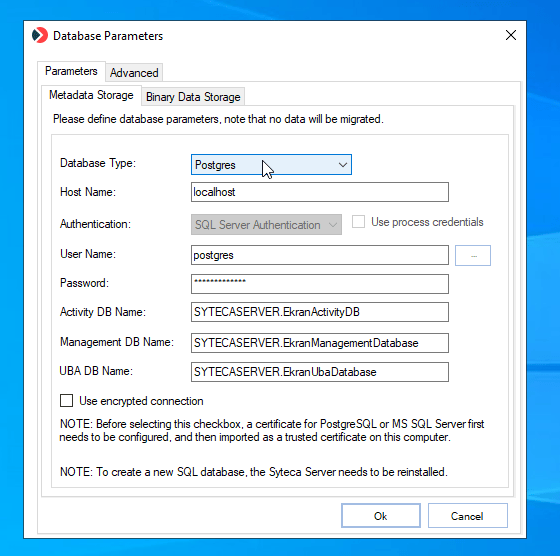
The Database Parameters (DbSetupToolUI) tool's Metadata Storage sub-tab.
Related
Database management
Archive, cleanup, and PostgreSQL maintenance settings.
Amazon S3 binary storage
Store binary session data in Amazon S3 instead of the file system.
System Health dashboards
Monitor database connectivity and error events.
High availability
Database considerations for multi-server deployments.