Manage the Syteca Master Certificate (EkranMasterCertificate) — back up, delete, import, reissue, and optionally migrate from RSA-2048 to RSA-4096 encryption. Essential for Application Server recovery, migration, and High Availability setup.
The single most important backup in your Syteca deployment
The Syteca Master Certificate — internally named EkranMasterCertificate — sits at the root of Syteca’s encryption hierarchy. It encrypts the Data Protection certificate (which encrypts every screen capture), the TOTP initial vectors, the database connection string, and the password protecting the symmetric key for logged keystrokes. Without it, the Syteca database is unreadable. There is no recovery mechanism.That makes the Master Certificate the single most important artifact to back up. Every operational scenario that involves moving Syteca — Application Server recovery after host failure, migration to a new server, High Availability cluster setup, system upgrade, even reinstalling on the same host with a preserved database — depends on having a working backup of this certificate. Compare this to general key management in CyberArk (Vault Server keys), Delinea (Encryption Key), and BeyondTrust (Master Key): the cryptographic foundation under all of them is similar; what matters is whether your operations team treats it with the same seriousness.
NOT AVAILABLE IN SAAS. The Master Certificate is managed by the vendor in SaaS deployments — customers don’t perform these operations. This procedure applies to on-premises deployments only.
Master Certificate operations require administrator access to the Application Server computer. The operations themselves are performed via the Microsoft Management Console (MMC) Certificates snap-in, scoped to the Local Computer account → Personal → Certificates store.
The backup is a .pfx file (Personal Information Exchange) containing the certificate and its private key, protected with a password you set during export. Keep both the file and the password somewhere safe and not on the Application Server host itself.
1
Open MMC on the Application Server
On the Application Server computer, press Windows + R, enter mmc in the Run window, and press Enter. Click Yes in the User Account Control prompt.
2
Add the Certificates snap-in
In the Console window, select File → Add/Remove Snap-in. In the Add or Remove Snap-ins window, select Certificates, then click Add.In the Certificates Snap-in window, select Computer account, then click Next. In the Select Computer window, select Local computer, then click Finish. Back in the Add or Remove Snap-ins window, click OK.
3
Locate EkranMasterCertificate
In the Certificates (Local Computer) tree-view, expand Personal → Certificates. Find the certificate named EkranMasterCertificate.
4
Start the Certificate Export Wizard
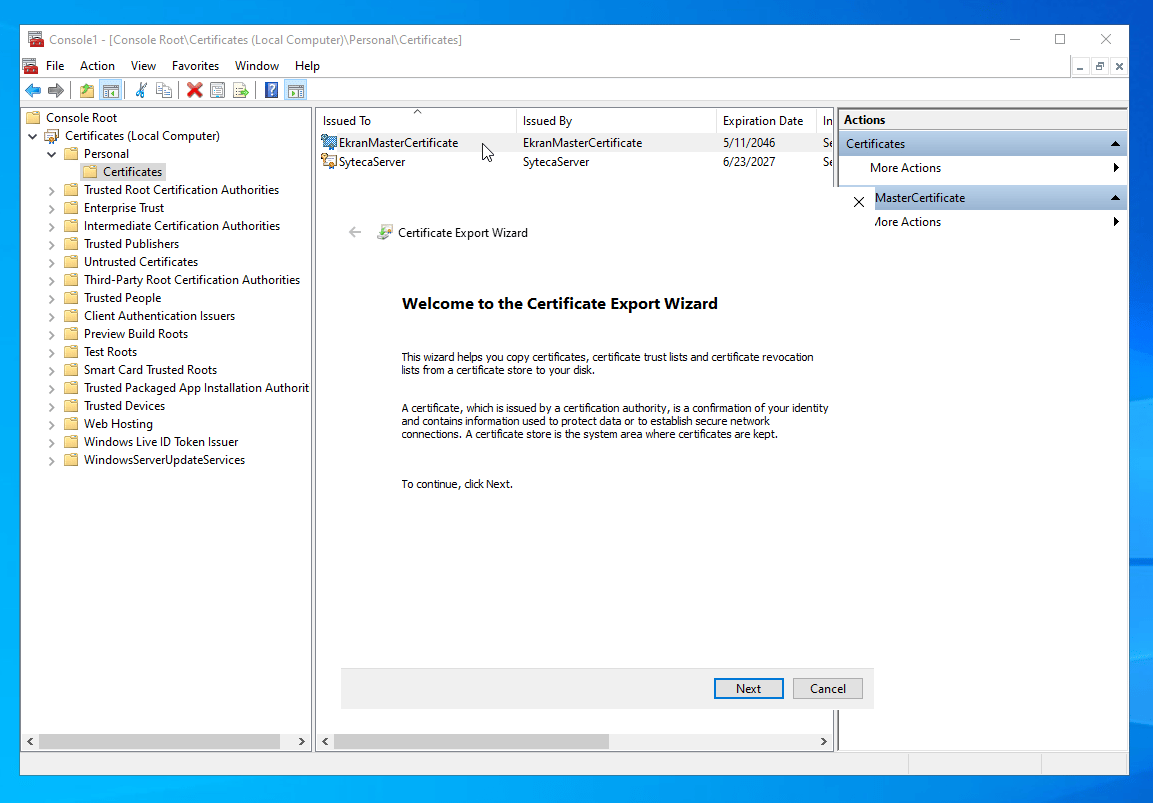
Right-click EkranMasterCertificate, then select All Tasks → Export from the context menu. The Certificate Export Wizard opens; click Next on the welcome page.
5
Export the private key
On the Export Private Key page, select Yes, export the private key, then click Next.
Without the private key, the export is useless for recovery. Always export the private key when backing up the Master Certificate.
6
Choose the file format
On the Export File Format page, select Personal Information Exchange and the following options under it:
Include all certificates in the certification path if possible
Export all extended properties
Click Next.
7
Set a password
On the Security page, select the Password checkbox, then enter and confirm a password.
Remember this password. You’ll need it to restore the certificate or import it on another host. There is no password-reset path — if you lose the password, the backup is unusable.
Click Next.
8
Save the file
On the File to Export page, specify the location and filename for the .pfx file. Pick a meaningful name like EkranMasterCertificate-<deployment>-<date>.pfx. Click Next, then Finish on the completion page.
Store the .pfx file and its password separately — for example, the file in a secured network share or backup vault, and the password in a password manager or sealed envelope. Storing both together on the same machine defeats the purpose.
Deletion is needed in two scenarios: (1) cleaning up a duplicate certificate before a fresh install, and (2) replacing the certificate after a reissue.
Never delete the Master Certificate without a verified backup unless you’ve already imported a replacement. Without the certificate, the Syteca database becomes unreadable.
1
Open MMC and the Certificates snap-in
On the Application Server computer, press Windows + R, enter mmc, then press Enter. Click Yes in the UAC prompt.In the Console window: File → Add/Remove Snap-in → Certificates → Add → Computer account → Next → Local Computer → Finish → OK.
2
Locate EkranMasterCertificate
In the Certificates (Local Computer) tree-view, expand Personal → Certificates. Find EkranMasterCertificate.
3
Delete
Right-click EkranMasterCertificate, then select Delete in the context menu. Click Yes in the confirmation message.
Exporting the master certificate produces a file you can copy to another computer and import there — for example, when moving an MS SQL Server database signed with the certificate to a different machine.
1
Open the Certificates snap-in
On the Application Server computer, press Windows+R, enter mmc, and press Enter. Click Yes on the User Account Control prompt.
2
Add the Certificates snap-in
In the Console window, select File > Add/Remove Snap-in. Select Certificates and click Add.
3
Target the local computer account
Select Computer account, click Next, select Local computer: (the computer this console is running on), and click Finish. Click OK to close the Add or Remove Snap-ins window.
4
Locate the certificate
In the tree view, select Certificates (Local Computer) > Personal > Certificates, and find the master certificate used to sign monitoring data in the database.
5
Start the export
Right-click the certificate and select All Tasks > Export.
6
Complete the Certificate Export Wizard
Click Next through the Welcome and Export Private Key pages, select the export file format, click Next, specify where to save the exported file and its name (or use Browse), click Next, then Finish.
7
Move the file to the destination computer
Copy the exported certificate file to the new computer, then import it there.
Selecting an export format in the Certificate Export Wizard.
Restoring from a .pfx backup — used after reinstallation, host migration, HA cluster setup, or reissue.
1
Open MMC and the Certificates snap-in
On the Application Server computer, press Windows + R, enter mmc, press Enter, click Yes in the UAC prompt.In the Console window: File → Add/Remove Snap-in → Certificates → Add → Computer account → Next → Local Computer → Finish → OK.
2
Start the Certificate Import Wizard
In the Console window, select Action → All Tasks → Import. The Certificate Import Wizard opens; click Next on the welcome page.
3
Pick the file
On the File to Import page, click Browse, select the .pfx backup file, then click Next.
4
Enter the password
On the Private Key Protection page, enter the password you set during backup, then click Next.
5
Pick the destination store
On the Certificate Store page, select Place all certificates in the following folder, click Browse, select Personal, then click Next.
The Master Certificate has an expiration date. Expiration does not stop Syteca from functioning - the system continues operating normally - but the Application Server starts logging alerts to the Windows Event log about the expiration. Reissue replaces the certificate so the alerts stop.
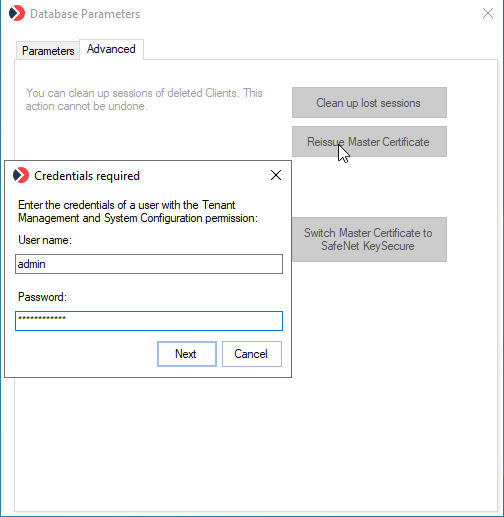
The Database Parameters tool's Advanced tab - Reissue Master Certificate is the primary action, with the Migrate Master Certificate to 4096-bit button visible above it for deployments upgraded to v.7.23+.
1
Sign in as a local administrator
Log in to the Application Server host as an admin user.
2
Open Database Parameters
In the Windows Notification area, right-click the Syteca Server tray icon and select Database Parameters to open the DbSetupToolUI application.
3
(Optional) Migrate to RSA-4096 first
If your deployment was upgraded to Syteca v.7.23 or higher and the Master Certificate hasn’t been migrated yet, the Advanced tab displays a Migrate Master Certificate to 4096-bit button. See Migrate to RSA-4096 below — complete that migration before clicking Reissue.
4
Click Reissue Master Certificate
On the Advanced tab, click Reissue Master Certificate.
In the Certificate generated successfully pop-up, the system displays the password of the new Master Certificate. Copy and save this password somewhere secure — you’ll need it when importing.Click Save. In the Save as window, choose a location and click Save.
7
Complete the reissue lifecycle
The reissue alone doesn’t stop the Windows Event log alerts. Three follow-up steps are required:
For deployments upgraded to Syteca v.7.23 or higher from earlier versions, the Master Certificate remains at its original RSA-2048 encryption. An optional migration to RSA-4096 is available — providing stronger encryption for the entire key hierarchy. The migration is one-way (RSA-4096 cannot be downgraded back to RSA-2048 in-place).
New deployments of Syteca v.7.23 or higher generate the Master Certificate at the version’s default encryption strength. The Migrate option is only relevant for existing deployments that have been upgraded from an earlier version.
1
Open Database Parameters
Right-click the Syteca Server tray icon and select Database Parameters to open the DbSetupToolUI application.
2
Click Migrate Master Certificate to 4096-bit
On the Advanced tab, click Migrate Master Certificate to 4096-bit. The button only appears if the deployment is on v.7.23 or higher and the Master Certificate is still RSA-2048.
3
Follow the on-screen instructions
A series of pop-up windows guides the migration process. Follow each pop-up’s instructions.
4
Verify completion
Once migration completes, the Migrate Master Certificate to 4096-bit button no longer appears on the Advanced tab. The Reissue Master Certificate button is now available for use on the migrated certificate.
After migration to the new Master Certificate, it is automatically added to the certificate store on the node where the migration was performed.
For deployments with two or more nodes the new certificate must be manuallyimported to the certificate store on all other nodes.
In addition, the “EncryptionIV” and “EncryptionKey” values must be manually copied from the EkranServer.Settings.config file on the node where the migration was performed to the EkranServer.Settings.config file on every other node.
The EncryptionIV and EncryptionKey values copied from the EkranServer.Settings.config file.
The EkranServer service will not start on the other nodes with the new certificate until these values are updated.
The full key hierarchy — Master Certificate, Data Protection certificate, AES-256, RSA-2048/4096, Diffie-Hellman.
Install Application Server
Where the Master Certificate is first generated.
HSM-based Master Certificate
Store the Master Certificate in a Thales HSM instead of the Windows Certificate Store.
Update Syteca
The full upgrade procedure — includes the Master Certificate backup step before updating.
{"docsConfig":{"theme":"mint","$schema":"https://mintlify.com/docs.json","name":"Syteca","description":"Syteca documentation - User Activity Monitoring and Privileged Access Management in a single platform.","colors":{"primary":"#2563EB","light":"#5B8DEF","dark":"#1D4ED8"},"logo":{"light":"https://mintcdn.com/syteca/ZVta4JfIcSnC47NX/logo/syteca-light.svg?fit=max\u0026auto=format\u0026n=ZVta4JfIcSnC47NX\u0026q=85\u0026s=154a18f69aa4aefa55de0de7669934c7","dark":"https://mintcdn.com/syteca/ZVta4JfIcSnC47NX/logo/syteca-dark.svg?fit=max\u0026auto=format\u0026n=ZVta4JfIcSnC47NX\u0026q=85\u0026s=07170d0c543f4264cca523f1b74b912e","href":"https://www.syteca.com/docs"},"favicon":"https://mintcdn.com/syteca/0FlD-vkHsBA1azVX/favicon.ico?fit=max\u0026auto=format\u0026n=0FlD-vkHsBA1azVX\u0026q=85\u0026s=6c6a5b9e7da5f386c9d031d55704987a","appearance":{"default":"system","strict":false},"background":{"decoration":"grid","color":{"light":"#FFFFFF","dark":"#0B0D12"}},"navbar":{"links":[{"href":"https://www.syteca.com/docs/release-notes/overview","label":"Changelog"},{"href":"https://www.syteca.com/docs/api/acb/api-reference","label":"API Reference"},{"href":"https://www.syteca.com/en/support/contact-support","label":"Support"}],"primary":{"type":"button","label":"Book a Demo","href":"https://www.syteca.com/en/book-a-demo"}},"footer":{"socials":{"youtube":"https://www.youtube.com/@syteca","linkedin":"https://www.linkedin.com/company/syteca.com"},"links":[{"header":"Product","items":[{"label":"Overview","href":"https://www.syteca.com/docs"},{"label":"Releases","href":"https://www.syteca.com/docs/release-notes/overview"},{"label":"Pricing","href":"https://syteca.com/pricing"}]},{"header":"Company","items":[{"label":"About","href":"https://www.syteca.com/en/company/about-us"}]},{"header":"Legal","items":[{"label":"Privacy","href":"https://syteca.com/privacy"},{"label":"Terms","href":"https://www.syteca.com/en/terms-of-use"}]}]},"search":{"prompt":"Syteca Documentation"},"seo":{"metatags":{"og:image":"https://www.syteca.com/og-default.png","og:site_name":"Syteca Docs","canonical":"https://www.syteca.com/docs"}},"fonts":{"heading":{"family":"Inter","weight":700},"body":{"family":"Inter","weight":400}},"icons":{"library":"lucide"},"styling":{"eyebrows":"section","codeblocks":"system","latex":false},"integrations":{"ga4":{"measurementId":"G-3SYH6XSJXQ"}},"errors":{"404":{"redirect":false}},"navigation":{"pages":[]}},"deployment":{"deploymentMetadataValue":{"subdomain":"syteca","hasAudioNarration":false,"actualSubdomain":"syteca","customDomains":["syteca.com"],"gitSource":{"type":"github","owner":"syteca","repo":"syteca-docs-poc","deployBranch":"main","contentDirectory":"","isPrivate":true,"mountPath":"","label":""},"chroma":{"liveDeploymentHistoryId":"6ad1514242be2c5dff43c208","collectionId":"e06ba704-cd46-4c1a-bce9-943887181a47","schemaVersion":"v3","latestBuiltDeploymentHistoryId":"6ad1514242be2c5dff43c208"},"feedback":{"thumbs":false},"entitlements":{"AI_CHAT":{"status":"DISABLED"}},"buildId":"6ad1514242be2c5dff43c208","clientVersion":"0.0.3879","searchFilterCounts":[{"language":"default","tag":"Administration","count":95},{"language":"default","tag":"API \u0026 Integrations","count":80},{"language":"default","tag":"Application Credentials Broker","count":50},{"language":"default","tag":"Session Monitoring","count":42},{"language":"default","tag":"Endpoint Risk Control","count":31},{"language":"default","tag":"Endpoints","count":28},{"language":"default","tag":"Privileged Access Management","count":26},{"language":"default","tag":"Release Notes","count":24},{"language":"default","tag":"Get Started","count":18},{"language":"default","tag":"Syteca changelog","count":18}]},"assistantConfig":{"enableAskAiButton":false,"enableStarterQuestions":false,"enableContextualStarterQuestions":false,"enableAskAiSearchBar":true},"hasChatPermissions":false,"hasWebMcpPermissions":false,"toggles":[{"name":"kill-isr","enabled":true,"variant":{"name":"disabled","enabled":false,"feature_enabled":true},"impressionData":false},{"name":"agent-mintlify-slack","enabled":true,"variant":{"name":"disabled","enabled":false,"feature_enabled":true},"impressionData":false},{"name":"editor-v7-file-tree","enabled":true,"variant":{"name":"disabled","enabled":false,"feature_enabled":true},"impressionData":false},{"name":"agent-integrations-settings","enabled":true,"variant":{"name":"disabled","enabled":false,"feature_enabled":true},"impressionData":false},{"name":"automations-pr-grouping","enabled":true,"variant":{"name":"disabled","enabled":false,"feature_enabled":true},"impressionData":false},{"name":"custom-prefix","enabled":true,"variant":{"name":"disabled","enabled":false,"feature_enabled":true},"impressionData":false},{"name":"analytics-v7","enabled":true,"variant":{"name":"disabled","enabled":false,"feature_enabled":true},"impressionData":false},{"name":"user-flows-analytics","enabled":true,"variant":{"name":"disabled","enabled":false,"feature_enabled":true},"impressionData":false},{"name":"no-publish-flow","enabled":true,"variant":{"name":"disabled","enabled":false,"feature_enabled":true},"impressionData":false},{"name":"llms-txt-v2","enabled":true,"variant":{"name":"disabled","enabled":false,"feature_enabled":true},"impressionData":false},{"name":"pause-universal-search-reconcile","enabled":true,"variant":{"name":"disabled","enabled":false,"feature_enabled":true},"impressionData":false},{"name":"snapshot-serving-live","enabled":true,"variant":{"name":"disabled","enabled":false,"feature_enabled":true},"impressionData":false},{"name":"stripTemperatureMiddleware","enabled":true,"variant":{"name":"disabled","enabled":false,"feature_enabled":true},"impressionData":false},{"name":"per-site-search-delta","enabled":true,"variant":{"name":"disabled","enabled":false,"feature_enabled":true},"impressionData":false},{"name":"support-platform-pylon-zendesk","enabled":true,"variant":{"name":"disabled","enabled":false,"feature_enabled":true},"impressionData":false},{"name":"editor-branches-v2-autocommit","enabled":true,"variant":{"name":"disabled","enabled":false,"feature_enabled":true},"impressionData":false},{"name":"editor-branches-v2","enabled":true,"variant":{"name":"disabled","enabled":false,"feature_enabled":true},"impressionData":false},{"name":"snapshot-serving","enabled":true,"variant":{"name":"disabled","enabled":false,"feature_enabled":true},"impressionData":false},{"name":"instant-rollback","enabled":true,"variant":{"name":"disabled","enabled":false,"feature_enabled":true},"impressionData":false},{"name":"granular-notifications-server","enabled":true,"variant":{"name":"disabled","enabled":false,"feature_enabled":true},"impressionData":false},{"name":"granular-notifications","enabled":true,"variant":{"name":"disabled","enabled":false,"feature_enabled":true},"impressionData":false},{"name":"editor-private-page-search","enabled":true,"variant":{"name":"disabled","enabled":false,"feature_enabled":true},"impressionData":false},{"name":"automations-fable","enabled":true,"variant":{"name":"disabled","enabled":false,"feature_enabled":true},"impressionData":false},{"name":"fixed-ai-action-pricing","enabled":true,"variant":{"name":"disabled","enabled":false,"feature_enabled":true},"impressionData":false},{"name":"automation-resolve-merge-conflict","enabled":true,"variant":{"name":"disabled","enabled":false,"feature_enabled":true},"impressionData":false},{"name":"scoped-publishing","enabled":true,"variant":{"name":"disabled","enabled":false,"feature_enabled":true},"impressionData":false},{"name":"mintql","enabled":true,"variant":{"name":"disabled","enabled":false,"feature_enabled":true},"impressionData":false},{"name":"page-level-analytics","enabled":true,"variant":{"name":"disabled","enabled":false,"feature_enabled":true},"impressionData":false},{"name":"teamspace","enabled":true,"variant":{"name":"disabled","enabled":false,"feature_enabled":true},"impressionData":false},{"name":"editor-version-history-v2","enabled":true,"variant":{"name":"disabled","enabled":false,"feature_enabled":true},"impressionData":false},{"name":"vite-origin","enabled":true,"variant":{"name":"disabled","enabled":false,"feature_enabled":true},"impressionData":false},{"name":"editor-nav-generations","enabled":true,"variant":{"name":"disabled","enabled":false,"feature_enabled":true},"impressionData":false},{"name":"workspace-projects","enabled":true,"variant":{"name":"disabled","enabled":false,"feature_enabled":true},"impressionData":false},{"name":"assistant-v5","enabled":true,"variant":{"name":"disabled","enabled":false,"feature_enabled":true},"impressionData":false},{"name":"byok-sep-25","enabled":true,"variant":{"name":"disabled","enabled":false,"feature_enabled":true},"impressionData":false},{"name":"revalidation-jwt","enabled":true,"variant":{"name":"disabled","enabled":false,"feature_enabled":true},"impressionData":false},{"name":"editor-agent-model-picker","enabled":true,"variant":{"name":"disabled","enabled":false,"feature_enabled":true},"impressionData":false},{"name":"client-snapshot-docs-config","enabled":true,"variant":{"name":"disabled","enabled":false,"feature_enabled":true},"impressionData":false},{"name":"hobby-abuse-scan","enabled":true,"variant":{"name":"disabled","enabled":false,"feature_enabled":true},"impressionData":false}],"isAtlas":false,"googleFontsInlined":false},"customCss":[{"filePath":"style.css","content":":root{--syteca-brand:#2563EB;--syteca-brand-strong:#1D4ED8;--syteca-brand-soft:#EFF6FF;--syteca-accent-green:#16A34A;--syteca-accent-amber:#D97706;--syteca-accent-violet:#7C3AED;--syteca-accent-rose:#DB2777;--syteca-accent-cyan:#0891B2;--syteca-accent-teal:#0D9488}html.dark{--syteca-brand:#5B8DEF;--syteca-brand-strong:#7AA1F3;--syteca-brand-soft:#14213D}.prose h1{letter-spacing:-.025em}.prose h2{letter-spacing:-.015em}a[class*=rounded-][class*=border]:hover{transform:translateY(-1px);transition:transform 150ms ease,box-shadow 150ms ease,border-color 150ms ease}.prose code,.prose pre{font-family:\"JetBrains Mono\",\"SF Mono\",\"Menlo\",\"Consolas\",monospace}.prose table thead th{border-bottom:2px solid var(--syteca-brand);font-weight:600}.prose table tbody td{padding-top:.55rem;padding-bottom:.55rem}figure figcaption{font-size:13px;color:rgb(113 113 122/1);margin-top:.6rem}nav[aria-label=Sidebar] a{padding-top:.3rem;padding-bottom:.3rem;font-size:13.5px}.demo-bar{display:none}"}],"page":{"pagePath":"administration/security/master-certificate","slug":"/administration/security/master-certificate","pageMetadata":{"title":"Master Certificate Management","sidebarTitle":"Master Certificate","description":"Manage the Syteca Master Certificate (EkranMasterCertificate) — back up, delete, import, reissue, and optionally migrate from RSA-2048 to RSA-4096 encryption. Essential for Application Server recovery, migration, and High Availability setup.","icon":"key","keywords":["syteca master certificate","ekranmastercertificate","back up master certificate","import master certificate","reissue master certificate","rsa-4096 migration syteca","certificate export wizard syteca"],"href":"/administration/security/master-certificate"},"description":{"compiledSource":"\"use strict\";\nconst {jsx: _jsx} = arguments[0];\nconst {useMDXComponents: _provideComponents} = arguments[0];\nfunction _createMdxContent(props) {\n const _components = {\n p: \"p\",\n ..._provideComponents(),\n ...props.components\n };\n return _jsx(_components.p, {\n children: \"Manage the Syteca Master Certificate (EkranMasterCertificate) — back up, delete, import, reissue, and optionally migrate from RSA-2048 to RSA-4096 encryption. Essential for Application Server recovery, migration, and High Availability setup.\"\n });\n}\nfunction MDXContent(props = {}) {\n const {wrapper: MDXLayout} = {\n ..._provideComponents(),\n ...props.components\n };\n return MDXLayout ? _jsx(MDXLayout, {\n ...props,\n children: _jsx(_createMdxContent, {\n ...props\n })\n }) : _createMdxContent(props);\n}\nreturn {\n default: MDXContent\n};\n","frontmatter":{},"scope":{}},"pageType":"default","mdx":{"mdxSource":{"compiledSource":"\"use strict\";const{Fragment:_Fragment,jsx:_jsx,jsxs:_jsxs}=arguments[0];const{useMDXComponents:_provideComponents}=arguments[0];function _createMdxContent(props){const _components={a:`a`,code:`code`,em:`em`,li:`li`,ol:`ol`,p:`p`,strong:`strong`,tbody:`tbody`,td:`td`,th:`th`,thead:`thead`,tr:`tr`,ul:`ul`,..._provideComponents(),...props.components},{Card,CardGroup,Frame,Heading,Note,OptimizedImage,Step,Steps,Table,Tip,Warning}=_components;if(!Card)_missingMdxReference(`Card`,true);if(!CardGroup)_missingMdxReference(`CardGroup`,true);if(!Frame)_missingMdxReference(`Frame`,true);if(!Heading)_missingMdxReference(`Heading`,true);if(!Note)_missingMdxReference(`Note`,true);if(!OptimizedImage)_missingMdxReference(`OptimizedImage`,true);if(!Step)_missingMdxReference(`Step`,true);if(!Steps)_missingMdxReference(`Steps`,true);if(!Table)_missingMdxReference(`Table`,true);if(!Tip)_missingMdxReference(`Tip`,true);if(!Warning)_missingMdxReference(`Warning`,true);return _jsxs(_Fragment,{children:[_jsx(Heading,{level:`2`,id:`the-single-most-important-backup-in-your-syteca-deployment`,children:`The single most important backup in your Syteca deployment`}),`\n`,_jsxs(_components.p,{children:[`The `,_jsx(_components.strong,{children:`Syteca Master Certificate`}),` — internally named `,_jsx(_components.code,{children:`EkranMasterCertificate`}),` — sits at the root of Syteca’s encryption hierarchy. It encrypts the Data Protection certificate (which encrypts every screen capture), the TOTP initial vectors, the database connection string, and the password protecting the symmetric key for logged keystrokes. `,_jsx(_components.strong,{children:`Without it, the Syteca database is unreadable. There is no recovery mechanism.`})]}),`\n`,_jsx(_components.p,{children:`That makes the Master Certificate the single most important artifact to back up. Every operational scenario that involves moving Syteca — Application Server recovery after host failure, migration to a new server, High Availability cluster setup, system upgrade, even reinstalling on the same host with a preserved database — depends on having a working backup of this certificate. Compare this to general key management in CyberArk (Vault Server keys), Delinea (Encryption Key), and BeyondTrust (Master Key): the cryptographic foundation under all of them is similar; what matters is whether your operations team treats it with the same seriousness.`}),`\n`,_jsx(Warning,{children:_jsxs(_components.p,{children:[_jsx(_components.strong,{children:`NOT AVAILABLE IN SAAS.`}),` The Master Certificate is managed by the vendor in SaaS deployments — customers don’t perform these operations. This procedure applies to `,_jsx(_components.strong,{children:`on-premises`}),` deployments only.`]})}),`\n`,_jsx(Note,{children:_jsxs(_components.p,{children:[`Master Certificate operations require `,_jsx(_components.strong,{children:`administrator access to the Application Server computer`}),`. The operations themselves are performed via the `,_jsx(_components.strong,{children:`Microsoft Management Console (MMC)`}),` Certificates snap-in, scoped to the `,_jsx(_components.strong,{children:`Local Computer account → Personal → Certificates`}),` store.`]})}),`\n`,_jsx(Heading,{level:`2`,id:`when-you-need-this`,children:`When you need this`}),`\n`,_jsxs(Table,{children:[_jsx(_components.thead,{children:_jsxs(_components.tr,{children:[_jsx(_components.th,{children:`Scenario`}),_jsx(_components.th,{children:`Operations required`})]})}),_jsxs(_components.tbody,{children:[_jsxs(_components.tr,{children:[_jsx(_components.td,{children:_jsx(_components.strong,{children:`First time installing the Application Server`})}),_jsxs(_components.td,{children:[`After install, `,_jsx(_components.a,{href:`#back-up-the-master-certificate`,children:`back up`}),` immediately. Store the backup in a secure location separate from the Application Server host.`]})]}),_jsxs(_components.tr,{children:[_jsx(_components.td,{children:_jsx(_components.strong,{children:`Reinstalling on the same host, reusing the existing database`})}),_jsxs(_components.td,{children:[_jsx(_components.a,{href:`#delete-the-master-certificate`,children:`Delete`}),` the newly-generated certificate; `,_jsx(_components.a,{href:`#import-the-master-certificate`,children:`import`}),` the original backup.`]})]}),_jsxs(_components.tr,{children:[_jsx(_components.td,{children:_jsx(_components.strong,{children:`Migrating to a different Application Server host`})}),_jsxs(_components.td,{children:[`On the old host: `,_jsx(_components.a,{href:`#back-up-the-master-certificate`,children:`back up`}),`. On the new host: install Application Server selecting `,_jsx(_components.strong,{children:`Use an existing certificate`}),`, then `,_jsx(_components.a,{href:`#import-the-master-certificate`,children:`import`}),` the backup.`]})]}),_jsxs(_components.tr,{children:[_jsx(_components.td,{children:_jsx(_components.strong,{children:`High Availability cluster — adding additional Application Server nodes`})}),_jsxs(_components.td,{children:[_jsx(_components.a,{href:`#back-up-the-master-certificate`,children:`Back up`}),` from the first node. On each additional node, `,_jsx(_components.a,{href:`#import-the-master-certificate`,children:`import`}),` the backup before installing the Application Server.`]})]}),_jsxs(_components.tr,{children:[_jsx(_components.td,{children:_jsx(_components.strong,{children:`Master Certificate has expired`})}),_jsxs(_components.td,{children:[_jsx(_components.a,{href:`#reissue-the-master-certificate`,children:`Reissue`}),` the certificate. The system continues operating with an expired certificate, but generates ongoing Windows Event log alerts until reissued.`]})]}),_jsxs(_components.tr,{children:[_jsxs(_components.td,{children:[_jsx(_components.strong,{children:`Upgrading deployment to RSA-4096 encryption`}),` `,_jsx(_components.em,{children:`(post-v.7.23)`})]}),_jsxs(_components.td,{children:[`Use the `,_jsx(_components.strong,{children:`Migrate Master Certificate to 4096-bit`}),` option in the Database Parameters tool — see `,_jsx(_components.a,{href:`#migrate-to-rsa-4096`,children:`Migrate to RSA-4096`}),` below.`]})]})]})]}),`\n`,_jsx(Heading,{level:`2`,id:`back-up-the-master-certificate`,children:`Back up the Master Certificate`}),`\n`,_jsxs(_components.p,{children:[`The backup is a `,_jsx(_components.code,{children:`.pfx`}),` file (Personal Information Exchange) containing the certificate and its private key, protected with a password you set during export. Keep both the file and the password somewhere safe and `,_jsx(_components.strong,{children:`not on the Application Server host itself`}),`.`]}),`\n`,_jsxs(Steps,{children:[_jsx(Step,{title:`Open MMC on the Application Server`,children:_jsxs(_components.p,{children:[`On the Application Server computer, press `,_jsx(_components.strong,{children:`Windows + R`}),`, enter `,_jsx(_components.code,{children:`mmc`}),` in the `,_jsx(_components.strong,{children:`Run`}),` window, and press `,_jsx(_components.strong,{children:`Enter`}),`. Click `,_jsx(_components.strong,{children:`Yes`}),` in the User Account Control prompt.`]})}),_jsxs(Step,{title:`Add the Certificates snap-in`,children:[_jsxs(_components.p,{children:[`In the `,_jsx(_components.strong,{children:`Console`}),` window, select `,_jsx(_components.strong,{children:`File → Add/Remove Snap-in`}),`. In the `,_jsx(_components.strong,{children:`Add or Remove Snap-ins`}),` window, select `,_jsx(_components.strong,{children:`Certificates`}),`, then click `,_jsx(_components.strong,{children:`Add`}),`.`]}),_jsxs(_components.p,{children:[`In the `,_jsx(_components.strong,{children:`Certificates Snap-in`}),` window, select `,_jsx(_components.strong,{children:`Computer account`}),`, then click `,_jsx(_components.strong,{children:`Next`}),`. In the `,_jsx(_components.strong,{children:`Select Computer`}),` window, select `,_jsx(_components.strong,{children:`Local computer`}),`, then click `,_jsx(_components.strong,{children:`Finish`}),`. Back in the `,_jsx(_components.strong,{children:`Add or Remove Snap-ins`}),` window, click `,_jsx(_components.strong,{children:`OK`}),`.`]})]}),_jsx(Step,{title:`Locate EkranMasterCertificate`,children:_jsxs(_components.p,{children:[`In the `,_jsx(_components.strong,{children:`Certificates (Local Computer)`}),` tree-view, expand `,_jsx(_components.strong,{children:`Personal → Certificates`}),`. Find the certificate named `,_jsx(_components.code,{children:`EkranMasterCertificate`}),`.`]})}),_jsx(Step,{title:`Start the Certificate Export Wizard`,children:_jsxs(_components.p,{children:[`Right-click `,_jsx(_components.code,{children:`EkranMasterCertificate`}),`, then select `,_jsx(_components.strong,{children:`All Tasks → Export`}),` from the context menu. The `,_jsx(_components.strong,{children:`Certificate Export Wizard`}),` opens; click `,_jsx(_components.strong,{children:`Next`}),` on the welcome page.`]})}),_jsxs(Step,{title:`Export the private key`,children:[_jsxs(_components.p,{children:[`On the `,_jsx(_components.strong,{children:`Export Private Key`}),` page, select `,_jsx(_components.strong,{children:`Yes, export the private key`}),`, then click `,_jsx(_components.strong,{children:`Next`}),`.`]}),_jsx(Warning,{children:_jsxs(_components.p,{children:[`Without the private key, the export is `,_jsx(_components.strong,{children:`useless`}),` for recovery. Always export the private key when backing up the Master Certificate.`]})})]}),_jsxs(Step,{title:`Choose the file format`,children:[_jsxs(_components.p,{children:[`On the `,_jsx(_components.strong,{children:`Export File Format`}),` page, select `,_jsx(_components.strong,{children:`Personal Information Exchange`}),` and the following options under it:`]}),_jsxs(_components.ul,{children:[`\n`,_jsx(_components.li,{children:_jsx(_components.strong,{children:`Include all certificates in the certification path if possible`})}),`\n`,_jsx(_components.li,{children:_jsx(_components.strong,{children:`Export all extended properties`})}),`\n`]}),_jsxs(_components.p,{children:[`Click `,_jsx(_components.strong,{children:`Next`}),`.`]})]}),_jsxs(Step,{title:`Set a password`,children:[_jsxs(_components.p,{children:[`On the `,_jsx(_components.strong,{children:`Security`}),` page, select the `,_jsx(_components.strong,{children:`Password`}),` checkbox, then enter and confirm a password.`]}),_jsx(Warning,{children:_jsxs(_components.p,{children:[_jsx(_components.strong,{children:`Remember this password.`}),` You’ll need it to restore the certificate or import it on another host. There is no password-reset path — if you lose the password, the backup is unusable.`]})}),_jsxs(_components.p,{children:[`Click `,_jsx(_components.strong,{children:`Next`}),`.`]})]}),_jsx(Step,{title:`Save the file`,children:_jsxs(_components.p,{children:[`On the `,_jsx(_components.strong,{children:`File to Export`}),` page, specify the location and filename for the `,_jsx(_components.code,{children:`.pfx`}),` file. Pick a meaningful name like `,_jsx(_components.code,{children:`EkranMasterCertificate-\u003cdeployment>-\u003cdate>.pfx`}),`. Click `,_jsx(_components.strong,{children:`Next`}),`, then `,_jsx(_components.strong,{children:`Finish`}),` on the completion page.`]})})]}),`\n`,_jsx(Tip,{children:_jsxs(_components.p,{children:[`Store the `,_jsx(_components.code,{children:`.pfx`}),` file and its password `,_jsx(_components.strong,{children:`separately`}),` — for example, the file in a secured network share or backup vault, and the password in a password manager or sealed envelope. Storing both together on the same machine defeats the purpose.`]})}),`\n`,_jsx(Heading,{level:`2`,id:`delete-the-master-certificate`,children:`Delete the Master Certificate`}),`\n`,_jsxs(_components.p,{children:[`Deletion is needed in two scenarios: (1) cleaning up a duplicate certificate before a fresh install, and (2) replacing the certificate after a `,_jsx(_components.a,{href:`#reissue-the-master-certificate`,children:`reissue`}),`.`]}),`\n`,_jsx(Warning,{children:_jsxs(_components.p,{children:[_jsx(_components.strong,{children:`Never delete the Master Certificate without a verified backup`}),` unless you’ve already imported a replacement. Without the certificate, the Syteca database becomes unreadable.`]})}),`\n`,_jsxs(Steps,{children:[_jsxs(Step,{title:`Open MMC and the Certificates snap-in`,children:[_jsxs(_components.p,{children:[`On the Application Server computer, press `,_jsx(_components.strong,{children:`Windows + R`}),`, enter `,_jsx(_components.code,{children:`mmc`}),`, then press `,_jsx(_components.strong,{children:`Enter`}),`. Click `,_jsx(_components.strong,{children:`Yes`}),` in the UAC prompt.`]}),_jsxs(_components.p,{children:[`In the `,_jsx(_components.strong,{children:`Console`}),` window: `,_jsx(_components.strong,{children:`File → Add/Remove Snap-in → Certificates → Add → Computer account → Next → Local Computer → Finish → OK`}),`.`]})]}),_jsx(Step,{title:`Locate EkranMasterCertificate`,children:_jsxs(_components.p,{children:[`In the `,_jsx(_components.strong,{children:`Certificates (Local Computer)`}),` tree-view, expand `,_jsx(_components.strong,{children:`Personal → Certificates`}),`. Find `,_jsx(_components.code,{children:`EkranMasterCertificate`}),`.`]})}),_jsx(Step,{title:`Delete`,children:_jsxs(_components.p,{children:[`Right-click `,_jsx(_components.code,{children:`EkranMasterCertificate`}),`, then select `,_jsx(_components.strong,{children:`Delete`}),` in the context menu. Click `,_jsx(_components.strong,{children:`Yes`}),` in the confirmation message.`]})})]}),`\n`,_jsx(Heading,{level:`2`,id:`export-the-master-certificate`,children:`Export the master certificate`}),`\n`,_jsx(Warning,{children:_jsx(_components.p,{children:_jsx(_components.strong,{children:`NOT AVAILABLE IN SAAS.`})})}),`\n`,_jsxs(_components.p,{children:[`Exporting the master certificate produces a file you can copy to another computer and `,_jsx(_components.a,{href:`/administration/security/master-certificate#import-the-master-certificate`,children:`import`}),` there — for example, when moving an MS SQL Server database signed with the certificate to a different machine.`]}),`\n`,_jsxs(Steps,{children:[_jsx(Step,{title:`Open the Certificates snap-in`,children:_jsxs(_components.p,{children:[`On the Application Server computer, press `,_jsx(_components.strong,{children:`Windows+R`}),`, enter `,_jsx(_components.code,{children:`mmc`}),`, and press `,_jsx(_components.strong,{children:`Enter`}),`. Click `,_jsx(_components.strong,{children:`Yes`}),` on the User Account Control prompt.`]})}),_jsx(Step,{title:`Add the Certificates snap-in`,children:_jsxs(_components.p,{children:[`In the Console window, select `,_jsx(_components.strong,{children:`File > Add/Remove Snap-in`}),`. Select `,_jsx(_components.strong,{children:`Certificates`}),` and click `,_jsx(_components.strong,{children:`Add`}),`.`]})}),_jsx(Step,{title:`Target the local computer account`,children:_jsxs(_components.p,{children:[`Select `,_jsx(_components.strong,{children:`Computer account`}),`, click `,_jsx(_components.strong,{children:`Next`}),`, select `,_jsx(_components.strong,{children:`Local computer: (the computer this console is running on)`}),`, and click `,_jsx(_components.strong,{children:`Finish`}),`. Click `,_jsx(_components.strong,{children:`OK`}),` to close the Add or Remove Snap-ins window.`]})}),_jsx(Step,{title:`Locate the certificate`,children:_jsxs(_components.p,{children:[`In the tree view, select `,_jsx(_components.strong,{children:`Certificates (Local Computer) > Personal > Certificates`}),`, and find the master certificate used to sign monitoring data in the database.`]})}),_jsx(Step,{title:`Start the export`,children:_jsxs(_components.p,{children:[`Right-click the certificate and select `,_jsx(_components.strong,{children:`All Tasks > Export`}),`.`]})}),_jsx(Step,{title:`Complete the Certificate Export Wizard`,children:_jsxs(_components.p,{children:[`Click `,_jsx(_components.strong,{children:`Next`}),` through the `,_jsx(_components.strong,{children:`Welcome`}),` and `,_jsx(_components.strong,{children:`Export Private Key`}),` pages, select the export `,_jsx(_components.strong,{children:`file format`}),`, click `,_jsx(_components.strong,{children:`Next`}),`, specify where to save the exported file and its name (or use `,_jsx(_components.strong,{children:`Browse`}),`), click `,_jsx(_components.strong,{children:`Next`}),`, then `,_jsx(_components.strong,{children:`Finish`}),`.`]})}),_jsx(Step,{title:`Move the file to the destination computer`,children:_jsxs(_components.p,{children:[`Copy the exported certificate file to the new computer, then `,_jsx(_components.a,{href:`/administration/security/master-certificate#import-the-master-certificate`,children:`import it`}),` there.`]})})]}),`\n`,_jsx(Frame,{caption:`Selecting an export format in the Certificate Export Wizard.`,children:_jsx(OptimizedImage,{src:`https://mintcdn.com/syteca/FKrkO8bEqEQ6WSgs/images/administration/security/master-certificate-export-wizard.png?fit=max\u0026auto=format\u0026n=FKrkO8bEqEQ6WSgs\u0026q=85\u0026s=0fe0c6f45ce753beab21e76cc6662446`,alt:`Certificate Export Wizard Export File Format page`,\"data-og-width\":`1153`,width:`1153`,\"data-og-height\":`803`,height:`803`,\"data-path\":`images/administration/security/master-certificate-export-wizard.png`,\"data-optimize\":`true`,\"data-opv\":`3`,srcset:`https://mintcdn.com/syteca/FKrkO8bEqEQ6WSgs/images/administration/security/master-certificate-export-wizard.png?w=280\u0026fit=max\u0026auto=format\u0026n=FKrkO8bEqEQ6WSgs\u0026q=85\u0026s=bd2862eafef9e284c7f96de4fd1e5339 280w, https://mintcdn.com/syteca/FKrkO8bEqEQ6WSgs/images/administration/security/master-certificate-export-wizard.png?w=560\u0026fit=max\u0026auto=format\u0026n=FKrkO8bEqEQ6WSgs\u0026q=85\u0026s=83ba67df87e060895825685d12b798be 560w, https://mintcdn.com/syteca/FKrkO8bEqEQ6WSgs/images/administration/security/master-certificate-export-wizard.png?w=840\u0026fit=max\u0026auto=format\u0026n=FKrkO8bEqEQ6WSgs\u0026q=85\u0026s=2ac18c37dcb4ffa1fc095de7f32996c0 840w, https://mintcdn.com/syteca/FKrkO8bEqEQ6WSgs/images/administration/security/master-certificate-export-wizard.png?w=1100\u0026fit=max\u0026auto=format\u0026n=FKrkO8bEqEQ6WSgs\u0026q=85\u0026s=90dc0b1c2d57ade0de1afb422f4a7181 1100w, https://mintcdn.com/syteca/FKrkO8bEqEQ6WSgs/images/administration/security/master-certificate-export-wizard.png?w=1650\u0026fit=max\u0026auto=format\u0026n=FKrkO8bEqEQ6WSgs\u0026q=85\u0026s=dfbd96a857ceb13acf955154a9d00340 1650w, https://mintcdn.com/syteca/FKrkO8bEqEQ6WSgs/images/administration/security/master-certificate-export-wizard.png?w=2500\u0026fit=max\u0026auto=format\u0026n=FKrkO8bEqEQ6WSgs\u0026q=85\u0026s=1285bd4d7823bca7b145d05e1e10440a 2500w`})}),`\n`,_jsx(Heading,{level:`2`,id:`import-the-master-certificate`,children:`Import the Master Certificate`}),`\n`,_jsxs(_components.p,{children:[`Restoring from a `,_jsx(_components.code,{children:`.pfx`}),` backup — used after reinstallation, host migration, HA cluster setup, or reissue.`]}),`\n`,_jsxs(Steps,{children:[_jsxs(Step,{title:`Open MMC and the Certificates snap-in`,children:[_jsxs(_components.p,{children:[`On the Application Server computer, press `,_jsx(_components.strong,{children:`Windows + R`}),`, enter `,_jsx(_components.code,{children:`mmc`}),`, press `,_jsx(_components.strong,{children:`Enter`}),`, click `,_jsx(_components.strong,{children:`Yes`}),` in the UAC prompt.`]}),_jsxs(_components.p,{children:[`In the `,_jsx(_components.strong,{children:`Console`}),` window: `,_jsx(_components.strong,{children:`File → Add/Remove Snap-in → Certificates → Add → Computer account → Next → Local Computer → Finish → OK`}),`.`]})]}),_jsx(Step,{title:`Start the Certificate Import Wizard`,children:_jsxs(_components.p,{children:[`In the `,_jsx(_components.strong,{children:`Console`}),` window, select `,_jsx(_components.strong,{children:`Action → All Tasks → Import`}),`. The `,_jsx(_components.strong,{children:`Certificate Import Wizard`}),` opens; click `,_jsx(_components.strong,{children:`Next`}),` on the welcome page.`]})}),_jsx(Step,{title:`Pick the file`,children:_jsxs(_components.p,{children:[`On the `,_jsx(_components.strong,{children:`File to Import`}),` page, click `,_jsx(_components.strong,{children:`Browse`}),`, select the `,_jsx(_components.code,{children:`.pfx`}),` backup file, then click `,_jsx(_components.strong,{children:`Next`}),`.`]})}),_jsx(Step,{title:`Enter the password`,children:_jsxs(_components.p,{children:[`On the `,_jsx(_components.strong,{children:`Private Key Protection`}),` page, enter the password you set during backup, then click `,_jsx(_components.strong,{children:`Next`}),`.`]})}),_jsx(Step,{title:`Pick the destination store`,children:_jsxs(_components.p,{children:[`On the `,_jsx(_components.strong,{children:`Certificate Store`}),` page, select `,_jsx(_components.strong,{children:`Place all certificates in the following folder`}),`, click `,_jsx(_components.strong,{children:`Browse`}),`, select `,_jsx(_components.strong,{children:`Personal`}),`, then click `,_jsx(_components.strong,{children:`Next`}),`.`]})}),_jsx(Step,{title:`Finish`,children:_jsxs(_components.p,{children:[`Click `,_jsx(_components.strong,{children:`Finish`}),` on the completion page.`]})})]}),`\n`,_jsx(Heading,{level:`2`,id:`reissue-the-master-certificate`,children:`Reissue the Master Certificate`}),`\n`,_jsxs(_components.p,{children:[`The Master Certificate has an expiration date. Expiration does `,_jsx(_components.strong,{children:`not`}),` stop Syteca from functioning - the system continues operating normally - but the Application Server starts logging alerts to the Windows Event log about the expiration. Reissue replaces the certificate so the alerts stop.`]}),`\n`,_jsx(Frame,{caption:`The Database Parameters tool's Advanced tab - Reissue Master Certificate is the primary action, with the Migrate Master Certificate to 4096-bit button visible above it for deployments upgraded to v.7.23+.`,children:_jsx(OptimizedImage,{src:`https://mintcdn.com/syteca/FKrkO8bEqEQ6WSgs/images/administration/security/database-parameters-advanced-tab.png?fit=max\u0026auto=format\u0026n=FKrkO8bEqEQ6WSgs\u0026q=85\u0026s=2420ed77b0005a1836de236fed744670`,alt:`Database Parameters DbSetupToolUI Advanced tab showing the Reissue Master Certificate button and Migrate Master Certificate to 4096-bit button`,\"data-og-width\":`504`,width:`504`,\"data-og-height\":`517`,height:`517`,\"data-path\":`images/administration/security/database-parameters-advanced-tab.png`,\"data-optimize\":`true`,\"data-opv\":`3`,srcset:`https://mintcdn.com/syteca/FKrkO8bEqEQ6WSgs/images/administration/security/database-parameters-advanced-tab.png?w=280\u0026fit=max\u0026auto=format\u0026n=FKrkO8bEqEQ6WSgs\u0026q=85\u0026s=5bfb70c0fe8f4913623cd4caf4ff8f36 280w, https://mintcdn.com/syteca/FKrkO8bEqEQ6WSgs/images/administration/security/database-parameters-advanced-tab.png?w=560\u0026fit=max\u0026auto=format\u0026n=FKrkO8bEqEQ6WSgs\u0026q=85\u0026s=32e5b51642eeecf1fed93c54fe7e57a5 560w, https://mintcdn.com/syteca/FKrkO8bEqEQ6WSgs/images/administration/security/database-parameters-advanced-tab.png?w=840\u0026fit=max\u0026auto=format\u0026n=FKrkO8bEqEQ6WSgs\u0026q=85\u0026s=2149d739f3f7f2bd4cece78bb129ce33 840w, https://mintcdn.com/syteca/FKrkO8bEqEQ6WSgs/images/administration/security/database-parameters-advanced-tab.png?w=1100\u0026fit=max\u0026auto=format\u0026n=FKrkO8bEqEQ6WSgs\u0026q=85\u0026s=00269952198e701b20c10f06b3505c1f 1100w, https://mintcdn.com/syteca/FKrkO8bEqEQ6WSgs/images/administration/security/database-parameters-advanced-tab.png?w=1650\u0026fit=max\u0026auto=format\u0026n=FKrkO8bEqEQ6WSgs\u0026q=85\u0026s=4166594eaf1a2980f31e8ea4b75ef496 1650w, https://mintcdn.com/syteca/FKrkO8bEqEQ6WSgs/images/administration/security/database-parameters-advanced-tab.png?w=2500\u0026fit=max\u0026auto=format\u0026n=FKrkO8bEqEQ6WSgs\u0026q=85\u0026s=3bcc0eb00c5c79aa3ae55f1dc07340d0 2500w`})}),`\n`,_jsxs(Steps,{children:[_jsx(Step,{title:`Sign in as a local administrator`,children:_jsxs(_components.p,{children:[`Log in to the Application Server host as an `,_jsx(_components.strong,{children:`admin user`}),`.`]})}),_jsx(Step,{title:`Open Database Parameters`,children:_jsxs(_components.p,{children:[`In the Windows Notification area, right-click the `,_jsx(_components.strong,{children:`Syteca Server`}),` tray icon and select `,_jsx(_components.strong,{children:`Database Parameters`}),` to open the `,_jsx(_components.strong,{children:_jsx(_components.code,{children:`DbSetupToolUI`})}),` application.`]})}),_jsx(Step,{title:`(Optional) Migrate to RSA-4096 first`,children:_jsxs(_components.p,{children:[`If your deployment was upgraded `,_jsx(_components.strong,{children:`to Syteca v.7.23 or higher`}),` and the Master Certificate hasn’t been migrated yet, the `,_jsx(_components.strong,{children:`Advanced`}),` tab displays a `,_jsx(_components.strong,{children:`Migrate Master Certificate to 4096-bit`}),` button. See `,_jsx(_components.a,{href:`#migrate-to-rsa-4096`,children:`Migrate to RSA-4096`}),` below — complete that migration `,_jsx(_components.strong,{children:`before`}),` clicking Reissue.`]})}),_jsx(Step,{title:`Click Reissue Master Certificate`,children:_jsxs(_components.p,{children:[`On the `,_jsx(_components.strong,{children:`Advanced`}),` tab, click `,_jsx(_components.strong,{children:`Reissue Master Certificate`}),`.`]})}),_jsx(Step,{title:`Authenticate as a system-configuration admin`,children:_jsxs(_components.p,{children:[`In the `,_jsx(_components.strong,{children:`Credentials required`}),` pop-up, enter the `,_jsx(_components.strong,{children:`User name`}),` and `,_jsx(_components.strong,{children:`Password`}),` of a user with the `,_jsx(_components.a,{href:`/administration/users/administrative-permissions#tenant-management-and-system-configuration`,children:`administrative Tenant Management and System Configuration permission`}),`, then click `,_jsx(_components.strong,{children:`Next`}),`.`]})}),_jsxs(Step,{title:`Save the new certificate file`,children:[_jsxs(_components.p,{children:[`In the `,_jsx(_components.strong,{children:`Certificate generated successfully`}),` pop-up, the system displays the password of the new Master Certificate. `,_jsx(_components.strong,{children:`Copy and save this password`}),` somewhere secure — you’ll need it when importing.`]}),_jsxs(_components.p,{children:[`Click `,_jsx(_components.strong,{children:`Save`}),`. In the `,_jsx(_components.strong,{children:`Save as`}),` window, choose a location and click `,_jsx(_components.strong,{children:`Save`}),`.`]})]}),_jsxs(Step,{title:`Complete the reissue lifecycle`,children:[_jsx(_components.p,{children:`The reissue alone doesn’t stop the Windows Event log alerts. Three follow-up steps are required:`}),_jsxs(_components.ol,{children:[`\n`,_jsxs(_components.li,{children:[_jsxs(_components.a,{href:`#back-up-the-master-certificate`,children:[`Back up the `,_jsx(_components.strong,{children:`existing`}),` (about-to-be-replaced) Master Certificate`]}),` as a final fallback.`]}),`\n`,_jsxs(_components.li,{children:[_jsxs(_components.a,{href:`#delete-the-master-certificate`,children:[`Delete the `,_jsx(_components.strong,{children:`existing`}),` Master Certificate`]}),` from the Certificate Store.`]}),`\n`,_jsxs(_components.li,{children:[_jsxs(_components.a,{href:`#import-the-master-certificate`,children:[`Import the `,_jsx(_components.strong,{children:`new`}),` Master Certificate`]}),` that was just generated.`]}),`\n`]}),_jsx(_components.p,{children:`After completing all three, the expiration alerts stop.`})]})]}),`\n`,_jsx(Note,{children:_jsxs(_components.p,{children:[`A reissue is recorded in the Management Tool’s `,_jsx(_components.a,{href:`/administration/audit-log`,children:`Audit log`}),` as: `,_jsx(_components.code,{children:`Configuration / Generating / The user has issued and saved a new Master Certificate.`})]})}),`\n`,_jsx(Heading,{level:`2`,id:`migrate-to-rsa-4096`,children:`Migrate to RSA-4096`}),`\n`,_jsxs(_components.p,{children:[`For deployments upgraded `,_jsx(_components.strong,{children:`to Syteca v.7.23 or higher`}),` from earlier versions, the Master Certificate remains at its original `,_jsx(_components.strong,{children:`RSA-2048`}),` encryption. An optional migration to `,_jsx(_components.strong,{children:`RSA-4096`}),` is available — providing stronger encryption for the entire key hierarchy. The migration is one-way (RSA-4096 cannot be downgraded back to RSA-2048 in-place).`]}),`\n`,_jsx(Note,{children:_jsxs(_components.p,{children:[_jsx(_components.strong,{children:`New deployments`}),` of Syteca v.7.23 or higher generate the Master Certificate at the version’s default encryption strength. The Migrate option is only relevant for existing deployments that have been `,_jsx(_components.strong,{children:`upgraded`}),` from an earlier version.`]})}),`\n`,_jsxs(Steps,{children:[_jsx(Step,{title:`Open Database Parameters`,children:_jsxs(_components.p,{children:[`Right-click the `,_jsx(_components.strong,{children:`Syteca Server`}),` tray icon and select `,_jsx(_components.strong,{children:`Database Parameters`}),` to open the `,_jsx(_components.code,{children:`DbSetupToolUI`}),` application.`]})}),_jsx(Step,{title:`Click Migrate Master Certificate to 4096-bit`,children:_jsxs(_components.p,{children:[`On the `,_jsx(_components.strong,{children:`Advanced`}),` tab, click `,_jsx(_components.strong,{children:`Migrate Master Certificate to 4096-bit`}),`. The button only appears if the deployment is on v.7.23 or higher and the Master Certificate is still RSA-2048.`]})}),_jsx(Step,{title:`Follow the on-screen instructions`,children:_jsx(_components.p,{children:`A series of pop-up windows guides the migration process. Follow each pop-up’s instructions.`})}),_jsx(Step,{title:`Verify completion`,children:_jsxs(_components.p,{children:[`Once migration completes, the `,_jsx(_components.strong,{children:`Migrate Master Certificate to 4096-bit`}),` button no longer appears on the Advanced tab. The `,_jsx(_components.strong,{children:`Reissue Master Certificate`}),` button is now available for use on the migrated certificate.`]})})]}),`\n`,_jsxs(Note,{children:[_jsxs(_components.p,{children:[_jsx(_components.strong,{children:`After migration`}),` to the new Master Certificate, it is automatically added to the certificate store on the node where the migration was performed.\nFor deployments with `,_jsx(_components.a,{href:`/administration/deployment/high-availability#how-ha-mode-works`,children:`two or more nodes`}),` the new certificate must be `,_jsx(_components.strong,{children:`manually`}),` `,_jsx(_components.a,{href:`/administration/security/master-certificate#import-the-master-certificate`,children:`imported`}),` to the certificate store on all other nodes.\nIn addition, the `,_jsx(_components.strong,{children:`“EncryptionIV” and “EncryptionKey”`}),` values must be manually copied from the EkranServer.Settings.config file on the node where the migration was performed to the EkranServer.Settings.config file on every other node.`]}),_jsx(Frame,{caption:`The EncryptionIV and EncryptionKey values copied from the EkranServer.Settings.config file.`,children:_jsx(OptimizedImage,{src:`https://mintcdn.com/syteca/vfe7GS_naG5GiQso/images/administration/security/encryptioniv-and-encryptionkey-values.png?fit=max\u0026auto=format\u0026n=vfe7GS_naG5GiQso\u0026q=85\u0026s=07c488f5cdf3b5e1ade375a051536397`,alt:`The EncryptionIV and EncryptionKey values copied from the EkranServer.Settings.config file.`,\"data-og-width\":`1376`,width:`1376`,\"data-og-height\":`707`,height:`707`,\"data-path\":`images/administration/security/encryptioniv-and-encryptionkey-values.png`,\"data-optimize\":`true`,\"data-opv\":`3`,srcset:`https://mintcdn.com/syteca/vfe7GS_naG5GiQso/images/administration/security/encryptioniv-and-encryptionkey-values.png?w=280\u0026fit=max\u0026auto=format\u0026n=vfe7GS_naG5GiQso\u0026q=85\u0026s=7e8e2325dfd05de3b3f0aab1b8d47457 280w, https://mintcdn.com/syteca/vfe7GS_naG5GiQso/images/administration/security/encryptioniv-and-encryptionkey-values.png?w=560\u0026fit=max\u0026auto=format\u0026n=vfe7GS_naG5GiQso\u0026q=85\u0026s=bb2899ce13b347d063ddfdf10db3cadc 560w, https://mintcdn.com/syteca/vfe7GS_naG5GiQso/images/administration/security/encryptioniv-and-encryptionkey-values.png?w=840\u0026fit=max\u0026auto=format\u0026n=vfe7GS_naG5GiQso\u0026q=85\u0026s=552b25339d4f4ce8706b2c4006bc9d93 840w, https://mintcdn.com/syteca/vfe7GS_naG5GiQso/images/administration/security/encryptioniv-and-encryptionkey-values.png?w=1100\u0026fit=max\u0026auto=format\u0026n=vfe7GS_naG5GiQso\u0026q=85\u0026s=9bd9916105a797df4756f415588d3bf3 1100w, https://mintcdn.com/syteca/vfe7GS_naG5GiQso/images/administration/security/encryptioniv-and-encryptionkey-values.png?w=1650\u0026fit=max\u0026auto=format\u0026n=vfe7GS_naG5GiQso\u0026q=85\u0026s=3661bc8e5fb6621f617e38e92914359c 1650w, https://mintcdn.com/syteca/vfe7GS_naG5GiQso/images/administration/security/encryptioniv-and-encryptionkey-values.png?w=2500\u0026fit=max\u0026auto=format\u0026n=vfe7GS_naG5GiQso\u0026q=85\u0026s=78d671155fe5b4850bed3d77dd23fd3f 2500w`})}),_jsx(_components.p,{children:`The EkranServer service will not start on the other nodes with the new certificate until these values are updated.`})]}),`\n`,_jsx(Heading,{level:`2`,id:`related`,children:`Related`}),`\n`,_jsxs(CardGroup,{cols:2,children:[_jsx(Card,{title:`Encryption architecture`,icon:`lock`,href:`/administration/security/encryption`,children:_jsx(_components.p,{children:`The full key hierarchy — Master Certificate, Data Protection certificate, AES-256, RSA-2048/4096, Diffie-Hellman.`})}),_jsx(Card,{title:`Install Application Server`,icon:`server`,href:`/administration/deployment/install-application-server`,children:_jsx(_components.p,{children:`Where the Master Certificate is first generated.`})}),_jsx(Card,{title:`HSM-based Master Certificate`,icon:`server-cog`,href:`/administration/integrations/thales-hsm`,children:_jsx(_components.p,{children:`Store the Master Certificate in a Thales HSM instead of the Windows Certificate Store.`})}),_jsx(Card,{title:`Update Syteca`,icon:`arrow-up`,href:`/administration/deployment/update-syteca`,children:_jsx(_components.p,{children:`The full upgrade procedure — includes the Master Certificate backup step before updating.`})})]})]})}function MDXContent(props={}){const{wrapper:MDXLayout}={..._provideComponents(),...props.components};return MDXLayout?_jsx(MDXLayout,{...props,children:_jsx(_createMdxContent,{...props})}):_createMdxContent(props)}return{default:MDXContent};function _missingMdxReference(id,component){throw new Error(`Expected `+(component?`component`:`object`)+\" `\"+id+\"` to be defined: you likely forgot to import, pass, or provide it.\")}","frontmatter":{},"scope":{"codeStyling":"system","config":{},"pageMetadata":{"title":"Master Certificate Management","sidebarTitle":"Master Certificate","description":"Manage the Syteca Master Certificate (EkranMasterCertificate) — back up, delete, import, reissue, and optionally migrate from RSA-2048 to RSA-4096 encryption. Essential for Application Server recovery, migration, and High Availability setup.","icon":"key","keywords":["syteca master certificate","ekranmastercertificate","back up master certificate","import master certificate","reissue master certificate","rsa-4096 migration syteca","certificate export wizard syteca"],"href":"/administration/security/master-certificate"}}},"mdxSourceWithNoJs":null},"mdxExtracts":{"tableOfContents":[{"title":"The single most important backup in your Syteca deployment","slug":"the-single-most-important-backup-in-your-syteca-deployment","depth":2,"children":[]},{"title":"When you need this","slug":"when-you-need-this","depth":2,"children":[]},{"title":"Back up the Master Certificate","slug":"back-up-the-master-certificate","depth":2,"children":[]},{"title":"Delete the Master Certificate","slug":"delete-the-master-certificate","depth":2,"children":[]},{"title":"Export the master certificate","slug":"export-the-master-certificate","depth":2,"children":[]},{"title":"Import the Master Certificate","slug":"import-the-master-certificate","depth":2,"children":[]},{"title":"Reissue the Master Certificate","slug":"reissue-the-master-certificate","depth":2,"children":[]},{"title":"Migrate to RSA-4096","slug":"migrate-to-rsa-4096","depth":2,"children":[]},{"title":"Related","slug":"related","depth":2,"children":[]}],"codeExamples":{}},"jsLinks":[],"subdomain":"syteca","siteName":"Syteca","title":"Master Certificate Management - Syteca","navMaps":{"firstHrefInVersion":{},"firstHrefInLanguage":{}},"lastModified":"2026-09-22T16:37:02.847Z","originalFileLocation":"administration/security/master-certificate.mdx"},"headHtml":"\u003cmeta data-mint-head name=\"description\" content=\"Manage the Syteca Master Certificate (EkranMasterCertificate) — back up, delete, import, reissue, and optionally migrate from RSA-2048 to RSA-4096 encryption. Essential for Application Server recovery, migration, and High Availability setup.\">\u003cmeta data-mint-head name=\"application-name\" content=\"Syteca\">\u003cmeta data-mint-head name=\"generator\" content=\"Mintlify\">\u003clink data-mint-head rel=\"icon\" type=\"image/png\" sizes=\"192x192\" href=\"/docs/mintlify-assets/_mintlify/favicons/syteca/6kVJ1RNAbG010Toj/_generated/favicon/android-chrome-192x192.png\" media=\"(prefers-color-scheme: light)\">\u003clink data-mint-head rel=\"apple-touch-icon\" type=\"image/png\" sizes=\"180x180\" href=\"/docs/mintlify-assets/_mintlify/favicons/syteca/6kVJ1RNAbG010Toj/_generated/favicon/apple-touch-icon.png\">\u003clink data-mint-head rel=\"icon\" type=\"image/png\" sizes=\"16x16\" href=\"/docs/mintlify-assets/_mintlify/favicons/syteca/6kVJ1RNAbG010Toj/_generated/favicon/favicon-16x16.png\" media=\"(prefers-color-scheme: light)\">\u003clink data-mint-head rel=\"icon\" type=\"image/png\" sizes=\"32x32\" href=\"/docs/mintlify-assets/_mintlify/favicons/syteca/6kVJ1RNAbG010Toj/_generated/favicon/favicon-32x32.png\" media=\"(prefers-color-scheme: light)\">\u003clink data-mint-head rel=\"shortcut icon\" type=\"image/x-icon\" href=\"/docs/mintlify-assets/_mintlify/favicons/syteca/6kVJ1RNAbG010Toj/_generated/favicon/favicon.ico\" media=\"(prefers-color-scheme: light)\">\u003clink data-mint-head rel=\"icon\" type=\"image/png\" sizes=\"192x192\" href=\"/docs/mintlify-assets/_mintlify/favicons/syteca/6kVJ1RNAbG010Toj/_generated/favicon-dark/android-chrome-192x192.png\" media=\"(prefers-color-scheme: dark)\">\u003clink data-mint-head rel=\"icon\" type=\"image/png\" sizes=\"16x16\" href=\"/docs/mintlify-assets/_mintlify/favicons/syteca/6kVJ1RNAbG010Toj/_generated/favicon-dark/favicon-16x16.png\" media=\"(prefers-color-scheme: dark)\">\u003clink data-mint-head rel=\"icon\" type=\"image/png\" sizes=\"32x32\" href=\"/docs/mintlify-assets/_mintlify/favicons/syteca/6kVJ1RNAbG010Toj/_generated/favicon-dark/favicon-32x32.png\" media=\"(prefers-color-scheme: dark)\">\u003clink data-mint-head rel=\"shortcut icon\" type=\"image/x-icon\" href=\"/docs/mintlify-assets/_mintlify/favicons/syteca/6kVJ1RNAbG010Toj/_generated/favicon-dark/favicon.ico\" media=\"(prefers-color-scheme: dark)\">\u003cmeta data-mint-head property=\"og:title\" content=\"Master Certificate Management - Syteca\">\u003cmeta data-mint-head property=\"og:description\" content=\"Manage the Syteca Master Certificate (EkranMasterCertificate) — back up, delete, import, reissue, and optionally migrate from RSA-2048 to RSA-4096 encryption. Essential for Application Server recovery, migration, and High Availability setup.\">\u003cmeta data-mint-head property=\"og:site_name\" content=\"Syteca Docs\">\u003cmeta data-mint-head property=\"og:url\" content=\"https://www.syteca.com/docs/administration/security/master-certificate\">\u003cmeta data-mint-head property=\"og:type\" content=\"website\">\u003cmeta data-mint-head property=\"og:image\" content=\"https://www.syteca.com/og-default.png\">\u003cmeta data-mint-head property=\"og:image:width\" content=\"1200\">\u003cmeta data-mint-head property=\"og:image:height\" content=\"630\">\u003cmeta data-mint-head name=\"twitter:card\" content=\"summary_large_image\">\u003cmeta data-mint-head name=\"twitter:title\" content=\"Master Certificate Management - Syteca\">\u003cmeta data-mint-head name=\"twitter:description\" content=\"Manage the Syteca Master Certificate (EkranMasterCertificate) — back up, delete, import, reissue, and optionally migrate from RSA-2048 to RSA-4096 encryption. Essential for Application Server recovery, migration, and High Availability setup.\">\u003cmeta data-mint-head name=\"twitter:image\" content=\"https://www.syteca.com/og-default.png\">\u003cmeta data-mint-head name=\"twitter:image:width\" content=\"1200\">\u003cmeta data-mint-head name=\"twitter:image:height\" content=\"630\">\u003cmeta data-mint-head name=\"msapplication-config\" content=\"/docs/mintlify-assets/_mintlify/favicons/syteca/6kVJ1RNAbG010Toj/_generated/favicon/browserconfig.xml\">\u003cmeta data-mint-head name=\"apple-mobile-web-app-title\" content=\"Syteca\">\u003cmeta data-mint-head name=\"msapplication-TileColor\" content=\"#2563EB\">\u003clink data-mint-head rel=\"canonical\" href=\"https://www.syteca.com/docs/administration/security/master-certificate\">\u003clink data-mint-head rel=\"alternate\" type=\"application/xml\" href=\"/docs/sitemap.xml\">\u003clink data-mint-head rel=\"alternate\" type=\"text/markdown\" href=\"/docs/administration/security/master-certificate.md\">\u003cscript data-mint-head type=\"application/ld+json\">{\"@context\":\"https://schema.org\",\"@graph\":[{\"@type\":\"Organization\",\"@id\":\"https://www.syteca.com/#organization\",\"name\":\"Syteca\",\"url\":\"https://www.syteca.com\",\"logo\":{\"@type\":\"ImageObject\",\"url\":\"https://mintcdn.com/syteca/ZVta4JfIcSnC47NX/logo/syteca-light.svg?fit=max\u0026auto=format\u0026n=ZVta4JfIcSnC47NX\u0026q=85\u0026s=154a18f69aa4aefa55de0de7669934c7\"}},{\"@type\":\"WebSite\",\"@id\":\"https://www.syteca.com/docs#website\",\"name\":\"Syteca\",\"url\":\"https://www.syteca.com/docs\",\"publisher\":{\"@id\":\"https://www.syteca.com/#organization\"}},{\"@type\":\"WebPage\",\"@id\":\"https://www.syteca.com/docs/administration/security/master-certificate#webpage\",\"url\":\"https://www.syteca.com/docs/administration/security/master-certificate\",\"name\":\"Master Certificate Management\",\"description\":\"Manage the Syteca Master Certificate (EkranMasterCertificate) — back up, delete, import, reissue, and optionally migrate from RSA-2048 to RSA-4096 encryption. Essential for Application Server recovery, migration, and High Availability setup.\",\"dateModified\":\"2026-09-22T16:37:02.847Z\",\"isPartOf\":{\"@id\":\"https://www.syteca.com/docs#website\"},\"breadcrumb\":{\"@id\":\"https://www.syteca.com/docs/administration/security/master-certificate#breadcrumb\"}},{\"@type\":\"BreadcrumbList\",\"@id\":\"https://www.syteca.com/docs/administration/security/master-certificate#breadcrumb\",\"itemListElement\":[{\"@type\":\"ListItem\",\"position\":1,\"name\":\"Security\",\"item\":\"https://www.syteca.com/docs/administration/security/encryption\"},{\"@type\":\"ListItem\",\"position\":2,\"name\":\"Master Certificate Management\",\"item\":\"https://www.syteca.com/docs/administration/security/master-certificate\"}]},{\"@type\":[\"Article\",\"TechArticle\"],\"@id\":\"https://www.syteca.com/docs/administration/security/master-certificate#article\",\"headline\":\"Master Certificate Management\",\"name\":\"Master Certificate Management\",\"description\":\"Manage the Syteca Master Certificate (EkranMasterCertificate) — back up, delete, import, reissue, and optionally migrate from RSA-2048 to RSA-4096 encryption. Essential for Application Server recovery, migration, and High Availability setup.\",\"url\":\"https://www.syteca.com/docs/administration/security/master-certificate\",\"mainEntityOfPage\":{\"@id\":\"https://www.syteca.com/docs/administration/security/master-certificate#webpage\"},\"image\":\"https://www.syteca.com/og-default.png\",\"dateModified\":\"2026-09-22T16:37:02.847Z\",\"keywords\":\"syteca master certificate, ekranmastercertificate, back up master certificate, import master certificate, reissue master certificate, rsa-4096 migration syteca, certificate export wizard syteca\",\"publisher\":{\"@id\":\"https://www.syteca.com/#organization\"},\"isPartOf\":{\"@id\":\"https://www.syteca.com/docs#website\"}}]}\u003c/script>\u003cscript data-mint-head type=\"application/ld+json\">{\"@context\":\"https://schema.org\",\"@type\":\"WebSite\",\"name\":\"Syteca\",\"creator\":{\"@type\":\"Organization\",\"name\":\"Mintlify\",\"url\":\"https://mintlify.com\"}}\u003c/script>","siteName":"Syteca","nav":{"global":null,"tabs":[{"tab":"Get Started","pages":[{"title":"Get Started","href":"/get-started/what-is-syteca"}]},{"tab":"Session Monitoring","pages":[{"title":"Session Monitoring","href":"/session-monitoring/overview"}]},{"tab":"Privileged Access Management","pages":[{"title":"Privileged Access Management","href":"/pam/overview"}]},{"tab":"Endpoint Risk Control","pages":[{"title":"Endpoint Risk Control","href":"/risk/overview"}]},{"tab":"Administration","groups":[{"group":"Overview","pages":[{"title":"Administration","sidebarTitle":"Overview","icon":"settings","href":"/administration/overview"}]},{"group":"Installation","pages":[{"title":"Syteca Architecture","sidebarTitle":"Architecture","icon":"layers","href":"/administration/deployment/architecture"},{"title":"Comparison of Standard and High Availability Modes","sidebarTitle":"Standard vs HA Modes","icon":"scale","href":"/administration/deployment/standard-vs-ha-modes"},{"title":"Installation Checklist","sidebarTitle":"Installation checklist","icon":"list-checks","href":"/administration/deployment/installation-checklist"},{"title":"Install the Application Server","sidebarTitle":"Install Application Server","icon":"server","href":"/administration/deployment/install-application-server"},{"title":"The Syteca Server Tray Application","sidebarTitle":"Server Tray Application","icon":"server","href":"/administration/deployment/server-tray-application"},{"title":"Application Server Advanced Settings","sidebarTitle":"Advanced settings","icon":"settings","href":"/administration/deployment/server-advanced-settings"},{"title":"Management Tool Prerequisites","sidebarTitle":"Management Tool prerequisites","icon":"list-checks","href":"/administration/deployment/management-tool-prerequisites"},{"title":"Install the Management Tool","sidebarTitle":"Install Management Tool","icon":"download","href":"/administration/deployment/install-management-tool"},{"title":"Install the Syteca Tray Notifications Application","sidebarTitle":"Tray Notifications","icon":"bell-off","href":"/administration/deployment/tray-notifications"},{"title":"Update the Application Server","sidebarTitle":"Update Application Server","icon":"arrow-up","href":"/administration/deployment/update-application-server"},{"title":"Update Syteca","sidebarTitle":"Update Syteca","icon":"arrow-up","href":"/administration/deployment/update-syteca"},{"title":"Uninstall the Application Server","sidebarTitle":"Uninstall Application Server","icon":"trash-2","href":"/administration/deployment/uninstall-application-server"},{"title":"Migrate the Application Server to Another Computer","sidebarTitle":"Migrate Application Server","icon":"server","href":"/administration/deployment/migrate-application-server"}]},{"group":"Scaling \u0026 High Availability","pages":[{"title":"High Availability, Load Balancing, and Disaster Recovery","sidebarTitle":"High Availability","icon":"network","href":"/administration/deployment/high-availability"},{"title":"Configure Golden Image Mode","sidebarTitle":"Golden Image Mode","icon":"copy","href":"/administration/deployment/golden-image-mode"},{"title":"VDI Monitoring","sidebarTitle":"VDI monitoring","icon":"monitor","href":"/administration/deployment/vdi-monitoring"},{"title":"Install the Syteca Master Panel","sidebarTitle":"Master Panel","icon":"monitor-check","href":"/administration/deployment/master-panel"},{"title":"Install Additional Application Servers for Load Balancing","sidebarTitle":"Load balancing install","icon":"server-cog","href":"/administration/deployment/load-balancing-installation"},{"title":"Shared Storage High Availability","sidebarTitle":"Shared Storage HA","icon":"hard-drive","href":"/administration/deployment/shared-storage-ha"},{"title":"Deploy Syteca on Azure Cloud from Azure Marketplace","sidebarTitle":"Azure Marketplace","icon":"cloud","href":"/administration/deployment/azure-marketplace"}]},{"group":"Database","pages":[{"title":"Database Management","sidebarTitle":"Database management","icon":"database","href":"/administration/deployment/database-management"},{"title":"MS SQL vs PostgreSQL for Syteca","sidebarTitle":"Compare Database Types","icon":"database","href":"/administration/database/compare-databases"},{"title":"Edit the Database Parameters","sidebarTitle":"Database Parameters","icon":"database","href":"/administration/database/database-parameters"},{"title":"Creating Databases Manually","sidebarTitle":"Creating Databases Manually","icon":"database","href":"/administration/database/creating-databases-manually"},{"title":"Set Up a Remote PostgreSQL Server","sidebarTitle":"Remote PostgreSQL Setup","icon":"network","href":"/administration/database/postgresql-remote"},{"title":"Moving the MS SQL Database","sidebarTitle":"Moving the MS SQL Database","icon":"database","href":"/administration/database/moving-ms-sql-database"},{"title":"Moving the PostgreSQL Database","sidebarTitle":"Moving the PostgreSQL Database","icon":"database","href":"/administration/database/moving-postgresql-database"},{"title":"MS SQL Database Maintenance: Index Rebuilding","sidebarTitle":"MS SQL Index Maintenance","icon":"database","href":"/administration/database/ms-sql-index-maintenance"},{"title":"Using a gMSA or sMSA Account for the MS SQL Server Connection","sidebarTitle":"gMSA/sMSA Account","icon":"shield-check","href":"/administration/database/gmsa-account"},{"title":"Configure Windows Authentication for Use with NTLM","sidebarTitle":"Windows Authentication \u0026 NTLM","icon":"shield","href":"/administration/database/windows-authentication-ntlm"}]},{"group":"Users and Permissions","pages":[{"title":"Users and User Groups","sidebarTitle":"Users","icon":"users","href":"/administration/users/users"},{"title":"Administrative Permissions","sidebarTitle":"Administrative permissions","icon":"key","href":"/administration/users/administrative-permissions"},{"title":"Endpoint Permissions","sidebarTitle":"Endpoint permissions","icon":"lock","href":"/administration/users/client-permissions"}]},{"group":"Clients","pages":[{"title":"The Clients Page","sidebarTitle":"Overview","icon":"server","href":"/administration/clients/overview"},{"title":"Windows Client Installation Prerequisites","sidebarTitle":"Windows install prerequisites","icon":"monitor-check","href":"/administration/clients/windows-install-prerequisites"},{"title":"Windows Client Installation Package Parameters","sidebarTitle":"Installation Package Parameters","icon":"file-cog","href":"/administration/clients/windows-installation-package-parameters"},{"title":"Windows Clients","sidebarTitle":"Windows Clients","icon":"monitor","href":"/administration/clients/windows"},{"title":"Install Windows Clients","sidebarTitle":"Install Windows Clients","icon":"monitor-down","href":"/administration/clients/install-windows"},{"title":"Deploy the Windows Client Using Microsoft Intune","sidebarTitle":"Intune Deployment","icon":"windows","href":"/administration/clients/windows-intune-deployment"},{"title":"Editing the Windows Client Configuration","sidebarTitle":"Editing Client Configuration","icon":"sliders-horizontal","href":"/administration/clients/windows-client-configuration"},{"title":"macOS Clients","sidebarTitle":"macOS Clients","icon":"apple","href":"/administration/clients/macos"},{"title":"macOS Hidden Client","sidebarTitle":"macOS Hidden Client","icon":"eye-off","href":"/administration/clients/macos-hidden"},{"title":"Install macOS Clients","sidebarTitle":"Install macOS Clients","icon":"apple","href":"/administration/clients/install-macos"},{"title":"Linux Clients","sidebarTitle":"Linux Clients","icon":"terminal","href":"/administration/clients/linux"},{"title":"Install Linux Clients","sidebarTitle":"Install Linux Clients","icon":"terminal","href":"/administration/clients/install-linux"},{"title":"Client Groups","sidebarTitle":"Client groups","icon":"server-cog","href":"/administration/clients/client-groups"},{"title":"Update Clients","sidebarTitle":"Update Clients","icon":"refresh-cw","href":"/administration/clients/update-clients"},{"title":"Uninstall Clients","sidebarTitle":"Uninstall Clients","icon":"trash-2","href":"/administration/clients/uninstall"},{"title":"Delete Clients","sidebarTitle":"Delete Clients","icon":"trash-2","href":"/administration/clients/delete-clients"},{"title":"Offline Cache Size Parameter","sidebarTitle":"Offline Cache Size","icon":"database","href":"/administration/clients/parameters/offline-cache-size"}]},{"group":"Access","pages":[{"title":"Endpoint Access Control","sidebarTitle":"Endpoint access control","icon":"shield-check","href":"/administration/access/endpoint-access-control"},{"title":"Smart Card Access","sidebarTitle":"Smart card access","icon":"id-card","href":"/administration/access/smart-card-access"},{"title":"Two-Factor Authentication","sidebarTitle":"Two-factor authentication","icon":"smartphone","href":"/administration/access/two-factor-authentication"}]},{"group":"Management Tool Settings","pages":[{"title":"System Settings","sidebarTitle":"System Settings","icon":"settings","href":"/administration/configuration/system-settings"},{"title":"Email Sending Settings","sidebarTitle":"Email Sending Settings","icon":"mail","href":"/administration/configuration/email-sending-settings"},{"title":"Customization Settings","sidebarTitle":"Customization Settings","icon":"palette","href":"/administration/configuration/customization-settings"},{"title":"Date \u0026 Time Format Settings","sidebarTitle":"Date \u0026 Time Format","icon":"calendar-clock","href":"/administration/configuration/date-time-format"},{"title":"Export Storage Settings","sidebarTitle":"Export Storage Settings","icon":"folder","href":"/administration/configuration/export-storage-settings"},{"title":"Database Management Settings","sidebarTitle":"Database Management Settings","icon":"database","href":"/administration/configuration/database-management-settings"},{"title":"Account Discovery Settings","sidebarTitle":"Account Discovery Settings","icon":"settings","href":"/administration/configuration/account-discovery-settings"}]},{"group":"Client Parameters","pages":[{"title":"Endpoint Description","sidebarTitle":"Endpoint description","icon":"tag","href":"/administration/clients/parameters/client-description"},{"title":"Update Client Automatically","sidebarTitle":"Update client automatically","icon":"refresh-ccw","href":"/administration/clients/parameters/update-client-automatically"},{"title":"Disconnected Endpoint Detection","sidebarTitle":"Disconnected endpoint detection","icon":"bell-off","href":"/administration/clients/parameters/disconnected-client-detection"},{"title":"Auto-Cleanup Parameters","sidebarTitle":"Auto-cleanup","icon":"trash","href":"/administration/clients/parameters/auto-cleanup"},{"title":"Protected Mode","sidebarTitle":"Protected mode","icon":"shield-check","href":"/administration/clients/parameters/protected-mode"},{"title":"Syteca PAM Connection Manager (Jump Server Mode)","sidebarTitle":"PAM Connection Manager","icon":"arrow-right-left","href":"/administration/clients/parameters/pam-connection-manager"},{"title":"Windows Event Log Integration","sidebarTitle":"Windows Event Log integration","icon":"scroll-text","href":"/administration/clients/parameters/windows-event-log-integration"},{"title":"Custom Path for the Client Installation Folder","sidebarTitle":"Custom installation path","icon":"folder-cog","href":"/administration/clients/parameters/custom-installation-path"},{"title":"One-Time Passwords","sidebarTitle":"One-Time Passwords","icon":"key-round","href":"/administration/clients/parameters/one-time-passwords"},{"title":"Secondary User Authentication","sidebarTitle":"Secondary User Authentication","icon":"user-check","href":"/administration/clients/parameters/secondary-user-authentication"},{"title":"Display an Additional Message on Login","sidebarTitle":"Additional Login Message","icon":"message-square-warning","href":"/administration/clients/parameters/additional-login-message"},{"title":"Linux Client Parameters","sidebarTitle":"Linux Client Parameters","icon":"terminal","href":"/administration/clients/parameters/linux-client-parameters"}]},{"group":"Licensing","pages":[{"title":"Licensing Overview","sidebarTitle":"Overview","icon":"key","href":"/administration/licensing/overview"},{"title":"Activate or Update the Serial Key","sidebarTitle":"Activate serial key","icon":"key-round","href":"/administration/licensing/activate-serial-key"},{"title":"Manage the Serial Key","sidebarTitle":"Manage serial key","icon":"key-round","href":"/administration/licensing/manage-serial-key"},{"title":"Assign PAM Seat Licenses","sidebarTitle":"Assign PAM seat licenses","icon":"users","href":"/administration/licensing/assign-pam-seat-licenses"},{"title":"Assign Endpoint Licenses to Clients","sidebarTitle":"Assign endpoint licenses","icon":"laptop","href":"/administration/licensing/assign-endpoint-licenses"},{"title":"Automatic License Assignment","sidebarTitle":"Automatic license assignment","icon":"list-ordered","href":"/administration/licensing/automatic-license-assignment"}]},{"group":"Multi-Tenant","pages":[{"title":"Multi-Tenant Mode","sidebarTitle":"Overview","icon":"users-round","href":"/administration/multi-tenant/overview"},{"title":"Manage Tenants","sidebarTitle":"Manage tenants","icon":"list-tree","href":"/administration/multi-tenant/manage-tenants"},{"title":"Cross-Tenant Access","sidebarTitle":"Cross-tenant access","icon":"user-plus","href":"/administration/multi-tenant/cross-tenant-access"}]},{"group":"Dashboards","pages":[{"title":"Application Server Resource Monitoring","sidebarTitle":"AS resource monitoring","icon":"chart-line","href":"/administration/dashboards/application-server-monitoring"},{"title":"System Health Dashboards","sidebarTitle":"System health dashboards","icon":"activity","href":"/administration/dashboards/system-health-dashboards"},{"title":"System Error and Warning Reference","sidebarTitle":"Error Reference","icon":"search-alert","href":"/administration/dashboards/system-error-reference"}]},{"group":"Audit Log","pages":[{"title":"Audit Log","sidebarTitle":"Audit log","icon":"scroll-text","href":"/administration/audit-log"}]},{"group":"Security","pages":[{"title":"Syteca Encryption","sidebarTitle":"Encryption","description":"Cryptographic architecture of Syteca — RSA-2048 Master Certificate, AES-256 for monitoring data, FIPS 140-2 certified implementations, Diffie-Hellman key exchange, and SHA-256 password hashing.","icon":"lock","href":"/administration/security/encryption"},{"title":"Master Certificate Management","sidebarTitle":"Master Certificate","icon":"key","href":"/administration/security/master-certificate"},{"title":"Third-Party Software Used by Syteca","sidebarTitle":"Third-Party Software","description":"Open-source components incorporated into Syteca that carry copyleft license obligations, including source-code availability under LGPLv3.","icon":"package","href":"/administration/security/third-party-notices"},{"title":"Add IIS Request Filtering Exceptions for Syteca","sidebarTitle":"IIS Request Filtering","icon":"shield-check","href":"/administration/security/iis-request-filtering"},{"title":"Exclude Syteca Processes from Antivirus Software","sidebarTitle":"Antivirus Exclusions","icon":"shield-check","href":"/administration/security/antivirus-exclusions"},{"title":"Keystroke Logging and Password Masking","sidebarTitle":"Keystroke \u0026 Password Masking","icon":"eye-off","href":"/administration/security/keystroke-password-masking"},{"title":"Move the Master Certificate to Thales HSM","sidebarTitle":"Thales HSM Integration","icon":"shield-check","href":"/administration/integrations/thales-hsm"}]}]},{"tab":"API \u0026 Integrations","pages":[{"title":"API \u0026 Integrations","href":"/api/overview"}]},{"tab":"Release Notes","pages":[{"title":"Release Notes","href":"/release-notes/overview"}]},{"tab":"Resources","pages":[{"title":"Resources","href":"/resources/overview"}]}]},"title":"Master Certificate Management - Syteca","buildId":"dpl_5RqNM3aFjHx4rxa692xPUjjAYWUJ","deploymentId":"dpl_5RqNM3aFjHx4rxa692xPUjjAYWUJ","dynamics":["07c022d89b","a74be98ba7"],"chunks":["Frame-D7a9yXhc.js","DynamicMarkdown-D-TCymSR.js","zoom-image-lightbox-ybXWFI49.js","PlusIcon-BNxukcRA.js","lightbox-handle-r17bVUz3.js"]}