Syteca user management: three user types (internal, Active Directory, application account), four default user groups, custom groups, per-Endpoint permission scoping, two-factor authentication, and admin hardening.
Every security platform has user roles. Most do the minimum: admin, operator, viewer, maybe a custom role tier and call it RBAC. That works until you’re running a real PAM and User Activity Monitoring deployment, at which point you need to express things like: “Sarah can view monitoring results for the Finance Endpoint group but not Engineering, can’t see clipboard text, can approve One-Time Password requests, can’t disable the default admin, and her permissions inherit from the Supervisors user group except when overridden by her own grants.” Generic RBAC doesn’t fit that shape; you either over-grant and hope, or you write workarounds.Competitors at this layer handle similar problems with their own permission models, but with varying granularity. Syteca’s permission model is built around exactly the operations a UAM/PAM admin needs: seven administrative permissions that gate platform-wide actions, six Endpoint permissions that gate per-Endpoint operations, User-to-User access scoping for restricting which endpoint users’ monitoring results a Management Tool user can see, and three user types (internal, Active Directory, application account) that share the same permission engine.
Use Syteca user management when you need to:
Implement separation of duties between platform admins, investigators, and operations staff — with permissions granular enough to express the real boundaries.
Inherit AD user groups automatically — domain group → Management Tool user group → user, so new hires get correct access on day one.
Restrict which endpoint users a given investigator can monitor (the “User-to-User” model) — useful for legal-team segmentation, regional separation, or contractor isolation.
Enforce 2FA per user — TOTP via any authenticator app — with admin-managed reset for lost devices.
Harden the default admin by disabling it entirely once other Administrators are configured — eliminates the “default admin compromise” attack surface.
Wire applications into Syteca via Application Account users through the Application Credentials Broker for service-to-service automation.
Pair it with Smart card access — RBAC scopes what a user can do; smart card access scopes who can authenticate as that user. Defense in depth.
All user and user group management requires the administrative User Management permission. In Multi-Tenant mode, users and user groups are completely independent per tenant.
By default, Syteca ships with one administrator — login admin, password set during Application Server installation. The default admin has every permission required to work with the system and is the technician in Multi-Tenant mode, with the ability to create tenants. Once another admin is configured, the default admin can be disabled to harden the deployment.
Local Management Tool accounts are most common for small deployments or for break-glass admin accounts. Authenticate with username + password defined in Syteca.
Active Directory
Domain users and domain user groups are most common for enterprise deployments. Authenticate with AD credentials. Requires an LDAP target configured.
A user can belong to multiple user groups. When a user is in a group:
They inherit every permission granted to that group.
Inherited permissions can only be removed by removing the user from the group — they can’t be revoked individually on the user.
The user can also have their own permissions in addition to inherited ones.
If an Active Directory user is added as an independent internal user and as a member of a Windows domain user group, the user’s own permissions take priority over the domain-group-inherited ones.For a worked example of how user-level and group-level permissions combine, see Example of permissions.
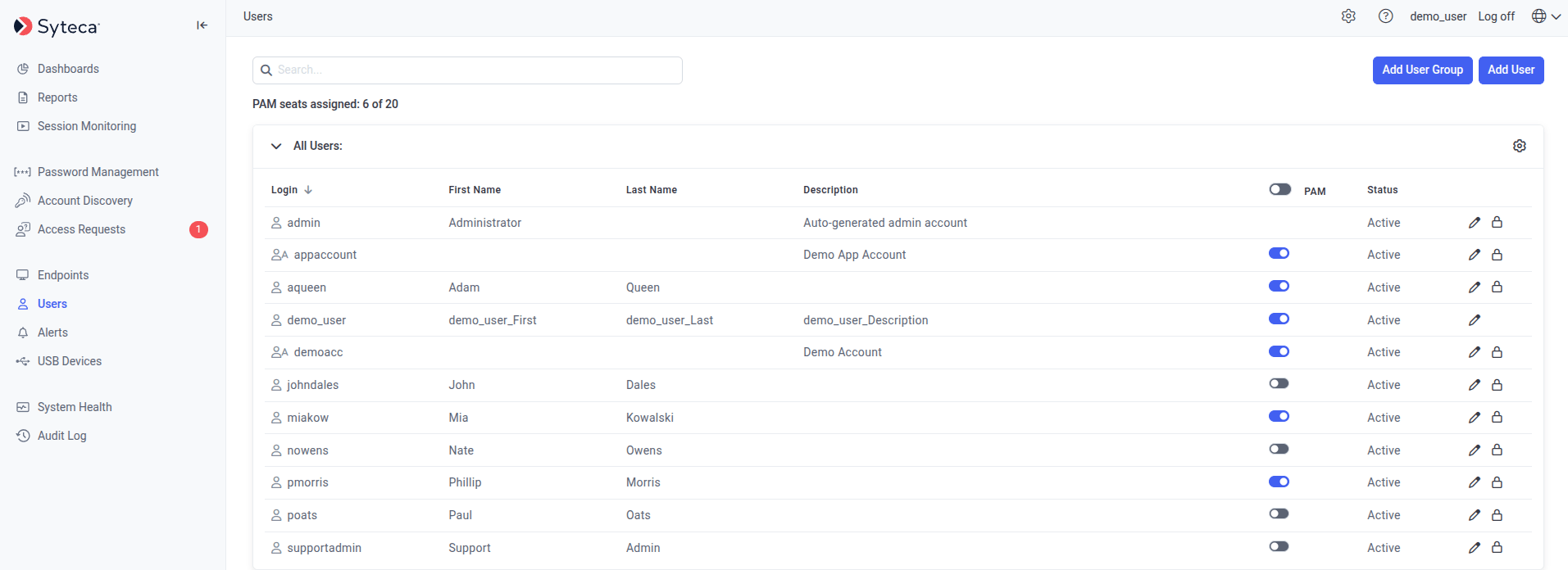
On the Users page, click Add User in the top right.
2
Pick the user type
On the User Type tab of the Adding New User page, click one:
Add an Internal User will create a local Management Tool account.
Add an Active Directory User / User Group will add an existing AD user or user group.
Add Application Account will create an account for the ACB API. Not available in SaaS.
Active Directory users / user groups can’t be added if no LDAP target has been configured for the domain, or if the domain is currently unavailable.
If an Active Directory user already belongs to two or more AD user groups in Syteca, that user can’t add themselves as an independent user — only other administrators with appropriate permissions can.
3
Fill in user details
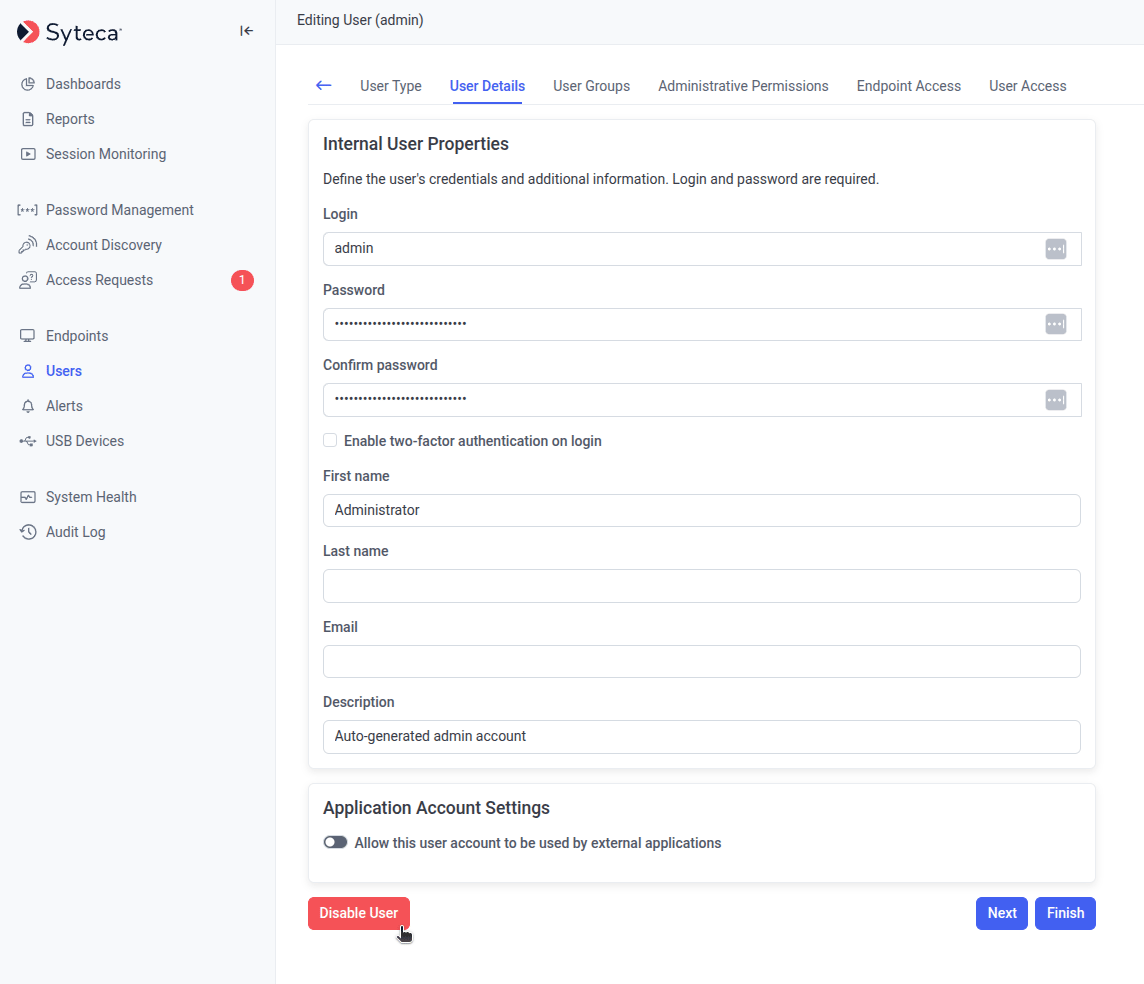
On the User Details tab, complete the form depending on user type:
Internal user
Active Directory user/group
Application Account
Login must be unique. (In Multi-Tenant mode, users of different tenants can share the same login.)
Password at least 8 characters, with at least one lowercase letter, one uppercase letter, one numeric character, and one special character. Cannot contain more than 3 consecutive identical characters or the user’s login name.
First Name / Last Name / Description optional, max 200 characters each.
Email is required for the user to receive an automatically generated one-time password.
Enable two-factor authentication on login force the user to set up TOTP 2FA on first sign-in.
User / User Group will search across any configured domain and select.
Enable two-factor authentication on login force 2FA in addition to AD authentication.
Login — name of the application account.
Client ID / Client Secret authentication — the Client ID is generated automatically and can’t be edited. Add one or more Client Secrets for the applications that will call the API.
Internal and Active Directory users can also call the ACB API. Enable Allow this user account to be used by external applications in the Application Account Settings section of this tab, and the same Client ID / Client Secret and Refresh Token sections appear. See Set up a user account.
Click Next.
4
Assign user groups
On the User Groups tab, select the groups this user will belong to. Click Next.
The user is automatically added to the All Users default group — this can’t be changed.
5
Set administrative permissions
On the Administrative Permissions tab, select the administrative permissions to grant the user directly (in addition to any inherited from groups).
You can only add new permissions on top of group-inherited ones. To remove inherited permissions, remove the user from the relevant group.
Click Next.
6
Set Endpoint access
On the Endpoint Access tab, for each Endpoint or Endpoint group:
Use the Search box + Apply Filters button at the top to find specific Endpoints or groups by name.
Click Next.
7
(Optional) Set User-to-User access
On the User Access tab, restrict which endpoint users’ monitoring results this Management Tool user can see. If you leave this empty, the user sees sessions for all endpoint users they have Viewing Monitoring Results permission for.To restrict:
Click Add User on the right.
Pick the Domain / Computer Name and User / User Group from the drop-downs. Use * as a wildcard.
Click the Add icon to commit.
The drop-downs only show domains, computers, users, and groups already seen by Syteca during monitoring — but you can also type new names directly.
Settings here apply to all sessions for the added endpoint users — past and future. Exception: if you add a domain group, only sessions recorded after adding the group are accessible.
On the Users page, click the Edit User icon next to the user.
2
Make your changes
Edit the user details, group memberships, permissions, Endpoint access, and User-to-User access on the corresponding tabs — same as when adding a user.
3
Reset 2FA (if needed)
A Reset 2FA button appears next to the Enable two-factor authentication on login checkbox — but only after the user has already signed in and set up 2FA, and only for the tenant admin and Management Tool users with the User Management permission. Click it to delete the user’s 2FA profile, useful when the user has lost both their phone and their 2FA recovery code.
4
Save
Click Finish to save and exit, or Next to save progressively across tabs.
The Delete User button appears in the bottom left when editing — see Delete a user below. For the default admin user, the Disable User button replaces Delete User — see Disable the default admin.
Deleting a user means they immediately lose access to the system. If they’re signed in at the moment of deletion, the Management Tool becomes unavailable immediately and pages stop loading.
1
Open the user
Click the Edit User icon next to the user on the Users page.
2
Delete
On the User Details tab, click Delete User in the bottom left.
The default admin user has unrestricted access to everything in Syteca — useful for initial setup, a meaningful risk during operation. After initial deployment, security-conscious organizations disable the default admin entirely and rely on other Administrators users (each with auditable, configurable permissions) to operate the platform.
On the default admin user's Edit page, the Disable User button replaces the Delete User button - and only appears when another Administrators-group user exists.
Why disable the default admin?
Eliminates a known, high-value credential target (the literal admin account).
Forces all administrative actions through accounts that show up in the Audit log by name.
Meets compliance frameworks (NIST 800-53 IA-4, ISO 27001 A.9.2) that restrict generic admin accounts.
Required by some Pseudonymizer / regulatory deployment patterns.
Before disabling the default admin, at least one other user must be added to the Administrators user group — either as an internal user, an AD user, or via membership in an AD user group added to Administrators.Additionally, the default admin can’t be disabled while they’re the sole owner of certain options or rules. Address these first:
Add another user to Users who can approve access on the Additional Options tab of the USB rule.
If the default admin is the owner (i.e. created) of a Scheduled Report rule, disabling the default admin stops the rule from running and removes it from the Scheduled Reports tab. To preserve the rule, transfer ownership before disabling — or recreate the rule under another user.
Sign in to the Management Tool as any user in the Administrators group except the default admin.
Only users in the default Administrators user group (internal or AD, or AD user-group members) can disable the default admin.
2
Open the default admin
Click Users in the left navigation. Click the Edit User icon next to the default admin user.
3
Click Disable User
On the User Details tab, click Disable User in the bottom left.
The Disable User button replaces Delete User for the default admin. It only appears if at least one other user has been added to the Administrators group.
4
Confirm
Click Confirm in the warning pop-up. If the default admin is the sole owner of any options/rules listed in the prerequisites table, the Confirm button won’t be available — resolve those first.
After the default admin is disabled, the last remaining user in the Administrators group cannot be deleted — Syteca preserves at least one administrator.
The Enable De-Anonymization Password section is hidden on the Pseudonymization configuration tab. If the password was set before disabling, it continues to function but cannot be deselected or changed until the default admin is re-enabled.
The default admin’s API key can no longer be used for API requests. Use the API key of any Administrators-group user instead. Note: Data Connector v.1.9 installation still requires the default admin credentials, so install before disabling.
If the default admin was in the Send email notifications about new accounts found to field of an Account Discovery rule, they’re removed from it and no longer receive notifications.
User groups work the same way as users — same Endpoint Access, same Administrative Permissions, same User-to-User access mechanism. Users in a group inherit the group’s permissions.
1
Open Add User Group
On the Users page, click Add User Group in the top right.
2
Set group properties
On the Group Properties tab, enter a Name (optionally a description), then click Next.
3
Add members
On the Management Tool Users tab, click Add Users in the top left, select the users to add, then click Next.
4
Set administrative permissions
On the Administrative Permissions tab, select the administrative permissions all group members will inherit. Click Next.
5
Set Endpoint access
On the Endpoint Access tab, for each Endpoint or Endpoint group, click the Edit Permissions icon and select the Endpoint permissions to grant. Click Save after each, then Next.
6
(Optional) Set User-to-User access
On the User Access tab, restrict which endpoint users’ monitoring results group members can see — same mechanism as for individual users in Add a user.
7
Finish
Click Finish. The new user group appears on the Users page.
Deleting a user group doesn’t delete the users in it — but those users lose any permissions they inherited only from this group. Permissions inherited from other groups or assigned directly to the user remain.
1
Open the group
Click the Edit Group icon in the top right of the user group on the Users page.
2
Delete
On the Group Properties tab, click Delete Group at the bottom of the page.
The seven administrative permissions and what each one grants.
Endpoint permissions reference
The six per-Endpoint permissions, plus a worked permission-inheritance example.
Two-factor authentication
Configure 2FA across users and the deployment.
ACB application accounts
Service-to-service authentication for the API.
{"docsConfig":{"theme":"mint","$schema":"https://mintlify.com/docs.json","name":"Syteca","description":"Syteca documentation - User Activity Monitoring and Privileged Access Management in a single platform.","colors":{"primary":"#2563EB","light":"#5B8DEF","dark":"#1D4ED8"},"logo":{"light":"https://mintcdn.com/syteca/ZVta4JfIcSnC47NX/logo/syteca-light.svg?fit=max\u0026auto=format\u0026n=ZVta4JfIcSnC47NX\u0026q=85\u0026s=154a18f69aa4aefa55de0de7669934c7","dark":"https://mintcdn.com/syteca/ZVta4JfIcSnC47NX/logo/syteca-dark.svg?fit=max\u0026auto=format\u0026n=ZVta4JfIcSnC47NX\u0026q=85\u0026s=07170d0c543f4264cca523f1b74b912e","href":"https://www.syteca.com/docs"},"favicon":"https://mintcdn.com/syteca/0FlD-vkHsBA1azVX/favicon.ico?fit=max\u0026auto=format\u0026n=0FlD-vkHsBA1azVX\u0026q=85\u0026s=6c6a5b9e7da5f386c9d031d55704987a","appearance":{"default":"system","strict":false},"background":{"decoration":"grid","color":{"light":"#FFFFFF","dark":"#0B0D12"}},"navbar":{"links":[{"href":"https://www.syteca.com/docs/release-notes/overview","label":"Changelog"},{"href":"https://www.syteca.com/docs/api/acb/api-reference","label":"API Reference"},{"href":"https://www.syteca.com/en/support/contact-support","label":"Support"}],"primary":{"type":"button","label":"Book a Demo","href":"https://www.syteca.com/en/book-a-demo"}},"footer":{"socials":{"youtube":"https://www.youtube.com/@syteca","linkedin":"https://www.linkedin.com/company/syteca.com"},"links":[{"header":"Product","items":[{"label":"Overview","href":"https://www.syteca.com/docs"},{"label":"Releases","href":"https://www.syteca.com/docs/release-notes/overview"},{"label":"Pricing","href":"https://syteca.com/pricing"}]},{"header":"Company","items":[{"label":"About","href":"https://www.syteca.com/en/company/about-us"}]},{"header":"Legal","items":[{"label":"Privacy","href":"https://syteca.com/privacy"},{"label":"Terms","href":"https://www.syteca.com/en/terms-of-use"}]}]},"search":{"prompt":"Syteca Documentation"},"seo":{"metatags":{"og:image":"https://www.syteca.com/og-default.png","og:site_name":"Syteca Docs","canonical":"https://www.syteca.com/docs"}},"fonts":{"heading":{"family":"Inter","weight":700},"body":{"family":"Inter","weight":400}},"icons":{"library":"lucide"},"styling":{"eyebrows":"section","codeblocks":"system","latex":false},"integrations":{"ga4":{"measurementId":"G-3SYH6XSJXQ"}},"errors":{"404":{"redirect":false}},"navigation":{"pages":[]}},"deployment":{"deploymentMetadataValue":{"subdomain":"syteca","hasAudioNarration":false,"actualSubdomain":"syteca","customDomains":["syteca.com"],"gitSource":{"type":"github","owner":"syteca","repo":"syteca-docs-poc","deployBranch":"main","contentDirectory":"","isPrivate":true,"mountPath":"","label":""},"chroma":{"liveDeploymentHistoryId":"6ad1514242be2c5dff43c208","collectionId":"e06ba704-cd46-4c1a-bce9-943887181a47","schemaVersion":"v3","latestBuiltDeploymentHistoryId":"6ad1514242be2c5dff43c208"},"feedback":{"thumbs":false},"entitlements":{"AI_CHAT":{"status":"DISABLED"}},"buildId":"6ad1514242be2c5dff43c208","clientVersion":"0.0.3869","searchFilterCounts":[{"language":"default","tag":"Administration","count":95},{"language":"default","tag":"API \u0026 Integrations","count":80},{"language":"default","tag":"Application Credentials Broker","count":50},{"language":"default","tag":"Session Monitoring","count":42},{"language":"default","tag":"Endpoint Risk Control","count":31},{"language":"default","tag":"Endpoints","count":28},{"language":"default","tag":"Privileged Access Management","count":26},{"language":"default","tag":"Release Notes","count":24},{"language":"default","tag":"Get Started","count":18},{"language":"default","tag":"Syteca changelog","count":18}]},"assistantConfig":{"enableAskAiButton":false,"enableStarterQuestions":false,"enableContextualStarterQuestions":false,"enableAskAiSearchBar":true},"hasChatPermissions":false,"hasWebMcpPermissions":false,"toggles":[{"name":"kill-isr","enabled":true,"variant":{"name":"disabled","enabled":false,"feature_enabled":true},"impressionData":false},{"name":"agent-mintlify-slack","enabled":true,"variant":{"name":"disabled","enabled":false,"feature_enabled":true},"impressionData":false},{"name":"editor-v7-file-tree","enabled":true,"variant":{"name":"disabled","enabled":false,"feature_enabled":true},"impressionData":false},{"name":"agent-integrations-settings","enabled":true,"variant":{"name":"disabled","enabled":false,"feature_enabled":true},"impressionData":false},{"name":"automations-pr-grouping","enabled":true,"variant":{"name":"disabled","enabled":false,"feature_enabled":true},"impressionData":false},{"name":"custom-prefix","enabled":true,"variant":{"name":"disabled","enabled":false,"feature_enabled":true},"impressionData":false},{"name":"analytics-v7","enabled":true,"variant":{"name":"disabled","enabled":false,"feature_enabled":true},"impressionData":false},{"name":"user-flows-analytics","enabled":true,"variant":{"name":"disabled","enabled":false,"feature_enabled":true},"impressionData":false},{"name":"no-publish-flow","enabled":true,"variant":{"name":"disabled","enabled":false,"feature_enabled":true},"impressionData":false},{"name":"llms-txt-v2","enabled":true,"variant":{"name":"disabled","enabled":false,"feature_enabled":true},"impressionData":false},{"name":"pause-universal-search-reconcile","enabled":true,"variant":{"name":"disabled","enabled":false,"feature_enabled":true},"impressionData":false},{"name":"snapshot-serving-live","enabled":true,"variant":{"name":"disabled","enabled":false,"feature_enabled":true},"impressionData":false},{"name":"stripTemperatureMiddleware","enabled":true,"variant":{"name":"disabled","enabled":false,"feature_enabled":true},"impressionData":false},{"name":"per-site-search-delta","enabled":true,"variant":{"name":"disabled","enabled":false,"feature_enabled":true},"impressionData":false},{"name":"support-platform-pylon-zendesk","enabled":true,"variant":{"name":"disabled","enabled":false,"feature_enabled":true},"impressionData":false},{"name":"editor-branches-v2-autocommit","enabled":true,"variant":{"name":"disabled","enabled":false,"feature_enabled":true},"impressionData":false},{"name":"editor-branches-v2","enabled":true,"variant":{"name":"disabled","enabled":false,"feature_enabled":true},"impressionData":false},{"name":"snapshot-serving","enabled":true,"variant":{"name":"disabled","enabled":false,"feature_enabled":true},"impressionData":false},{"name":"instant-rollback","enabled":true,"variant":{"name":"disabled","enabled":false,"feature_enabled":true},"impressionData":false},{"name":"granular-notifications-server","enabled":true,"variant":{"name":"disabled","enabled":false,"feature_enabled":true},"impressionData":false},{"name":"granular-notifications","enabled":true,"variant":{"name":"disabled","enabled":false,"feature_enabled":true},"impressionData":false},{"name":"editor-private-page-search","enabled":true,"variant":{"name":"disabled","enabled":false,"feature_enabled":true},"impressionData":false},{"name":"automations-fable","enabled":true,"variant":{"name":"disabled","enabled":false,"feature_enabled":true},"impressionData":false},{"name":"fixed-ai-action-pricing","enabled":true,"variant":{"name":"disabled","enabled":false,"feature_enabled":true},"impressionData":false},{"name":"automation-resolve-merge-conflict","enabled":true,"variant":{"name":"disabled","enabled":false,"feature_enabled":true},"impressionData":false},{"name":"scoped-publishing","enabled":true,"variant":{"name":"disabled","enabled":false,"feature_enabled":true},"impressionData":false},{"name":"mintql","enabled":true,"variant":{"name":"disabled","enabled":false,"feature_enabled":true},"impressionData":false},{"name":"page-level-analytics","enabled":true,"variant":{"name":"disabled","enabled":false,"feature_enabled":true},"impressionData":false},{"name":"teamspace","enabled":true,"variant":{"name":"disabled","enabled":false,"feature_enabled":true},"impressionData":false},{"name":"editor-version-history-v2","enabled":true,"variant":{"name":"disabled","enabled":false,"feature_enabled":true},"impressionData":false},{"name":"vite-origin","enabled":true,"variant":{"name":"disabled","enabled":false,"feature_enabled":true},"impressionData":false},{"name":"editor-nav-generations","enabled":true,"variant":{"name":"disabled","enabled":false,"feature_enabled":true},"impressionData":false},{"name":"workspace-projects","enabled":true,"variant":{"name":"disabled","enabled":false,"feature_enabled":true},"impressionData":false},{"name":"assistant-v5","enabled":true,"variant":{"name":"disabled","enabled":false,"feature_enabled":true},"impressionData":false},{"name":"byok-sep-25","enabled":true,"variant":{"name":"disabled","enabled":false,"feature_enabled":true},"impressionData":false},{"name":"revalidation-jwt","enabled":true,"variant":{"name":"disabled","enabled":false,"feature_enabled":true},"impressionData":false},{"name":"editor-agent-model-picker","enabled":true,"variant":{"name":"disabled","enabled":false,"feature_enabled":true},"impressionData":false},{"name":"client-snapshot-docs-config","enabled":true,"variant":{"name":"disabled","enabled":false,"feature_enabled":true},"impressionData":false}],"isAtlas":false,"googleFontsInlined":false},"customCss":[{"filePath":"style.css","content":":root{--syteca-brand:#2563EB;--syteca-brand-strong:#1D4ED8;--syteca-brand-soft:#EFF6FF;--syteca-accent-green:#16A34A;--syteca-accent-amber:#D97706;--syteca-accent-violet:#7C3AED;--syteca-accent-rose:#DB2777;--syteca-accent-cyan:#0891B2;--syteca-accent-teal:#0D9488}html.dark{--syteca-brand:#5B8DEF;--syteca-brand-strong:#7AA1F3;--syteca-brand-soft:#14213D}.prose h1{letter-spacing:-.025em}.prose h2{letter-spacing:-.015em}a[class*=rounded-][class*=border]:hover{transform:translateY(-1px);transition:transform 150ms ease,box-shadow 150ms ease,border-color 150ms ease}.prose code,.prose pre{font-family:\"JetBrains Mono\",\"SF Mono\",\"Menlo\",\"Consolas\",monospace}.prose table thead th{border-bottom:2px solid var(--syteca-brand);font-weight:600}.prose table tbody td{padding-top:.55rem;padding-bottom:.55rem}figure figcaption{font-size:13px;color:rgb(113 113 122/1);margin-top:.6rem}nav[aria-label=Sidebar] a{padding-top:.3rem;padding-bottom:.3rem;font-size:13.5px}.demo-bar{display:none}"}],"page":{"pagePath":"administration/users/users","slug":"/administration/users/users","pageMetadata":{"title":"Users and User Groups","sidebarTitle":"Users","description":"Syteca user management: three user types (internal, Active Directory, application account), four default user groups, custom groups, per-Endpoint permission scoping, two-factor authentication, and admin hardening.","icon":"users","keywords":["syteca user management","rbac pam platform","active directory user groups syteca","application account acb","user-to-user access","disable default admin","syteca 2fa"],"href":"/administration/users/users"},"description":{"compiledSource":"\"use strict\";\nconst {jsx: _jsx} = arguments[0];\nconst {useMDXComponents: _provideComponents} = arguments[0];\nfunction _createMdxContent(props) {\n const _components = {\n p: \"p\",\n ..._provideComponents(),\n ...props.components\n };\n return _jsx(_components.p, {\n children: \"Syteca user management: three user types (internal, Active Directory, application account), four default user groups, custom groups, per-Endpoint permission scoping, two-factor authentication, and admin hardening.\"\n });\n}\nfunction MDXContent(props = {}) {\n const {wrapper: MDXLayout} = {\n ..._provideComponents(),\n ...props.components\n };\n return MDXLayout ? _jsx(MDXLayout, {\n ...props,\n children: _jsx(_createMdxContent, {\n ...props\n })\n }) : _createMdxContent(props);\n}\nreturn {\n default: MDXContent\n};\n","frontmatter":{},"scope":{}},"pageType":"default","mdx":{"mdxSource":{"compiledSource":"\"use strict\";const{Fragment:_Fragment,jsx:_jsx,jsxs:_jsxs}=arguments[0];const{useMDXComponents:_provideComponents}=arguments[0];function _createMdxContent(props){const _components={a:`a`,code:`code`,em:`em`,li:`li`,p:`p`,strong:`strong`,tbody:`tbody`,td:`td`,th:`th`,thead:`thead`,tr:`tr`,ul:`ul`,..._provideComponents(),...props.components},{Card,CardGroup,Frame,Heading,Info,Note,OptimizedImage,Step,Steps,Tab,Table,Tabs,Tip,Warning}=_components;if(!Card)_missingMdxReference(`Card`,true);if(!CardGroup)_missingMdxReference(`CardGroup`,true);if(!Frame)_missingMdxReference(`Frame`,true);if(!Heading)_missingMdxReference(`Heading`,true);if(!Info)_missingMdxReference(`Info`,true);if(!Note)_missingMdxReference(`Note`,true);if(!OptimizedImage)_missingMdxReference(`OptimizedImage`,true);if(!Step)_missingMdxReference(`Step`,true);if(!Steps)_missingMdxReference(`Steps`,true);if(!Tab)_missingMdxReference(`Tab`,true);if(!Table)_missingMdxReference(`Table`,true);if(!Tabs)_missingMdxReference(`Tabs`,true);if(!Tip)_missingMdxReference(`Tip`,true);if(!Warning)_missingMdxReference(`Warning`,true);return _jsxs(_Fragment,{children:[_jsx(Heading,{level:`2`,id:`rbac-built-for-the-people-who-run-a-pam-platform`,children:`RBAC built for the people who run a PAM platform`}),`\n`,_jsxs(_components.p,{children:[`Every security platform has user roles. Most do the minimum: admin, operator, viewer, maybe a custom role tier and call it RBAC. That works until you’re running a real PAM and User Activity Monitoring deployment, at which point you need to express things like: `,_jsx(_components.em,{children:`“Sarah can view monitoring results for the Finance Endpoint group but not Engineering, can’t see clipboard text, can approve One-Time Password requests, can’t disable the default admin, and her permissions inherit from the Supervisors user group except when overridden by her own grants.”`}),` Generic RBAC doesn’t fit that shape; you either over-grant and hope, or you write workarounds.`]}),`\n`,_jsxs(_components.p,{children:[`Competitors at this layer handle similar problems with their own permission models, but with varying granularity. `,_jsx(_components.strong,{children:`Syteca’s permission model`}),` is built around exactly the operations a UAM/PAM admin needs: seven `,_jsx(_components.a,{href:`/administration/users/administrative-permissions`,children:`administrative permissions`}),` that gate platform-wide actions, six `,_jsx(_components.a,{href:`/administration/users/client-permissions`,children:`Endpoint permissions`}),` that gate per-Endpoint operations, `,_jsx(_components.strong,{children:`User-to-User access scoping`}),` for restricting which `,_jsx(_components.em,{children:`endpoint users’`}),` monitoring results a Management Tool user can see, and three user types (internal, Active Directory, application account) that share the same permission engine.`]}),`\n`,_jsxs(Info,{children:[_jsx(_components.p,{children:_jsx(_components.strong,{children:`Use Syteca user management when you need to:`})}),_jsxs(_components.ul,{children:[`\n`,_jsxs(_components.li,{children:[`Implement `,_jsx(_components.strong,{children:`separation of duties`}),` between platform admins, investigators, and operations staff — with permissions granular enough to express the real boundaries.`]}),`\n`,_jsxs(_components.li,{children:[_jsx(_components.strong,{children:`Inherit AD user groups`}),` automatically — domain group → Management Tool user group → user, so new hires get correct access on day one.`]}),`\n`,_jsxs(_components.li,{children:[`Restrict `,_jsx(_components.strong,{children:`which endpoint users a given investigator can monitor`}),` (the “User-to-User” model) — useful for legal-team segmentation, regional separation, or contractor isolation.`]}),`\n`,_jsxs(_components.li,{children:[`Enforce `,_jsx(_components.strong,{children:`2FA per user`}),` — TOTP via any authenticator app — with admin-managed reset for lost devices.`]}),`\n`,_jsxs(_components.li,{children:[_jsx(_components.strong,{children:`Harden the default admin`}),` by disabling it entirely once other Administrators are configured — eliminates the “default admin compromise” attack surface.`]}),`\n`,_jsxs(_components.li,{children:[`Wire applications into Syteca via `,_jsx(_components.strong,{children:`Application Account users`}),` through the `,_jsx(_components.a,{href:`/api/acb/overview`,children:`Application Credentials Broker`}),` for service-to-service automation.`]}),`\n`]}),_jsxs(_components.p,{children:[_jsxs(_components.strong,{children:[`Pair it with `,_jsx(_components.a,{href:`/administration/access/smart-card-access`,children:`Smart card access`})]}),` — RBAC scopes `,_jsx(_components.em,{children:`what`}),` a user can do; smart card access scopes `,_jsx(_components.em,{children:`who can authenticate as that user`}),`. Defense in depth.`]})]}),`\n`,_jsx(Note,{children:_jsxs(_components.p,{children:[`All user and user group management requires the `,_jsx(_components.a,{href:`/administration/users/administrative-permissions`,children:`administrative User Management permission`}),`. In Multi-Tenant mode, users and user groups are completely independent per tenant.`]})}),`\n`,_jsx(Heading,{level:`2`,id:`the-default-admin-and-tenant-model`,children:`The default admin and tenant model`}),`\n`,_jsxs(_components.p,{children:[`By default, Syteca ships with one administrator — login `,_jsx(_components.code,{children:`admin`}),`, password set during `,_jsx(_components.a,{href:`/administration/deployment/install-application-server`,children:`Application Server installation`}),`. The default admin has every permission required to work with the system and is the `,_jsx(_components.strong,{children:`technician`}),` in Multi-Tenant mode, with the ability to create tenants. Once another admin is configured, `,_jsx(_components.a,{href:`#disable-the-default-admin`,children:`the default admin can be disabled`}),` to harden the deployment.`]}),`\n`,_jsx(Heading,{level:`2`,id:`three-user-types`,children:`Three user types`}),`\n`,_jsxs(Table,{children:[_jsx(_components.thead,{children:_jsxs(_components.tr,{children:[_jsx(_components.th,{children:`User type`}),_jsx(_components.th,{children:`Best for`})]})}),_jsxs(_components.tbody,{children:[_jsxs(_components.tr,{children:[_jsx(_components.td,{children:_jsx(_components.strong,{children:`Internal`})}),_jsx(_components.td,{children:`Local Management Tool accounts are most common for small deployments or for break-glass admin accounts. Authenticate with username + password defined in Syteca.`})]}),_jsxs(_components.tr,{children:[_jsx(_components.td,{children:_jsx(_components.strong,{children:`Active Directory`})}),_jsxs(_components.td,{children:[`Domain users and domain user groups are most common for enterprise deployments. Authenticate with AD credentials. Requires an `,_jsx(_components.a,{href:`/administration/integrations/ldap-targets`,children:`LDAP target`}),` configured.`]})]}),_jsxs(_components.tr,{children:[_jsx(_components.td,{children:_jsx(_components.strong,{children:`Application Account`})}),_jsxs(_components.td,{children:[`Service-to-service accounts for the `,_jsx(_components.a,{href:`/api/acb/overview`,children:`Application Credentials Broker (ACB)`}),` API. Authenticate with a `,_jsx(_components.a,{href:`/api/acb/setup-user-account`,children:`Client ID and Client Secret`}),`. `,_jsx(_components.strong,{children:`Not available in SaaS.`})]})]})]})]}),`\n`,_jsx(Heading,{level:`2`,id:`four-default-user-groups`,children:`Four default user groups`}),`\n`,_jsx(_components.p,{children:`Every Syteca deployment ships with four user groups:`}),`\n`,_jsxs(Table,{children:[_jsx(_components.thead,{children:_jsxs(_components.tr,{children:[_jsx(_components.th,{children:`Group`}),_jsx(_components.th,{children:`Contains`}),_jsx(_components.th,{children:`Permissions`})]})}),_jsxs(_components.tbody,{children:[_jsxs(_components.tr,{children:[_jsx(_components.td,{children:_jsx(_components.strong,{children:`All Users`})}),_jsx(_components.td,{children:`Every user — automatic, can’t be removed`}),_jsx(_components.td,{children:`None inherent`})]}),_jsxs(_components.tr,{children:[_jsx(_components.td,{children:_jsx(_components.strong,{children:`Administrators`})}),_jsx(_components.td,{children:`Users who can perform administrative functions`}),_jsxs(_components.td,{children:[_jsx(_components.strong,{children:`All`}),` administrative and Endpoint permissions`]})]}),_jsxs(_components.tr,{children:[_jsx(_components.td,{children:_jsx(_components.strong,{children:`Supervisors`})}),_jsx(_components.td,{children:`Users whose job is to analyze Endpoints`}),_jsxs(_components.td,{children:[_jsx(_components.strong,{children:`Viewing Monitoring Results`}),` for all Endpoints`]})]}),_jsxs(_components.tr,{children:[_jsx(_components.td,{children:_jsx(_components.strong,{children:`PAM Users`})}),_jsxs(_components.td,{children:[`Users of `,_jsx(_components.a,{href:`/pam/access/desktop-connection-manager`,children:`Syteca Connection Manager`}),` who don’t have Management Tool access`]}),_jsx(_components.td,{children:`None for Management Tool`})]})]})]}),`\n`,_jsx(Warning,{children:_jsxs(_components.p,{children:[`The default `,_jsx(_components.code,{children:`admin`}),` user of the built-in default tenant `,_jsx(_components.strong,{children:`cannot be removed`}),` from the `,_jsx(_components.strong,{children:`Administrators`}),` user group.`]})}),`\n`,_jsxs(_components.p,{children:[`You can add custom user groups for finer-grained role definitions — see `,_jsx(_components.a,{href:`#add-a-user-group`,children:`Add a user group`}),` below.`]}),`\n`,_jsx(Heading,{level:`2`,id:`permission-inheritance`,children:`Permission inheritance`}),`\n`,_jsx(_components.p,{children:`A user can belong to multiple user groups. When a user is in a group:`}),`\n`,_jsxs(_components.ul,{children:[`\n`,_jsxs(_components.li,{children:[`They `,_jsx(_components.strong,{children:`inherit`}),` every permission granted to that group.`]}),`\n`,_jsxs(_components.li,{children:[_jsx(_components.strong,{children:`Inherited permissions can only be removed by removing the user from the group`}),` — they can’t be revoked individually on the user.`]}),`\n`,_jsxs(_components.li,{children:[`The user can also have `,_jsx(_components.strong,{children:`their own`}),` permissions in addition to inherited ones.`]}),`\n`]}),`\n`,_jsxs(_components.p,{children:[`If an Active Directory user is added as an independent internal user `,_jsx(_components.strong,{children:`and`}),` as a member of a Windows domain user group, `,_jsx(_components.strong,{children:`the user’s own permissions take priority`}),` over the domain-group-inherited ones.`]}),`\n`,_jsxs(_components.p,{children:[`For a worked example of how user-level and group-level permissions combine, see `,_jsx(_components.a,{href:`/administration/users/client-permissions#example-of-permission-inheritance`,children:`Example of permissions`}),`.`]}),`\n`,_jsx(Heading,{level:`2`,id:`open-the-users-page`,children:`Open the Users page`}),`\n`,_jsxs(_components.p,{children:[`Sign in to the Management Tool, click `,_jsx(_components.strong,{children:`Users`}),` in the left navigation. Users are listed grouped by the user groups they belong to. Each row shows:`]}),`\n`,_jsxs(Table,{children:[_jsx(_components.thead,{children:_jsxs(_components.tr,{children:[_jsx(_components.th,{children:`Column`}),_jsx(_components.th,{children:`Shows`})]})}),_jsxs(_components.tbody,{children:[_jsxs(_components.tr,{children:[_jsx(_components.td,{children:_jsx(_components.strong,{children:`Login`})}),_jsx(_components.td,{children:`The user’s login name.`})]}),_jsxs(_components.tr,{children:[_jsxs(_components.td,{children:[_jsx(_components.strong,{children:`First Name`}),` / `,_jsx(_components.strong,{children:`Last Name`})]}),_jsxs(_components.td,{children:[`Filled in manually for internal users; `,_jsx(_components.strong,{children:`auto-populated for AD users after first sign-in`}),`.`]})]}),_jsxs(_components.tr,{children:[_jsx(_components.td,{children:_jsx(_components.strong,{children:`Description`})}),_jsx(_components.td,{children:`Optional description.`})]}),_jsxs(_components.tr,{children:[_jsxs(_components.td,{children:[_jsx(_components.strong,{children:`PAM`}),` `,_jsx(_components.em,{children:`(toggle)`})]}),_jsxs(_components.td,{children:[`Whether the user has a `,_jsx(_components.a,{href:`/administration/licensing/assign-pam-seat-licenses`,children:`PAM seat license`}),` assigned — required for Password Management and Account Discovery.`]})]}),_jsxs(_components.tr,{children:[_jsx(_components.td,{children:_jsx(_components.strong,{children:`Status`})}),_jsxs(_components.td,{children:[_jsx(_components.strong,{children:`Active`}),` or `,_jsx(_components.strong,{children:`Locked`}),`, plus icons for `,_jsx(_components.strong,{children:`Edit User`}),` and `,_jsx(_components.strong,{children:`Lock User`}),` / `,_jsx(_components.strong,{children:`Unlock User`}),`.`]})]})]})]}),`\n`,_jsx(Tip,{children:_jsxs(_components.p,{children:[`Use the `,_jsx(_components.strong,{children:`Search box`}),` at the top to find users or user groups by user name, group name, first name, last name, or description.`]})}),`\n`,_jsx(Frame,{caption:`The Users page - users listed under the groups they belong to, with PAM seat toggle and lock/unlock status visible per row.`,children:_jsx(OptimizedImage,{src:`https://mintcdn.com/syteca/FKrkO8bEqEQ6WSgs/images/administration/users/users-page-grid.png?fit=max\u0026auto=format\u0026n=FKrkO8bEqEQ6WSgs\u0026q=85\u0026s=833544f2eb9c57eeeca9a61808eb190c`,alt:`Users page showing the user list grouped by user groups with Login, names, Description, PAM toggle, and Status columns`,\"data-og-width\":`1913`,width:`1913`,\"data-og-height\":`696`,height:`696`,\"data-path\":`images/administration/users/users-page-grid.png`,\"data-optimize\":`true`,\"data-opv\":`3`,srcset:`https://mintcdn.com/syteca/FKrkO8bEqEQ6WSgs/images/administration/users/users-page-grid.png?w=280\u0026fit=max\u0026auto=format\u0026n=FKrkO8bEqEQ6WSgs\u0026q=85\u0026s=a2ed2c55c25bf709a7411b81919ec979 280w, https://mintcdn.com/syteca/FKrkO8bEqEQ6WSgs/images/administration/users/users-page-grid.png?w=560\u0026fit=max\u0026auto=format\u0026n=FKrkO8bEqEQ6WSgs\u0026q=85\u0026s=9832fc4f42ed69c13d2be62216f74e20 560w, https://mintcdn.com/syteca/FKrkO8bEqEQ6WSgs/images/administration/users/users-page-grid.png?w=840\u0026fit=max\u0026auto=format\u0026n=FKrkO8bEqEQ6WSgs\u0026q=85\u0026s=f579f62dc147e752accbe0703ee50ee5 840w, https://mintcdn.com/syteca/FKrkO8bEqEQ6WSgs/images/administration/users/users-page-grid.png?w=1100\u0026fit=max\u0026auto=format\u0026n=FKrkO8bEqEQ6WSgs\u0026q=85\u0026s=5b4ef45ec701e08c3e0acabacb3f69b2 1100w, https://mintcdn.com/syteca/FKrkO8bEqEQ6WSgs/images/administration/users/users-page-grid.png?w=1650\u0026fit=max\u0026auto=format\u0026n=FKrkO8bEqEQ6WSgs\u0026q=85\u0026s=c857cc3831d253a56ae96dff14214b77 1650w, https://mintcdn.com/syteca/FKrkO8bEqEQ6WSgs/images/administration/users/users-page-grid.png?w=2500\u0026fit=max\u0026auto=format\u0026n=FKrkO8bEqEQ6WSgs\u0026q=85\u0026s=7aedffe060d80e8426edc0621f700000 2500w`})}),`\n`,_jsx(Heading,{level:`2`,id:`add-a-user`,children:`Add a user`}),`\n`,_jsxs(Steps,{children:[_jsx(Step,{title:`Open Add User`,children:_jsxs(_components.p,{children:[`On the `,_jsx(_components.strong,{children:`Users`}),` page, click `,_jsx(_components.strong,{children:`Add User`}),` in the top right.`]})}),_jsxs(Step,{title:`Pick the user type`,children:[_jsxs(_components.p,{children:[`On the `,_jsx(_components.strong,{children:`User Type`}),` tab of the `,_jsx(_components.strong,{children:`Adding New User`}),` page, click one:`]}),_jsxs(_components.ul,{children:[`\n`,_jsxs(_components.li,{children:[_jsx(_components.strong,{children:`Add an Internal User`}),` will create a local Management Tool account.`]}),`\n`,_jsxs(_components.li,{children:[_jsx(_components.strong,{children:`Add an Active Directory User / User Group`}),` will add an existing AD user or user group.`]}),`\n`,_jsxs(_components.li,{children:[_jsx(_components.strong,{children:`Add Application Account`}),` will create an account for the `,_jsx(_components.a,{href:`/api/acb/overview`,children:`ACB API`}),`. `,_jsx(_components.em,{children:`Not available in SaaS.`})]}),`\n`]}),_jsx(Warning,{children:_jsxs(_components.p,{children:[`Active Directory users / user groups can’t be added if no `,_jsx(_components.a,{href:`/administration/integrations/ldap-targets`,children:`LDAP target`}),` has been configured for the domain, or if the domain is currently unavailable.`]})}),_jsx(Note,{children:_jsx(_components.p,{children:`If an Active Directory user already belongs to two or more AD user groups in Syteca, that user can’t add themselves as an independent user — only other administrators with appropriate permissions can.`})})]}),_jsxs(Step,{title:`Fill in user details`,children:[_jsxs(_components.p,{children:[`On the `,_jsx(_components.strong,{children:`User Details`}),` tab, complete the form depending on user type:`]}),_jsxs(Tabs,{children:[_jsx(Tab,{title:`Internal user`,id:`internal-user`,children:_jsxs(_components.ul,{children:[`\n`,_jsxs(_components.li,{children:[_jsx(_components.strong,{children:`Login`}),` must be unique. `,_jsx(_components.em,{children:`(In Multi-Tenant mode, users of different tenants can share the same login.)`})]}),`\n`,_jsxs(_components.li,{children:[_jsx(_components.strong,{children:`Password`}),` at least 8 characters, with at least one lowercase letter, one uppercase letter, one numeric character, and one special character. Cannot contain more than 3 consecutive identical characters or the user’s login name.`]}),`\n`,_jsxs(_components.li,{children:[_jsx(_components.strong,{children:`First Name`}),` / `,_jsx(_components.strong,{children:`Last Name`}),` / `,_jsx(_components.strong,{children:`Description`}),` optional, max 200 characters each.`]}),`\n`,_jsxs(_components.li,{children:[_jsx(_components.strong,{children:`Email`}),` is required for the user to receive an automatically generated one-time password.`]}),`\n`,_jsxs(_components.li,{children:[_jsx(_components.strong,{children:`Enable two-factor authentication on login`}),` force the user to set up TOTP 2FA on first sign-in.`]}),`\n`]})}),_jsx(Tab,{title:`Active Directory user/group`,id:`active-directory-user%2Fgroup`,children:_jsxs(_components.ul,{children:[`\n`,_jsxs(_components.li,{children:[_jsx(_components.strong,{children:`User / User Group`}),` will search across any configured domain and select.`]}),`\n`,_jsxs(_components.li,{children:[_jsx(_components.strong,{children:`Enable two-factor authentication on login`}),` force 2FA in addition to AD authentication.`]}),`\n`]})}),_jsx(Tab,{title:`Application Account`,id:`application-account`,children:_jsxs(_components.ul,{children:[`\n`,_jsxs(_components.li,{children:[_jsx(_components.strong,{children:`Login`}),` — name of the application account.`]}),`\n`,_jsxs(_components.li,{children:[_jsx(_components.strong,{children:`Client ID / Client Secret authentication`}),` — the Client ID is generated automatically and can’t be edited. Add one or more Client Secrets for the applications that will call the API.`]}),`\n`,_jsxs(_components.li,{children:[_jsx(_components.strong,{children:`Refresh Token-Based Authentication`}),` — legacy, and deprecated from 7.28. See `,_jsx(_components.a,{href:`/api/acb/setup-user-account`,children:`Set up a user account`}),` for both, and `,_jsx(_components.a,{href:`/api/acb/migrate-to-client-credentials`,children:`Migrate to Client ID / Client Secret`}),` for the transition.`]}),`\n`]})})]}),_jsx(Note,{children:_jsxs(_components.p,{children:[`Internal and Active Directory users can also call the ACB API. Enable `,_jsx(_components.strong,{children:`Allow this user account to be used by external applications`}),` in the `,_jsx(_components.strong,{children:`Application Account Settings`}),` section of this tab, and the same Client ID / Client Secret and Refresh Token sections appear. See `,_jsx(_components.a,{href:`/api/acb/setup-user-account`,children:`Set up a user account`}),`.`]})}),_jsxs(_components.p,{children:[`Click `,_jsx(_components.strong,{children:`Next`}),`.`]})]}),_jsxs(Step,{title:`Assign user groups`,children:[_jsxs(_components.p,{children:[`On the `,_jsx(_components.strong,{children:`User Groups`}),` tab, select the groups this user will belong to. Click `,_jsx(_components.strong,{children:`Next`}),`.`]}),_jsx(Note,{children:_jsxs(_components.p,{children:[`The user is automatically added to the `,_jsx(_components.strong,{children:`All Users`}),` default group — this can’t be changed.`]})})]}),_jsxs(Step,{title:`Set administrative permissions`,children:[_jsxs(_components.p,{children:[`On the `,_jsx(_components.strong,{children:`Administrative Permissions`}),` tab, select the `,_jsx(_components.a,{href:`/administration/users/administrative-permissions`,children:`administrative permissions`}),` to grant the user directly (in addition to any inherited from groups).`]}),_jsx(Note,{children:_jsxs(_components.p,{children:[`You can only `,_jsx(_components.strong,{children:`add`}),` new permissions on top of group-inherited ones. To remove inherited permissions, remove the user from the relevant group.`]})}),_jsxs(_components.p,{children:[`Click `,_jsx(_components.strong,{children:`Next`}),`.`]})]}),_jsxs(Step,{title:`Set Endpoint access`,children:[_jsxs(_components.p,{children:[`On the `,_jsx(_components.strong,{children:`Endpoint Access`}),` tab, for each Endpoint or Endpoint group:`]}),_jsxs(_components.ul,{children:[`\n`,_jsxs(_components.li,{children:[`Click the `,_jsx(_components.strong,{children:`Edit Permissions`}),` icon on the right.`]}),`\n`,_jsxs(_components.li,{children:[`In the `,_jsx(_components.strong,{children:`Endpoint Permissions`}),` window, select which `,_jsx(_components.a,{href:`/administration/users/client-permissions`,children:`Endpoint permissions`}),` to grant.`]}),`\n`,_jsxs(_components.li,{children:[`Click `,_jsx(_components.strong,{children:`Save`}),`.`]}),`\n`]}),_jsx(Tip,{children:_jsxs(_components.p,{children:[`Use the `,_jsx(_components.strong,{children:`Search box`}),` + `,_jsx(_components.strong,{children:`Apply Filters`}),` button at the top to find specific Endpoints or groups by name.`]})}),_jsxs(_components.p,{children:[`Click `,_jsx(_components.strong,{children:`Next`}),`.`]})]}),_jsxs(Step,{title:`(Optional) Set User-to-User access`,children:[_jsxs(_components.p,{children:[`On the `,_jsx(_components.strong,{children:`User Access`}),` tab, restrict `,_jsx(_components.em,{children:`which endpoint users’ monitoring results this Management Tool user can see`}),`. If you leave this empty, the user sees sessions for all endpoint users they have Viewing Monitoring Results permission for.`]}),_jsx(_components.p,{children:`To restrict:`}),_jsxs(_components.ul,{children:[`\n`,_jsxs(_components.li,{children:[`Click `,_jsx(_components.strong,{children:`Add User`}),` on the right.`]}),`\n`,_jsxs(_components.li,{children:[`Pick the `,_jsx(_components.strong,{children:`Domain / Computer Name`}),` and `,_jsx(_components.strong,{children:`User / User Group`}),` from the drop-downs. `,_jsxs(_components.strong,{children:[`Use `,_jsx(_components.code,{children:`*`}),` as a wildcard.`]})]}),`\n`,_jsxs(_components.li,{children:[`Click the `,_jsx(_components.strong,{children:`Add`}),` icon to commit.`]}),`\n`]}),_jsx(Note,{children:_jsx(_components.p,{children:`The drop-downs only show domains, computers, users, and groups already seen by Syteca during monitoring — but you can also type new names directly.`})}),_jsx(Note,{children:_jsxs(_components.p,{children:[`Settings here apply to `,_jsx(_components.strong,{children:`all`}),` sessions for the added endpoint users — past and future. `,_jsx(_components.strong,{children:`Exception:`}),` if you add a `,_jsx(_components.em,{children:`domain group`}),`, only sessions recorded `,_jsx(_components.em,{children:`after`}),` adding the group are accessible.`]})})]}),_jsx(Step,{title:`(Optional) Assign a PAM seat license`,children:_jsxs(_components.p,{children:[`After saving, on the `,_jsx(_components.strong,{children:`Users`}),` page, toggle the `,_jsx(_components.strong,{children:`PAM`}),` column on for users who need `,_jsx(_components.a,{href:`/pam/overview`,children:`Password Management`}),` and `,_jsx(_components.a,{href:`/pam/discovery/overview`,children:`Account Discovery`}),` — see `,_jsx(_components.a,{href:`/administration/licensing/assign-pam-seat-licenses`,children:`PAM seat licenses`}),`.`]})}),_jsx(Step,{title:`Finish`,children:_jsxs(_components.p,{children:[`Click `,_jsx(_components.strong,{children:`Finish`}),` in the bottom right. The new user appears on the Users page.`]})})]}),`\n`,_jsx(Heading,{level:`2`,id:`edit-a-user`,children:`Edit a user`}),`\n`,_jsxs(Steps,{children:[_jsx(Step,{title:`Open the user`,children:_jsxs(_components.p,{children:[`On the `,_jsx(_components.strong,{children:`Users`}),` page, click the `,_jsx(_components.strong,{children:`Edit User`}),` icon next to the user.`]})}),_jsx(Step,{title:`Make your changes`,children:_jsxs(_components.p,{children:[`Edit the user details, group memberships, permissions, Endpoint access, and User-to-User access on the corresponding tabs — same as when `,_jsx(_components.a,{href:`#add-a-user`,children:`adding a user`}),`.`]})}),_jsx(Step,{title:`Reset 2FA (if needed)`,children:_jsxs(_components.p,{children:[`A `,_jsx(_components.strong,{children:`Reset 2FA`}),` button appears next to the `,_jsx(_components.strong,{children:`Enable two-factor authentication on login`}),` checkbox — but `,_jsx(_components.strong,{children:`only after`}),` the user has already signed in and set up 2FA, and `,_jsx(_components.strong,{children:`only for`}),` the tenant admin and Management Tool users with the User Management permission. Click it to delete the user’s 2FA profile, useful when the user has lost both their phone and their 2FA recovery code.`]})}),_jsx(Step,{title:`Save`,children:_jsxs(_components.p,{children:[`Click `,_jsx(_components.strong,{children:`Finish`}),` to save and exit, or `,_jsx(_components.strong,{children:`Next`}),` to save progressively across tabs.`]})})]}),`\n`,_jsx(Note,{children:_jsxs(_components.p,{children:[`The `,_jsx(_components.strong,{children:`Delete User`}),` button appears in the bottom left when editing — see `,_jsx(_components.a,{href:`#delete-a-user`,children:`Delete a user`}),` below. For the default `,_jsx(_components.code,{children:`admin`}),` user, the `,_jsx(_components.strong,{children:`Disable User`}),` button replaces `,_jsx(_components.strong,{children:`Delete User`}),` — see `,_jsx(_components.a,{href:`#disable-the-default-admin`,children:`Disable the default admin`}),`.`]})}),`\n`,_jsx(Heading,{level:`2`,id:`lock-and-unlock-users`,children:`Lock and unlock users`}),`\n`,_jsxs(_components.p,{children:[`User accounts can be locked automatically (after too many failed sign-ins — see `,_jsx(_components.a,{href:`/get-started/management-tool-basics#lock-user-accounts-on-multiple-failed-sign-in-attempts`,children:`Brute-force lockout`}),`) or manually by an administrator.`]}),`\n`,_jsxs(Tabs,{children:[_jsx(Tab,{title:`Lock a user`,id:`lock-a-user`,children:_jsxs(_components.p,{children:[`On the `,_jsx(_components.strong,{children:`Users`}),` page, click the `,_jsx(_components.strong,{children:`Lock User`}),` icon on the right of the user. Click `,_jsx(_components.strong,{children:`Confirm`}),` in the pop-up.`]})}),_jsx(Tab,{title:`Unlock a user`,id:`unlock-a-user`,children:_jsxs(_components.p,{children:[`On the `,_jsx(_components.strong,{children:`Users`}),` page, click the `,_jsx(_components.strong,{children:`Unlock User`}),` icon. Click `,_jsx(_components.strong,{children:`Confirm`}),` in the pop-up.`]})})]}),`\n`,_jsx(Heading,{level:`2`,id:`delete-a-user`,children:`Delete a user`}),`\n`,_jsx(Warning,{children:_jsx(_components.p,{children:`Deleting a user means they immediately lose access to the system. If they’re signed in at the moment of deletion, the Management Tool becomes unavailable immediately and pages stop loading.`})}),`\n`,_jsxs(Steps,{children:[_jsx(Step,{title:`Open the user`,children:_jsxs(_components.p,{children:[`Click the `,_jsx(_components.strong,{children:`Edit User`}),` icon next to the user on the Users page.`]})}),_jsx(Step,{title:`Delete`,children:_jsxs(_components.p,{children:[`On the `,_jsx(_components.strong,{children:`User Details`}),` tab, click `,_jsx(_components.strong,{children:`Delete User`}),` in the bottom left.`]})}),_jsx(Step,{title:`Confirm`,children:_jsxs(_components.p,{children:[`Click `,_jsx(_components.strong,{children:`Delete`}),` in the confirmation message.`]})})]}),`\n`,_jsx(Note,{children:_jsxs(_components.p,{children:[`The default `,_jsx(_components.code,{children:`admin`}),` user can’t be deleted — use `,_jsx(_components.a,{href:`#disable-the-default-admin`,children:`Disable the default admin`}),` instead.`]})}),`\n`,_jsx(Heading,{level:`2`,id:`disable-the-default-admin`,children:`Disable the default admin`}),`\n`,_jsxs(_components.p,{children:[`The default `,_jsx(_components.code,{children:`admin`}),` user has unrestricted access to everything in Syteca — useful for initial setup, a meaningful risk during operation. After initial deployment, security-conscious organizations disable the default admin entirely and rely on other Administrators users (each with auditable, configurable permissions) to operate the platform.`]}),`\n`,_jsx(Frame,{caption:`On the default admin user's Edit page, the Disable User button replaces the Delete User button - and only appears when another Administrators-group user exists.`,children:_jsx(OptimizedImage,{src:`https://mintcdn.com/syteca/FKrkO8bEqEQ6WSgs/images/administration/users/disable-default-admin-button.png?fit=max\u0026auto=format\u0026n=FKrkO8bEqEQ6WSgs\u0026q=85\u0026s=e830bdf220ebea1524ed8fa044a03b7f`,alt:`Edit User page for the default admin showing the Disable User button in the bottom left replacing the Delete User button`,\"data-og-width\":`1144`,width:`1144`,\"data-og-height\":`984`,height:`984`,\"data-path\":`images/administration/users/disable-default-admin-button.png`,\"data-optimize\":`true`,\"data-opv\":`3`,srcset:`https://mintcdn.com/syteca/FKrkO8bEqEQ6WSgs/images/administration/users/disable-default-admin-button.png?w=280\u0026fit=max\u0026auto=format\u0026n=FKrkO8bEqEQ6WSgs\u0026q=85\u0026s=ead393fc1001880969cc873943bb2991 280w, https://mintcdn.com/syteca/FKrkO8bEqEQ6WSgs/images/administration/users/disable-default-admin-button.png?w=560\u0026fit=max\u0026auto=format\u0026n=FKrkO8bEqEQ6WSgs\u0026q=85\u0026s=0df899fbdd1148083f8cee93c31a8a99 560w, https://mintcdn.com/syteca/FKrkO8bEqEQ6WSgs/images/administration/users/disable-default-admin-button.png?w=840\u0026fit=max\u0026auto=format\u0026n=FKrkO8bEqEQ6WSgs\u0026q=85\u0026s=4404aae99f9e48e84fd27a8e58ba3cdd 840w, https://mintcdn.com/syteca/FKrkO8bEqEQ6WSgs/images/administration/users/disable-default-admin-button.png?w=1100\u0026fit=max\u0026auto=format\u0026n=FKrkO8bEqEQ6WSgs\u0026q=85\u0026s=1561956af109cfce240f1127202d6ae4 1100w, https://mintcdn.com/syteca/FKrkO8bEqEQ6WSgs/images/administration/users/disable-default-admin-button.png?w=1650\u0026fit=max\u0026auto=format\u0026n=FKrkO8bEqEQ6WSgs\u0026q=85\u0026s=275f265a2174a54d2c2c931454511de5 1650w, https://mintcdn.com/syteca/FKrkO8bEqEQ6WSgs/images/administration/users/disable-default-admin-button.png?w=2500\u0026fit=max\u0026auto=format\u0026n=FKrkO8bEqEQ6WSgs\u0026q=85\u0026s=0f95438e2dbdc9bb0c7cb0d2e1dfcefe 2500w`})}),`\n`,_jsxs(Info,{children:[_jsx(_components.p,{children:_jsx(_components.strong,{children:`Why disable the default admin?`})}),_jsxs(_components.ul,{children:[`\n`,_jsxs(_components.li,{children:[`Eliminates a known, high-value credential target (the literal `,_jsx(_components.code,{children:`admin`}),` account).`]}),`\n`,_jsxs(_components.li,{children:[`Forces all administrative actions through accounts that show up in the `,_jsx(_components.a,{href:`/administration/audit-log`,children:`Audit log`}),` by name.`]}),`\n`,_jsx(_components.li,{children:`Meets compliance frameworks (NIST 800-53 IA-4, ISO 27001 A.9.2) that restrict generic admin accounts.`}),`\n`,_jsx(_components.li,{children:`Required by some Pseudonymizer / regulatory deployment patterns.`}),`\n`]})]}),`\n`,_jsx(Heading,{level:`3`,id:`prerequisites`,children:`Prerequisites`}),`\n`,_jsxs(_components.p,{children:[`Before disabling the default admin, `,_jsx(_components.strong,{children:`at least one other user must be added to the Administrators user group`}),` — either as an internal user, an AD user, or via membership in an AD user group added to Administrators.`]}),`\n`,_jsxs(_components.p,{children:[`Additionally, the default admin can’t be disabled while they’re the `,_jsx(_components.strong,{children:`sole owner`}),` of certain options or rules. Address these first:`]}),`\n`,_jsxs(Table,{children:[_jsx(_components.thead,{children:_jsxs(_components.tr,{children:[_jsx(_components.th,{children:`Option / Rule`}),_jsx(_components.th,{children:`Block`}),_jsx(_components.th,{children:`Remediation`})]})}),_jsxs(_components.tbody,{children:[_jsxs(_components.tr,{children:[_jsx(_components.td,{children:_jsx(_components.strong,{children:`Scheduled Reports`})}),_jsxs(_components.td,{children:[`Default admin is the only user in `,_jsx(_components.strong,{children:`Who Can Download`}),` for a `,_jsx(_components.a,{href:`/session-monitoring/reports/scheduled-reports`,children:`Scheduled Report rule`}),`.`]}),_jsxs(_components.td,{children:[`Add another user to the `,_jsx(_components.strong,{children:`Who Can Download`}),` field.`]})]}),_jsxs(_components.tr,{children:[_jsx(_components.td,{children:_jsx(_components.strong,{children:`Secrets`})}),_jsxs(_components.td,{children:[`Default admin is the only `,_jsx(_components.strong,{children:`Owner`}),` of a `,_jsx(_components.a,{href:`/pam/secrets/view-manage-secrets`,children:`secret`}),`.`]}),_jsx(_components.td,{children:`Add another user as Owner of the secret.`})]}),_jsxs(_components.tr,{children:[_jsx(_components.td,{children:_jsx(_components.strong,{children:`Folders`})}),_jsxs(_components.td,{children:[`Default admin is the only `,_jsx(_components.strong,{children:`Owner`}),` of a folder (including `,_jsx(_components.a,{href:`/pam/secrets/workforce-password-management`,children:`Workforce Password Management`}),` folders).`]}),_jsx(_components.td,{children:`Add another user as Owner of the folder.`})]}),_jsxs(_components.tr,{children:[_jsx(_components.td,{children:_jsx(_components.strong,{children:`Endpoint Access requests`})}),_jsxs(_components.td,{children:[`Default admin is the only user who can approve `,_jsx(_components.a,{href:`/administration/access/endpoint-access-control`,children:`Endpoint Access`}),` requests.`]}),_jsxs(_components.td,{children:[`Add another user to `,_jsx(_components.strong,{children:`Users Who Can Approve Access`}),`.`]})]}),_jsxs(_components.tr,{children:[_jsx(_components.td,{children:_jsx(_components.strong,{children:`One-Time Password requests`})}),_jsxs(_components.td,{children:[`Default admin is the only user who can approve `,_jsx(_components.a,{href:`/pam/secrets/password-checkout`,children:`OTP requests`}),`.`]}),_jsxs(_components.td,{children:[`Add another user to `,_jsx(_components.strong,{children:`Users who can approve access`}),` on the `,_jsx(_components.strong,{children:`Authentication Options`}),` tab of Editing Endpoint / Endpoint Group.`]})]}),_jsxs(_components.tr,{children:[_jsx(_components.td,{children:_jsx(_components.strong,{children:`Access to Usage of Secret`})}),_jsxs(_components.td,{children:[`Default admin is the only user who can approve `,_jsx(_components.a,{href:`/pam/secrets/use-secrets`,children:`secret-usage requests`}),`.`]}),_jsxs(_components.td,{children:[`Add another user to `,_jsx(_components.strong,{children:`Users who can approve access`}),` on the `,_jsx(_components.strong,{children:`Restrictions`}),` tab of Edit Secret.`]})]}),_jsxs(_components.tr,{children:[_jsx(_components.td,{children:_jsx(_components.strong,{children:`Mass Storage Device Access`})}),_jsxs(_components.td,{children:[`Default admin is the only user who can approve `,_jsx(_components.a,{href:`/session-monitoring/usb-devices/usb-access-approval`,children:`USB access requests`}),`.`]}),_jsxs(_components.td,{children:[`Add another user to `,_jsx(_components.strong,{children:`Users who can approve access`}),` on the `,_jsx(_components.strong,{children:`Additional Options`}),` tab of the USB rule.`]})]})]})]}),`\n`,_jsx(Note,{children:_jsxs(_components.p,{children:[`If the default admin is the `,_jsx(_components.strong,{children:`owner`}),` (i.e. created) of a Scheduled Report rule, disabling the default admin `,_jsx(_components.strong,{children:`stops the rule from running`}),` and removes it from the Scheduled Reports tab. To preserve the rule, transfer ownership before disabling — or recreate the rule under another user.`]})}),`\n`,_jsx(Heading,{level:`3`,id:`disable-the-default-admin-2`,children:`Disable the default admin`}),`\n`,_jsxs(Steps,{children:[_jsxs(Step,{title:`Sign in as another administrator`,children:[_jsxs(_components.p,{children:[`Sign in to the Management Tool as `,_jsx(_components.strong,{children:`any user in the Administrators group except the default admin`}),`.`]}),_jsx(Note,{children:_jsxs(_components.p,{children:[`Only users in the default `,_jsx(_components.strong,{children:`Administrators`}),` user group (internal or AD, or AD user-group members) can disable the default admin.`]})})]}),_jsx(Step,{title:`Open the default admin`,children:_jsxs(_components.p,{children:[`Click `,_jsx(_components.strong,{children:`Users`}),` in the left navigation. Click the `,_jsx(_components.strong,{children:`Edit User`}),` icon next to the default `,_jsx(_components.code,{children:`admin`}),` user.`]})}),_jsxs(Step,{title:`Click Disable User`,children:[_jsxs(_components.p,{children:[`On the `,_jsx(_components.strong,{children:`User Details`}),` tab, click `,_jsx(_components.strong,{children:`Disable User`}),` in the bottom left.`]}),_jsx(Note,{children:_jsxs(_components.p,{children:[`The `,_jsx(_components.strong,{children:`Disable User`}),` button replaces `,_jsx(_components.strong,{children:`Delete User`}),` for the default admin. It only appears if at least one other user has been added to the Administrators group.`]})})]}),_jsx(Step,{title:`Confirm`,children:_jsxs(_components.p,{children:[`Click `,_jsx(_components.strong,{children:`Confirm`}),` in the warning pop-up. If the default admin is the sole owner of any options/rules listed in the prerequisites table, the `,_jsx(_components.strong,{children:`Confirm`}),` button won’t be available — resolve those first.`]})})]}),`\n`,_jsxs(_components.p,{children:[`After the default admin is disabled, `,_jsx(_components.strong,{children:`the last remaining user in the Administrators group cannot be deleted`}),` — Syteca preserves at least one administrator.`]}),`\n`,_jsx(Heading,{level:`3`,id:`restrictions-after-disabling`,children:`Restrictions after disabling`}),`\n`,_jsx(_components.p,{children:`Disabling the default admin changes the behavior of several features:`}),`\n`,_jsxs(Table,{children:[_jsx(_components.thead,{children:_jsxs(_components.tr,{children:[_jsx(_components.th,{children:`Feature`}),_jsx(_components.th,{children:`Behavior after disabling`})]})}),_jsxs(_components.tbody,{children:[_jsxs(_components.tr,{children:[_jsx(_components.td,{children:_jsx(_components.strong,{children:_jsx(_components.a,{href:`/session-monitoring/masking/pseudonymizer`,children:`Pseudonymizer`})})}),_jsxs(_components.td,{children:[`The `,_jsx(_components.strong,{children:`Enable De-Anonymization Password`}),` section is hidden on the Pseudonymization configuration tab. If the password was set before disabling, `,_jsx(_components.strong,{children:`it continues to function`}),` but `,_jsx(_components.strong,{children:`cannot be deselected or changed`}),` until the default admin is re-enabled.`]})]}),_jsxs(_components.tr,{children:[_jsx(_components.td,{children:_jsx(_components.strong,{children:_jsx(_components.a,{href:`/api/data-connector/overview`,children:`Syteca API Data Connector`})})}),_jsxs(_components.td,{children:[`The default admin’s API key can no longer be used for API requests. Use the API key of any Administrators-group user instead. `,_jsx(_components.strong,{children:`Note:`}),` Data Connector v.1.9 installation still requires the default admin credentials, so install before disabling.`]})]}),_jsxs(_components.tr,{children:[_jsx(_components.td,{children:_jsx(_components.strong,{children:_jsx(_components.a,{href:`/pam/discovery/overview`,children:`Account Discovery`})})}),_jsxs(_components.td,{children:[`If the default admin was in the `,_jsx(_components.strong,{children:`Send email notifications about new accounts found to`}),` field of an Account Discovery rule, they’re removed from it and no longer receive notifications.`]})]}),_jsxs(_components.tr,{children:[_jsx(_components.td,{children:_jsx(_components.strong,{children:_jsx(_components.a,{href:`/administration/multi-tenant/overview`,children:`Multi-Tenant mode`})})}),_jsxs(_components.td,{children:[`The default `,_jsx(_components.code,{children:`admin`}),` username no longer appears in the `,_jsx(_components.strong,{children:`Tenant Admin`}),` column for the Built-in default tenant on the Tenants page.`]})]}),_jsxs(_components.tr,{children:[_jsx(_components.td,{children:_jsx(_components.strong,{children:_jsx(_components.a,{href:`/administration/deployment/high-availability`,children:`High Availability mode`})})}),_jsx(_components.td,{children:`Installing Syteca Application Server in High Availability (including with load balancing) can be done by any Administrators-group user.`})]})]})]}),`\n`,_jsx(Heading,{level:`2`,id:`add-a-user-group`,children:`Add a user group`}),`\n`,_jsx(_components.p,{children:`User groups work the same way as users — same Endpoint Access, same Administrative Permissions, same User-to-User access mechanism. Users in a group inherit the group’s permissions.`}),`\n`,_jsxs(Steps,{children:[_jsx(Step,{title:`Open Add User Group`,children:_jsxs(_components.p,{children:[`On the `,_jsx(_components.strong,{children:`Users`}),` page, click `,_jsx(_components.strong,{children:`Add User Group`}),` in the top right.`]})}),_jsx(Step,{title:`Set group properties`,children:_jsxs(_components.p,{children:[`On the `,_jsx(_components.strong,{children:`Group Properties`}),` tab, enter a `,_jsx(_components.strong,{children:`Name`}),` (optionally a description), then click `,_jsx(_components.strong,{children:`Next`}),`.`]})}),_jsx(Step,{title:`Add members`,children:_jsxs(_components.p,{children:[`On the `,_jsx(_components.strong,{children:`Management Tool Users`}),` tab, click `,_jsx(_components.strong,{children:`Add Users`}),` in the top left, select the users to add, then click `,_jsx(_components.strong,{children:`Next`}),`.`]})}),_jsx(Step,{title:`Set administrative permissions`,children:_jsxs(_components.p,{children:[`On the `,_jsx(_components.strong,{children:`Administrative Permissions`}),` tab, select the `,_jsx(_components.a,{href:`/administration/users/administrative-permissions`,children:`administrative permissions`}),` all group members will inherit. Click `,_jsx(_components.strong,{children:`Next`}),`.`]})}),_jsx(Step,{title:`Set Endpoint access`,children:_jsxs(_components.p,{children:[`On the `,_jsx(_components.strong,{children:`Endpoint Access`}),` tab, for each Endpoint or Endpoint group, click the `,_jsx(_components.strong,{children:`Edit Permissions`}),` icon and select the `,_jsx(_components.a,{href:`/administration/users/client-permissions`,children:`Endpoint permissions`}),` to grant. Click `,_jsx(_components.strong,{children:`Save`}),` after each, then `,_jsx(_components.strong,{children:`Next`}),`.`]})}),_jsx(Step,{title:`(Optional) Set User-to-User access`,children:_jsxs(_components.p,{children:[`On the `,_jsx(_components.strong,{children:`User Access`}),` tab, restrict which endpoint users’ monitoring results group members can see — same mechanism as for individual users in `,_jsx(_components.a,{href:`#add-a-user`,children:`Add a user`}),`.`]})}),_jsx(Step,{title:`Finish`,children:_jsxs(_components.p,{children:[`Click `,_jsx(_components.strong,{children:`Finish`}),`. The new user group appears on the Users page.`]})})]}),`\n`,_jsx(Heading,{level:`2`,id:`edit-a-user-group`,children:`Edit a user group`}),`\n`,_jsxs(Steps,{children:[_jsx(Step,{title:`Open the group`,children:_jsxs(_components.p,{children:[`On the `,_jsx(_components.strong,{children:`Users`}),` page, click the `,_jsx(_components.strong,{children:`Edit Group`}),` icon in the top right of the user group.`]})}),_jsx(Step,{title:`Make your changes`,children:_jsxs(_components.p,{children:[`Edit properties, members, permissions, and Endpoint access on the corresponding tabs — same as when `,_jsx(_components.a,{href:`#add-a-user-group`,children:`adding a user group`}),`.`]})}),_jsx(Step,{title:`Save`,children:_jsxs(_components.p,{children:[`Click `,_jsx(_components.strong,{children:`Finish`}),` to save and exit, or `,_jsx(_components.strong,{children:`Next`}),` to save progressively.`]})})]}),`\n`,_jsx(Warning,{children:_jsxs(_components.p,{children:[`The default `,_jsx(_components.code,{children:`admin`}),` user can’t be removed from the `,_jsx(_components.strong,{children:`Administrators`}),` user group.`]})}),`\n`,_jsx(Heading,{level:`2`,id:`delete-a-user-group`,children:`Delete a user group`}),`\n`,_jsx(Warning,{children:_jsxs(_components.p,{children:[`Deleting a user group `,_jsx(_components.strong,{children:`doesn’t delete the users in it`}),` — but those users lose any permissions they inherited only from this group. Permissions inherited from other groups or assigned directly to the user remain.`]})}),`\n`,_jsxs(Steps,{children:[_jsx(Step,{title:`Open the group`,children:_jsxs(_components.p,{children:[`Click the `,_jsx(_components.strong,{children:`Edit Group`}),` icon in the top right of the user group on the Users page.`]})}),_jsx(Step,{title:`Delete`,children:_jsxs(_components.p,{children:[`On the `,_jsx(_components.strong,{children:`Group Properties`}),` tab, click `,_jsx(_components.strong,{children:`Delete Group`}),` at the bottom of the page.`]})}),_jsx(Step,{title:`Confirm`,children:_jsxs(_components.p,{children:[`Click `,_jsx(_components.strong,{children:`Approve`}),` in the confirmation message.`]})})]}),`\n`,_jsx(Note,{children:_jsxs(_components.p,{children:[`The `,_jsx(_components.strong,{children:`All Users`}),` group can’t be deleted.`]})}),`\n`,_jsx(Heading,{level:`2`,id:`related`,children:`Related`}),`\n`,_jsxs(CardGroup,{cols:2,children:[_jsx(Card,{title:`Administrative permissions reference`,icon:`key`,href:`/administration/users/administrative-permissions`,children:_jsx(_components.p,{children:`The seven administrative permissions and what each one grants.`})}),_jsx(Card,{title:`Endpoint permissions reference`,icon:`lock`,href:`/administration/users/client-permissions`,children:_jsx(_components.p,{children:`The six per-Endpoint permissions, plus a worked permission-inheritance example.`})}),_jsx(Card,{title:`Two-factor authentication`,icon:`smartphone`,href:`/administration/access/two-factor-authentication`,children:_jsx(_components.p,{children:`Configure 2FA across users and the deployment.`})}),_jsx(Card,{title:`ACB application accounts`,icon:`plug`,href:`/api/acb/overview`,children:_jsx(_components.p,{children:`Service-to-service authentication for the API.`})})]})]})}function MDXContent(props={}){const{wrapper:MDXLayout}={..._provideComponents(),...props.components};return MDXLayout?_jsx(MDXLayout,{...props,children:_jsx(_createMdxContent,{...props})}):_createMdxContent(props)}return{default:MDXContent};function _missingMdxReference(id,component){throw new Error(`Expected `+(component?`component`:`object`)+\" `\"+id+\"` to be defined: you likely forgot to import, pass, or provide it.\")}","frontmatter":{},"scope":{"codeStyling":"system","config":{},"pageMetadata":{"title":"Users and User Groups","sidebarTitle":"Users","description":"Syteca user management: three user types (internal, Active Directory, application account), four default user groups, custom groups, per-Endpoint permission scoping, two-factor authentication, and admin hardening.","icon":"users","keywords":["syteca user management","rbac pam platform","active directory user groups syteca","application account acb","user-to-user access","disable default admin","syteca 2fa"],"href":"/administration/users/users"}}},"mdxSourceWithNoJs":null},"mdxExtracts":{"tableOfContents":[{"title":"RBAC built for the people who run a PAM platform","slug":"rbac-built-for-the-people-who-run-a-pam-platform","depth":2,"children":[]},{"title":"The default admin and tenant model","slug":"the-default-admin-and-tenant-model","depth":2,"children":[]},{"title":"Three user types","slug":"three-user-types","depth":2,"children":[]},{"title":"Four default user groups","slug":"four-default-user-groups","depth":2,"children":[]},{"title":"Permission inheritance","slug":"permission-inheritance","depth":2,"children":[]},{"title":"Open the Users page","slug":"open-the-users-page","depth":2,"children":[]},{"title":"Add a user","slug":"add-a-user","depth":2,"children":[]},{"title":"Edit a user","slug":"edit-a-user","depth":2,"children":[]},{"title":"Lock and unlock users","slug":"lock-and-unlock-users","depth":2,"children":[]},{"title":"Delete a user","slug":"delete-a-user","depth":2,"children":[]},{"title":"Disable the default admin","slug":"disable-the-default-admin","depth":2,"children":[{"title":"Prerequisites","slug":"prerequisites","depth":3,"children":[]},{"title":"Disable the default admin","slug":"disable-the-default-admin-2","depth":3,"children":[]},{"title":"Restrictions after disabling","slug":"restrictions-after-disabling","depth":3,"children":[]}]},{"title":"Add a user group","slug":"add-a-user-group","depth":2,"children":[]},{"title":"Edit a user group","slug":"edit-a-user-group","depth":2,"children":[]},{"title":"Delete a user group","slug":"delete-a-user-group","depth":2,"children":[]},{"title":"Related","slug":"related","depth":2,"children":[]}],"codeExamples":{}},"jsLinks":[],"subdomain":"syteca","siteName":"Syteca","title":"Users and User Groups - Syteca","navMaps":{"firstHrefInVersion":{},"firstHrefInLanguage":{}},"lastModified":"2026-10-06T04:32:40.504Z","originalFileLocation":"administration/users/users.mdx"},"headHtml":"\u003cmeta data-mint-head name=\"description\" content=\"Syteca user management: three user types (internal, Active Directory, application account), four default user groups, custom groups, per-Endpoint permission scoping, two-factor authentication, and admin hardening.\">\u003cmeta data-mint-head name=\"application-name\" content=\"Syteca\">\u003cmeta data-mint-head name=\"generator\" content=\"Mintlify\">\u003clink data-mint-head rel=\"icon\" type=\"image/png\" sizes=\"192x192\" href=\"/docs/mintlify-assets/_mintlify/favicons/syteca/6kVJ1RNAbG010Toj/_generated/favicon/android-chrome-192x192.png\" media=\"(prefers-color-scheme: light)\">\u003clink data-mint-head rel=\"apple-touch-icon\" type=\"image/png\" sizes=\"180x180\" href=\"/docs/mintlify-assets/_mintlify/favicons/syteca/6kVJ1RNAbG010Toj/_generated/favicon/apple-touch-icon.png\">\u003clink data-mint-head rel=\"icon\" type=\"image/png\" sizes=\"16x16\" href=\"/docs/mintlify-assets/_mintlify/favicons/syteca/6kVJ1RNAbG010Toj/_generated/favicon/favicon-16x16.png\" media=\"(prefers-color-scheme: light)\">\u003clink data-mint-head rel=\"icon\" type=\"image/png\" sizes=\"32x32\" href=\"/docs/mintlify-assets/_mintlify/favicons/syteca/6kVJ1RNAbG010Toj/_generated/favicon/favicon-32x32.png\" media=\"(prefers-color-scheme: light)\">\u003clink data-mint-head rel=\"shortcut icon\" type=\"image/x-icon\" href=\"/docs/mintlify-assets/_mintlify/favicons/syteca/6kVJ1RNAbG010Toj/_generated/favicon/favicon.ico\" media=\"(prefers-color-scheme: light)\">\u003clink data-mint-head rel=\"icon\" type=\"image/png\" sizes=\"192x192\" href=\"/docs/mintlify-assets/_mintlify/favicons/syteca/6kVJ1RNAbG010Toj/_generated/favicon-dark/android-chrome-192x192.png\" media=\"(prefers-color-scheme: dark)\">\u003clink data-mint-head rel=\"icon\" type=\"image/png\" sizes=\"16x16\" href=\"/docs/mintlify-assets/_mintlify/favicons/syteca/6kVJ1RNAbG010Toj/_generated/favicon-dark/favicon-16x16.png\" media=\"(prefers-color-scheme: dark)\">\u003clink data-mint-head rel=\"icon\" type=\"image/png\" sizes=\"32x32\" href=\"/docs/mintlify-assets/_mintlify/favicons/syteca/6kVJ1RNAbG010Toj/_generated/favicon-dark/favicon-32x32.png\" media=\"(prefers-color-scheme: dark)\">\u003clink data-mint-head rel=\"shortcut icon\" type=\"image/x-icon\" href=\"/docs/mintlify-assets/_mintlify/favicons/syteca/6kVJ1RNAbG010Toj/_generated/favicon-dark/favicon.ico\" media=\"(prefers-color-scheme: dark)\">\u003cmeta data-mint-head property=\"og:title\" content=\"Users and User Groups - Syteca\">\u003cmeta data-mint-head property=\"og:description\" content=\"Syteca user management: three user types (internal, Active Directory, application account), four default user groups, custom groups, per-Endpoint permission scoping, two-factor authentication, and admin hardening.\">\u003cmeta data-mint-head property=\"og:site_name\" content=\"Syteca Docs\">\u003cmeta data-mint-head property=\"og:url\" content=\"https://www.syteca.com/docs/administration/users/users\">\u003cmeta data-mint-head property=\"og:type\" content=\"website\">\u003cmeta data-mint-head property=\"og:image\" content=\"https://www.syteca.com/og-default.png\">\u003cmeta data-mint-head property=\"og:image:width\" content=\"1200\">\u003cmeta data-mint-head property=\"og:image:height\" content=\"630\">\u003cmeta data-mint-head name=\"twitter:card\" content=\"summary_large_image\">\u003cmeta data-mint-head name=\"twitter:title\" content=\"Users and User Groups - Syteca\">\u003cmeta data-mint-head name=\"twitter:description\" content=\"Syteca user management: three user types (internal, Active Directory, application account), four default user groups, custom groups, per-Endpoint permission scoping, two-factor authentication, and admin hardening.\">\u003cmeta data-mint-head name=\"twitter:image\" content=\"https://www.syteca.com/og-default.png\">\u003cmeta data-mint-head name=\"twitter:image:width\" content=\"1200\">\u003cmeta data-mint-head name=\"twitter:image:height\" content=\"630\">\u003cmeta data-mint-head name=\"msapplication-config\" content=\"/docs/mintlify-assets/_mintlify/favicons/syteca/6kVJ1RNAbG010Toj/_generated/favicon/browserconfig.xml\">\u003cmeta data-mint-head name=\"apple-mobile-web-app-title\" content=\"Syteca\">\u003cmeta data-mint-head name=\"msapplication-TileColor\" content=\"#2563EB\">\u003clink data-mint-head rel=\"canonical\" href=\"https://www.syteca.com/docs/administration/users/users\">\u003clink data-mint-head rel=\"alternate\" type=\"application/xml\" href=\"/docs/sitemap.xml\">\u003clink data-mint-head rel=\"alternate\" type=\"text/markdown\" href=\"/docs/administration/users/users.md\">\u003cscript data-mint-head type=\"application/ld+json\">{\"@context\":\"https://schema.org\",\"@graph\":[{\"@type\":\"Organization\",\"@id\":\"https://www.syteca.com/#organization\",\"name\":\"Syteca\",\"url\":\"https://www.syteca.com\",\"logo\":{\"@type\":\"ImageObject\",\"url\":\"https://mintcdn.com/syteca/ZVta4JfIcSnC47NX/logo/syteca-light.svg?fit=max\u0026auto=format\u0026n=ZVta4JfIcSnC47NX\u0026q=85\u0026s=154a18f69aa4aefa55de0de7669934c7\"}},{\"@type\":\"WebSite\",\"@id\":\"https://www.syteca.com/docs#website\",\"name\":\"Syteca\",\"url\":\"https://www.syteca.com/docs\",\"publisher\":{\"@id\":\"https://www.syteca.com/#organization\"}},{\"@type\":\"WebPage\",\"@id\":\"https://www.syteca.com/docs/administration/users/users#webpage\",\"url\":\"https://www.syteca.com/docs/administration/users/users\",\"name\":\"Users and User Groups\",\"description\":\"Syteca user management: three user types (internal, Active Directory, application account), four default user groups, custom groups, per-Endpoint permission scoping, two-factor authentication, and admin hardening.\",\"dateModified\":\"2026-10-06T04:32:40.504Z\",\"isPartOf\":{\"@id\":\"https://www.syteca.com/docs#website\"},\"breadcrumb\":{\"@id\":\"https://www.syteca.com/docs/administration/users/users#breadcrumb\"}},{\"@type\":\"BreadcrumbList\",\"@id\":\"https://www.syteca.com/docs/administration/users/users#breadcrumb\",\"itemListElement\":[{\"@type\":\"ListItem\",\"position\":1,\"name\":\"Syteca\",\"item\":\"https://www.syteca.com/docs\"},{\"@type\":\"ListItem\",\"position\":2,\"name\":\"Users and User Groups\",\"item\":\"https://www.syteca.com/docs/administration/users/users\"}]},{\"@type\":[\"Article\",\"TechArticle\"],\"@id\":\"https://www.syteca.com/docs/administration/users/users#article\",\"headline\":\"Users and User Groups\",\"name\":\"Users and User Groups\",\"description\":\"Syteca user management: three user types (internal, Active Directory, application account), four default user groups, custom groups, per-Endpoint permission scoping, two-factor authentication, and admin hardening.\",\"url\":\"https://www.syteca.com/docs/administration/users/users\",\"mainEntityOfPage\":{\"@id\":\"https://www.syteca.com/docs/administration/users/users#webpage\"},\"image\":\"https://www.syteca.com/og-default.png\",\"dateModified\":\"2026-10-06T04:32:40.504Z\",\"keywords\":\"syteca user management, rbac pam platform, active directory user groups syteca, application account acb, user-to-user access, disable default admin, syteca 2fa\",\"publisher\":{\"@id\":\"https://www.syteca.com/#organization\"},\"isPartOf\":{\"@id\":\"https://www.syteca.com/docs#website\"}}]}\u003c/script>\u003cscript data-mint-head type=\"application/ld+json\">{\"@context\":\"https://schema.org\",\"@type\":\"WebSite\",\"name\":\"Syteca\",\"creator\":{\"@type\":\"Organization\",\"name\":\"Mintlify\",\"url\":\"https://mintlify.com\"}}\u003c/script>","siteName":"Syteca","nav":{"global":null,"tabs":[{"tab":"Get Started","pages":[{"title":"Get Started","href":"/get-started/what-is-syteca"}]},{"tab":"Session Monitoring","pages":[{"title":"Session Monitoring","href":"/session-monitoring/overview"}]},{"tab":"Privileged Access Management","pages":[{"title":"Privileged Access Management","href":"/pam/overview"}]},{"tab":"Endpoint Risk Control","pages":[{"title":"Endpoint Risk Control","href":"/risk/overview"}]},{"tab":"Administration","groups":[{"group":"Overview","pages":[{"title":"Administration","sidebarTitle":"Overview","description":"Deploy, scale, secure, and operate Syteca — installation, databases, users and permissions, Client configuration, licensing, Multi-Tenant mode, and system health.","icon":"settings","keywords":["syteca administration","syteca deployment","syteca system administration","manage syteca"],"href":"/administration/overview"}]},{"group":"Installation","pages":[{"title":"Syteca Architecture","sidebarTitle":"Architecture","description":"The Syteca deployment architecture — Application Server, Management Tool, Clients (Windows / macOS / Linux), Master Panel, and SDK — with the basic deployment scheme and large-scale-deployment patterns for HA, multi-tenant, and global organizations.","icon":"layers","keywords":["syteca architecture","syteca system components","syteca application server management tool clients","syteca master panel","syteca sdk","syteca deployment scheme","syteca jump server"],"href":"/administration/deployment/architecture"},{"title":"Comparison of Standard and High Availability Modes","sidebarTitle":"Standard vs HA Modes","description":"The operational differences between a single-Application-Server deployment and High Availability mode with multiple Application Servers in a failover cluster.","icon":"scale","keywords":["syteca standard mode vs high availability","syteca ha comparison","syteca deployment mode differences"],"href":"/administration/deployment/standard-vs-ha-modes"},{"title":"Installation Checklist","sidebarTitle":"Installation checklist","description":"The 10-step deployment sequence for installing Syteca on-premises: IIS setup on the Management Tool host, Application Server install, Management Tool install, serial key activation, multi-tenant setup, and Client installation for Windows, macOS, and Linux.","icon":"list-checks","keywords":["syteca installation checklist","syteca deployment steps","install syteca from scratch","syteca on-premises deployment","iis application server management tool"],"href":"/administration/deployment/installation-checklist"},{"title":"Install the Application Server","sidebarTitle":"Install Application Server","description":"Step-by-step installation of the Syteca Application Server on Windows — Setup wizard walkthrough, database selection (PostgreSQL / MS SQL Server), Master Certificate generation, Windows Firewall configuration, cloud deployment notes, and external/cloud-based AS setup.","icon":"server","keywords":["install syteca application server","syteca_server.exe","syteca setup wizard","ekran master certificate generation","windows firewall application server","syteca cloud install","external application server"],"href":"/administration/deployment/install-application-server"},{"title":"The Syteca Server Tray Application","sidebarTitle":"Server Tray Application","description":"Start, stop, and monitor the Application Server, and access the Database Parameters tool, from the Windows notification area.","icon":"server","keywords":["syteca server tray application","syteca server icon","start stop application server","dbsetuptoolui"],"href":"/administration/deployment/server-tray-application"},{"title":"Application Server Advanced Settings","sidebarTitle":"Advanced settings","description":"Advanced Syteca Application Server configuration — change the Client connection port, allow a non-admin user to start the EkranServer service, enable SWIFT username monitoring, and display a Warning and Consent banner on Management Tool login.","icon":"settings","keywords":["syteca ekranserver.settings.config","ekranserver service permissions","syteca custom port portsecure","swift username monitoring syteca","warning and consent banner syteca","syteca registry configuration"],"href":"/administration/deployment/server-advanced-settings"},{"title":"Management Tool Prerequisites","sidebarTitle":"Management Tool prerequisites","description":"Prepare a Windows computer to install the Syteca Management Tool — enable IIS, install .NET Framework, configure IIS roles, set up an SSL certificate, and bind HTTPS.","icon":"list-checks","keywords":["syteca management tool prerequisites","syteca iis configuration","syteca self-signed certificate","syteca https binding iis","syteca .net framework 4.8","syteca management tool installation checklist"],"href":"/administration/deployment/management-tool-prerequisites"},{"title":"Install the Management Tool","sidebarTitle":"Install Management Tool","description":"Install, configure for remote access, update, and uninstall the Syteca Management Tool on a Windows computer — the single procedure end-to-end.","icon":"download","keywords":["install syteca management tool","syteca management tool setup","update syteca management tool","uninstall syteca management tool","syteca firewall https inbound rule"],"href":"/administration/deployment/install-management-tool"},{"title":"Install the Syteca Tray Notifications Application","sidebarTitle":"Tray Notifications","description":"Install the standalone Syteca Tray Notifications application on a Windows endpoint. Note that this application is deprecated from Syteca 7.23 onward and is not included in current installation packages.","icon":"bell-off","keywords":["syteca tray notifications application","syteca traynotifications msi","syteca tray icon deprecated","syteca 7.23 deprecation"],"href":"/administration/deployment/tray-notifications"},{"title":"Update the Application Server","sidebarTitle":"Update Application Server","description":"Upgrade the Syteca Application Server to a newer version — Setup wizard's Update path, database update vs reinstall, .NET 8.0 prereqs, and SMBv2 update warning.","icon":"arrow-up","keywords":["update syteca application server","syteca_server.exe update","database update vs reinstall syteca","syteca .net 8.0 upgrade","smbv2 syteca update"],"href":"/administration/deployment/update-application-server"},{"title":"Update Syteca","sidebarTitle":"Update Syteca","description":"Best-practice procedure for updating an on-premises Syteca deployment is pre-update backup, Isolation Mode, .NET prereqs, data migration, and Endpoint update strategy.","icon":"arrow-up","keywords":["update syteca","syteca upgrade procedure","isolation mode update","data migration syteca",".net 8 syteca application server","syteca update best practice","syteca download zip"],"href":"/administration/deployment/update-syteca"},{"title":"Uninstall the Application Server","sidebarTitle":"Uninstall Application Server","description":"Uninstall the Syteca Application Server from a Windows host — pre-uninstall Client cleanup, the Setup wizard's Uninstall path, and the irreversible database deletion option.","icon":"trash-2","keywords":["uninstall syteca application server","remove application server windows","syteca_server.exe uninstall","syteca database deletion"],"href":"/administration/deployment/uninstall-application-server"},{"title":"Migrate the Application Server to Another Computer","sidebarTitle":"Migrate Application Server","description":"Move Syteca Application Server to a new computer while keeping the existing database, and update Client connection settings if the address changes.","icon":"server","keywords":["syteca migrate application server","move application server new computer","change application server ip address","endpoint exposure management migration","migrate endpoint exposure management secrets"],"href":"/administration/deployment/migrate-application-server"}]},{"group":"Scaling \u0026 High Availability","pages":[{"title":"High Availability, Load Balancing, and Disaster Recovery","sidebarTitle":"High Availability","description":"Scale Syteca beyond a single Application Server — High Availability mode using Microsoft Failover Clustering, automatic load balancing across nodes, and disaster recovery via Storage Replica.","icon":"network","keywords":["syteca high availability","syteca failover cluster","syteca load balancing","syteca disaster recovery","syteca storage replica","syteca multiple application servers","syteca scale"],"href":"/administration/deployment/high-availability"},{"title":"Configure Golden Image Mode","sidebarTitle":"Golden Image Mode","description":"Prepare a Syteca Client golden image and enable Golden Image mode on the Application Server so cloned virtual machines don't create duplicate Client entries.","icon":"copy","keywords":["syteca golden image","vdi golden image mode","clone virtual machine syteca client","avoid duplicate clients vdi","golden image mode application server"],"href":"/administration/deployment/golden-image-mode"},{"title":"VDI Monitoring","sidebarTitle":"VDI monitoring","description":"Monitor user activity across virtual desktop infrastructure — VMware Horizon, Microsoft Hyper-V, Citrix, Microsoft AVD / Windows 365, Amazon WorkSpaces, AppStream — using Syteca Clients on master images and floating endpoint licensing.","icon":"monitor","keywords":["syteca vdi monitoring","citrix session recording alternative","vmware horizon monitoring syteca","microsoft avd monitoring","amazon workspaces monitoring","vdi floating licensing","syteca master image vdi","non-persistent vdi monitoring"],"href":"/administration/deployment/vdi-monitoring"},{"title":"Install the Syteca Master Panel","sidebarTitle":"Master Panel","description":"Install the Syteca Master Panel, a component that aggregates Client sessions from every Application Server across your organization into a single interface for centralized session review.","icon":"monitor-check","keywords":["syteca master panel install","syteca master panel deployment","distributed session monitoring","multi-location syteca","session aggregation syteca","master panel windows server 2019 core","master panel msi installer"],"href":"/administration/deployment/master-panel"},{"title":"Install Additional Application Servers for Load Balancing","sidebarTitle":"Load balancing install","description":"Install additional Syteca Application Server instances alongside an existing deployment to distribute Client load across a cluster in High Availability mode.","icon":"server-cog","keywords":["syteca load balancing install","additional application servers","syteca cluster deployment","syteca ha additional servers","syteca master certificate import","distribute client load"],"href":"/administration/deployment/load-balancing-installation"},{"title":"Shared Storage High Availability","sidebarTitle":"Shared Storage HA","description":"Deploy shared storage in High Availability mode for Syteca screen captures using Microsoft Failover Clustering and Storage Replica. Recommended for medium and large deployments.","icon":"hard-drive","keywords":["syteca shared storage","syteca high availability storage","microsoft failover clustering syteca","storage replica stretch cluster","syteca screen capture storage","syteca screen capture ha"],"href":"/administration/deployment/shared-storage-ha"},{"title":"Deploy Syteca on Azure Cloud from Azure Marketplace","sidebarTitle":"Azure Marketplace","description":"Deploy Syteca on Azure Cloud using the Azure Marketplace listing. An end-to-end automated deployment that provisions Application Server, SQL database, and network configuration in a single wizard.","icon":"cloud","keywords":["syteca azure marketplace","syteca azure deployment","syteca cloud install","azure marketplace Syteca","deploy syteca azure","syteca ms sql postgresql azure sql"],"href":"/administration/deployment/azure-marketplace"}]},{"group":"Database","pages":[{"title":"Database Management","sidebarTitle":"Database management","description":"Manage the Syteca database over its lifetime. Configure Archive and Cleanup operations, clean up sessions left behind by deleted Endpoints, and tune PostgreSQL autovacuuming to keep the database healthy under sustained write load.","icon":"database","keywords":["syteca database management","archive cleanup parameters syteca","postgresql autovacuum syteca","clean up deleted endpoint sessions","server tray database parameters","syteca database maintenance"],"href":"/administration/deployment/database-management"},{"title":"MS SQL vs PostgreSQL for Syteca","sidebarTitle":"Compare Database Types","description":"Compare MS SQL Server and PostgreSQL for Syteca Application Server. Covers licensing, scalability, performance, and security to help you choose the right database.","icon":"database","keywords":["syteca database types","ms sql postgresql syteca","syteca database comparison","postgresql vs ms sql server","syteca on-premises database"],"href":"/administration/database/compare-databases"},{"title":"Edit the Database Parameters","sidebarTitle":"Database Parameters","description":"Change the Application Server's database type, authentication method, encryption, and binary data storage location after installation.","icon":"database","keywords":["syteca database parameters","dbsetuptoolui","syteca binary data storage location","syteca database authentication","sql server windows authentication syteca"],"href":"/administration/database/database-parameters"},{"title":"Creating Databases Manually","sidebarTitle":"Creating Databases Manually","description":"Pre-create the Syteca databases and a limited-privilege database user by hand, for MS SQL Server or PostgreSQL, before installing the Application Server.","icon":"database","keywords":["syteca create database manually","ms sql server ekranactivitydb","postgresql ekranactivitydb","limited privilege database user syteca","db_executor role"],"href":"/administration/database/creating-databases-manually"},{"title":"Set Up a Remote PostgreSQL Server","sidebarTitle":"Remote PostgreSQL Setup","description":"Install PostgreSQL on a remote server and configure it for Syteca Application Server. Covers postgresql.conf, pg_hba.conf, and opening port 5432 on both machines.","icon":"network","keywords":["syteca remote postgresql","postgresql remote access syteca","postgresql port 5432 syteca","pg_hba.conf syteca","syteca separate database server"],"href":"/administration/database/postgresql-remote"},{"title":"Moving the MS SQL Database","sidebarTitle":"Moving the MS SQL Database","description":"Relocate the MS SQL Server database to another drive on the same computer, or migrate it to a new computer entirely, including databases signed with a certificate.","icon":"database","keywords":["syteca move ms sql database","relocate sql server database","migrate database new computer","detach attach sql server database"],"href":"/administration/database/moving-ms-sql-database"},{"title":"Moving the PostgreSQL Database","sidebarTitle":"Moving the PostgreSQL Database","description":"Relocate the PostgreSQL database to another drive using tablespaces, or migrate the entire PGDATA directory to a new computer.","icon":"database","keywords":["syteca move postgresql database","postgresql tablespace","pgdata migration","relocate postgresql server"],"href":"/administration/database/moving-postgresql-database"},{"title":"MS SQL Database Maintenance: Index Rebuilding","sidebarTitle":"MS SQL Index Maintenance","description":"Check index fragmentation and set up a recurring SQL Server Maintenance Plan to rebuild or reorganize indexes for better database performance.","icon":"database","keywords":["syteca ms sql index maintenance","index fragmentation","sql server maintenance plan","rebuild index reorganize index"],"href":"/administration/database/ms-sql-index-maintenance"},{"title":"Using a gMSA or sMSA Account for the MS SQL Server Connection","sidebarTitle":"gMSA/sMSA Account","description":"Set up a Group or Standalone Managed Service Account for the connection between MS SQL Server and the Application Server, instead of a standard SQL login.","icon":"shield-check","keywords":["syteca gmsa account","smsa account ms sql server","managed service account syteca","kerberos syteca database connection"],"href":"/administration/database/gmsa-account"},{"title":"Configure Windows Authentication for Use with NTLM","sidebarTitle":"Windows Authentication \u0026 NTLM","description":"Prevent authentication errors when Windows Authentication uses the NTLM security protocol to connect to an MS SQL Server database with NTLM restrictions in place.","icon":"shield","keywords":["syteca ntlm authentication error","windows authentication use process credentials","ms sql server ntlm restrictions"],"href":"/administration/database/windows-authentication-ntlm"}]},{"group":"Users and Permissions","pages":[{"title":"Users and User Groups","sidebarTitle":"Users","description":"Syteca user management: three user types (internal, Active Directory, application account), four default user groups, custom groups, per-Endpoint permission scoping, two-factor authentication, and admin hardening.","icon":"users","keywords":["syteca user management","rbac pam platform","active directory user groups syteca","application account acb","user-to-user access","disable default admin","syteca 2fa"],"href":"/administration/users/users"},{"title":"Administrative Permissions","sidebarTitle":"Administrative permissions","description":"Reference for Syteca's seven administrative permissions — what each one grants, prerequisites, and the actions it unlocks on the Users page, Configuration, dashboards, and reports.","icon":"key","keywords":["syteca administrative permissions","management tool access","client installation and management","user management permission","viewing monitoring results","tenant management and system configuration","pam user access"],"href":"/administration/users/administrative-permissions"},{"title":"Endpoint Permissions","sidebarTitle":"Endpoint permissions","description":"Reference for Syteca's six per-Endpoint permissions — what each grants, OS scope, and a worked example showing how user-level and group-level permissions combine.","icon":"lock","keywords":["syteca endpoint permissions","viewing monitoring results endpoint","endpoint uninstallation permission","viewing text data","access to endpoint via secondary auth","endpoint configuration management"],"href":"/administration/users/client-permissions"}]},{"group":"Clients","pages":[{"title":"The Clients Page","sidebarTitle":"Overview","description":"The Syteca Clients page: a single grid showing every Windows, macOS, and Linux Client in the deployment — with status, version, license, Last Activity, Client Groups, and inheritance state.","icon":"server","keywords":["syteca clients page","viewing clients management tool","client list grid","client status online offline","client groups inherited settings","windows macos linux clients"],"href":"/administration/clients/overview"},{"title":"Windows Client Installation Prerequisites","sidebarTitle":"Windows install prerequisites","description":"Verify the prerequisites on a Windows target computer before remotely installing the Syteca Client. Covers the required Windows system services: Server and Remote Procedure Call (RPC).","icon":"monitor-check","keywords":["syteca windows client install prerequisites","windows client remote install","windows services rpc server","syteca windows client requirements"],"href":"/administration/clients/windows-install-prerequisites"},{"title":"Windows Client Installation Package Parameters","sidebarTitle":"Installation Package Parameters","description":"Every configuration parameter available in the Windows Client .ini installation package, for defining Client behavior before deployment.","icon":"file-cog","keywords":["syteca windows client ini parameters","syteca client installation package","syteca client ini file reference","sytecaclient.ini parameters"],"href":"/administration/clients/windows-installation-package-parameters"},{"title":"Windows Clients","sidebarTitle":"Windows Clients","description":"Syteca's Windows endpoint agent: record local, remote, and concurrent Windows sessions, capture screen and keystrokes, and stream events to the Application Server.","icon":"monitor","keywords":["syteca windows client","windows endpoint monitoring","windows session recording","rdp session monitoring","user activity monitoring windows","insider threat windows agent"],"href":"/administration/clients/windows"},{"title":"Install Windows Clients","sidebarTitle":"Install Windows Clients","description":"Install the Syteca Windows Client using any of seven supported methods: remote installation via the Management Tool, remote via PsExec, Group Policy MSI deployment, third-party deployment tools, local install with a custom installation package, local install without an INI file, or Amazon WorkSpaces bundle deployment.","icon":"monitor-down","keywords":["install syteca windows client","syteca client remote install","syteca client psexec","syteca client group policy msi","syteca client sccm","syteca client amazon workspaces","sytecaclient.exe install","windows client installation"],"href":"/administration/clients/install-windows"},{"title":"Deploy the Windows Client Using Microsoft Intune","sidebarTitle":"Intune Deployment","description":"Package the Syteca Windows Client as a Win32 app and deploy it remotely to devices enrolled in Microsoft Intune.","icon":"windows","keywords":["syteca intune deployment","win32 app package syteca client","intunewin syteca","azure ad joined client deployment"],"href":"/administration/clients/windows-intune-deployment"},{"title":"Editing the Windows Client Configuration","sidebarTitle":"Editing Client Configuration","description":"A tab-by-tab map of the Editing Client page for Windows Clients, linking each tab to the detailed parameter page that covers it.","icon":"sliders-horizontal","keywords":["syteca editing client configuration","windows client settings tabs","editing client page map","syteca client group inheritance"],"href":"/administration/clients/windows-client-configuration"},{"title":"macOS Clients","sidebarTitle":"macOS Clients","description":"Syteca's macOS endpoint agent: record user sessions on Macs with multiple-display capture, manage native macOS permissions, and stream events to the Application Server.","icon":"apple","keywords":["syteca macos client","macos endpoint monitoring","macos user activity monitoring","mac session recording","accessibility screen recording permission","insider threat macos"],"href":"/administration/clients/macos"},{"title":"macOS Hidden Client","sidebarTitle":"macOS Hidden Client","description":"Stealth-mode macOS Client for monitoring without visible indicators - alternative to the standard macOS Client when users shouldn't know monitoring is active.","icon":"eye-off","keywords":["syteca macos hidden client","stealth mode endpoint monitoring","covert pam monitoring macos","hidden user activity monitoring","syteca system analysis","macos monitoring without notifications"],"href":"/administration/clients/macos-hidden"},{"title":"Install macOS Clients","sidebarTitle":"Install macOS Clients","description":"Install the Syteca macOS Client locally from the command line using the SytecaMacOSClientuniversal.tar.gz installation package. Covers standard and hidden Client variants, Multi-Tenant tenant keys, and the Accessibility and Screen Recording permission grants required for correct Client operation.","icon":"apple","keywords":["install syteca macos client","sytecamacosclientuniversal.tar.gz","macos hidden client install","syteca session client permissions","system analysis app macos","syteca macos install.sh"],"href":"/administration/clients/install-macos"},{"title":"Linux Clients","sidebarTitle":"Linux Clients","description":"How Syteca Linux Clients monitor SSH and terminal sessions, optionally X Window System GUI sessions, and how to fix Rescue mode and post-update status.","icon":"terminal","keywords":["syteca linux client","ssh session monitoring","linux terminal monitoring","x window system gui monitoring","linux rescue mode"],"href":"/administration/clients/linux"},{"title":"Install Linux Clients","sidebarTitle":"Install Linux Clients","description":"Install the Syteca Linux Client locally from the command line using the SytecaLinuxClient.tar.gz installation package. Supports default monitoring parameters, custom monitoring via an INI file, and SELinux-enabled endpoints with automatic variant selection.","icon":"terminal","keywords":["install syteca linux client","sytecaLinuxClient.tar.gz","install.sh script syteca","selinux client install","linux client x11 monitoring","linux client multi-tenant install"],"href":"/administration/clients/install-linux"},{"title":"Client Groups","sidebarTitle":"Client groups","description":"Manage Syteca Clients in bulk using Client groups — bulk-assign user permissions, inherit configuration settings, clone, and manage memberships from either the Client or the Client group side.","icon":"server-cog","keywords":["syteca client groups","client group settings inheritance","bulk manage clients","client group permissions","manage group settings bulk action","all clients group"],"href":"/administration/clients/client-groups"},{"title":"Update Clients","sidebarTitle":"Update Clients","description":"Update Syteca Windows, macOS, and Linux Clients automatically when the Application Server upgrades, or manually from the Management Tool with Bulk Action.","icon":"refresh-cw","keywords":["update syteca client","update client automatically","update client manually","bulk action update selected clients","client update procedure"],"href":"/administration/clients/update-clients"},{"title":"Uninstall Clients","sidebarTitle":"Uninstall Clients","description":"Uninstall Syteca Clients remotely from the Management Tool or locally on the endpoint — for Windows, macOS, and Linux. Includes the shared Uninstallation key, single and bulk remote uninstall, and per-OS local uninstall commands.","icon":"trash-2","keywords":["uninstall syteca client","client uninstallation key","remote uninstall pam client","uninstallclient.exe","syteca uninstall.sh macos","syteca uninstall.sh linux","uninstall syteca rpm"],"href":"/administration/clients/uninstall"},{"title":"Delete Clients","sidebarTitle":"Delete Clients","description":"Permanently remove an offline or uninstalled Client and all its recorded sessions from the database, individually or in bulk.","icon":"trash-2","keywords":["syteca delete client","remove client permanently","delete client bulk action","syteca client database cleanup"],"href":"/administration/clients/delete-clients"},{"title":"Offline Cache Size Parameter","sidebarTitle":"Offline Cache Size","description":"Configure how much local disk space a Syteca Client can use to cache monitoring data while disconnected from the Application Server.","icon":"database","keywords":["syteca offline cache size","client offline mode","syteca disconnected client data","offlinepool.dat linux","client local cache disk space"],"href":"/administration/clients/parameters/offline-cache-size"}]},{"group":"Access","pages":[{"title":"Endpoint Access Control","sidebarTitle":"Endpoint access control","description":"Require administrator approval before users log in to Windows and Linux Client computers in Syteca - always, or only outside defined work hours.","icon":"shield-check","keywords":["syteca endpoint access control","administrator approval on login","restrict client login","access restrictions","approval on login work hours"],"href":"/administration/access/endpoint-access-control"},{"title":"Smart Card Access","sidebarTitle":"Smart card access","description":"Syteca smart card authentication: enforce PIV / CAC / domain-certificate sign-in to the Management Tool, so only users holding the physical card can administer the platform.","icon":"id-card","keywords":["syteca smart card authentication","syteca piv cac","syteca client certificate mapping","smart card pam management","fips 201 pam","hardware token authentication"],"href":"/administration/access/smart-card-access"},{"title":"Two-Factor Authentication","sidebarTitle":"Two-factor authentication","description":"Require a TOTP second factor for logging in to Syteca Windows and Linux Client computers, using Google or Microsoft Authenticator. Includes Mass 2FA setup.","icon":"smartphone","keywords":["syteca two-factor authentication","2fa totp client login","google authenticator","mass 2fa","qr code login"],"href":"/administration/access/two-factor-authentication"}]},{"group":"Management Tool Settings","pages":[{"title":"System Settings","sidebarTitle":"System Settings","description":"Configure Multi-Tenant mode, session timeouts, concurrent login rules, access request expiration, and logging levels on the System Settings tab.","icon":"settings","keywords":["syteca system settings","syteca session timeout","concurrent sessions management tool","multi-tenant mode toggle","windows event log integration"],"href":"/administration/configuration/system-settings"},{"title":"Email Sending Settings","sidebarTitle":"Email Sending Settings","description":"Configure the SMTP server, credentials, and recipient rules Syteca uses to send alert, USB monitoring, report, and health monitoring email notifications.","icon":"mail","keywords":["syteca email sending settings","smtp configuration syteca","syteca email notifications","health monitoring notifications email"],"href":"/administration/configuration/email-sending-settings"},{"title":"Customization Settings","sidebarTitle":"Customization Settings","description":"Customize the Client notification logo, recording-in-progress icon, report branding, email subjects, blocked-user message, and 2FA login instructions.","icon":"palette","keywords":["syteca customization settings","custom logo syteca client","custom email subject syteca","syteca report branding","blocked user custom message"],"href":"/administration/configuration/customization-settings"},{"title":"Date \u0026 Time Format Settings","sidebarTitle":"Date \u0026 Time Format","description":"Set the date and time format used in the Management Tool and by Application Server features like Forensic Export, alert emails, and reports.","icon":"calendar-clock","keywords":["syteca date time format","management tool date format","application server date format","syteca timestamp format"],"href":"/administration/configuration/date-time-format"},{"title":"Export Storage Settings","sidebarTitle":"Export Storage Settings","description":"Set default storage locations for Forensic Export results and generated reports, particularly for High Availability deployments.","icon":"folder","keywords":["syteca export storage settings","forensic export storage location","reports storage location syteca","high availability export storage"],"href":"/administration/configuration/export-storage-settings"},{"title":"Database Management Settings","sidebarTitle":"Database Management Settings","description":"View database connection details and access Archive \u0026 Cleanup, Test Database Connection, Shrink Transaction Log, and Update Statistics from the Configuration page.","icon":"database","keywords":["syteca database management settings","test database connection","update statistics syteca","database management tab"],"href":"/administration/configuration/database-management-settings"},{"title":"Account Discovery Settings","sidebarTitle":"Account Discovery Settings","description":"Configure the reconciliation account, dependency failure notifications, and the WMI, PowerShell, and Linux SSH scanners used by Account Discovery — all from the Management Tool.","icon":"settings","keywords":["syteca account discovery settings","syteca reconciliation account","syteca wmi scanner settings","syteca powershell scanner settings","syteca linux ssh scanner settings"],"href":"/administration/configuration/account-discovery-settings"}]},{"group":"Client Parameters","pages":[{"title":"Endpoint Description","sidebarTitle":"Endpoint description","description":"Set a free-form description on a Syteca Endpoint to make it easier to find specific Endpointss when filtering by description as well as by name.","icon":"tag","keywords":["syteca endpoint description","endpoint comment field syteca","endpoint filtering by description"],"href":"/administration/clients/parameters/client-description"},{"title":"Update Client Automatically","sidebarTitle":"Update client automatically","description":"Enable Syteca Clients to update themselves automatically whenever they connect to an Application Server running a newer Syteca version - versus requiring manual bulk updates from the Management Tool.","icon":"refresh-ccw","keywords":["syteca update client automatically","automatic client updates","syteca client mode","syteca client upgrade"],"href":"/administration/clients/parameters/update-client-automatically"},{"title":"Disconnected Endpoint Detection","sidebarTitle":"Disconnected endpoint detection","description":"Receive email notifications when a Syteca Endpoint has been offline for longer than a specified period — for catching agent uninstalls, network outages, and disabled monitoring early.","icon":"bell-off","keywords":["syteca disconnected endpoint","syteca offline endpoint notification","syteca endpoint offline email alert","syteca monitoring gap detection"],"href":"/administration/clients/parameters/disconnected-client-detection"},{"title":"Auto-Cleanup Parameters","sidebarTitle":"Auto-cleanup","description":"Configure scheduled or one-time cleanup of Endpoint-collected monitoring data — delete from the database, or archive to secure storage first and then delete. Apply per Endpoint or per Endpoint group.","icon":"trash","keywords":["syteca auto cleanup","syteca data retention","syteca archive and cleanup","syteca scheduled cleanup","syteca database cleanup parameters"],"href":"/administration/clients/parameters/auto-cleanup"},{"title":"Protected Mode","sidebarTitle":"Protected mode","description":"Run the Syteca Windows Client in Protected mode - kernel-driver-enforced anti-tamper protection preventing users from editing Client data, settings, log files, or binaries even with local administrator rights.","icon":"shield-check","keywords":["syteca protected mode","syteca anti-tamper","syteca driver-level protection","client tamper protection","kernel driver tamper protection","syteca insider threat hardening"],"href":"/administration/clients/parameters/protected-mode"},{"title":"Syteca PAM Connection Manager (Jump Server Mode)","sidebarTitle":"PAM Connection Manager","description":"Enable the Syteca Desktop Connection Manager on a Windows Client computer - turns the Client into a jump server for credential-less access to remote accounts using Syteca account secrets.","icon":"arrow-right-left","keywords":["syteca pam connection manager","syteca jump server","syteca desktop connection manager","syteca remote access credentials","syteca account secrets remote access"],"href":"/administration/clients/parameters/pam-connection-manager"},{"title":"Windows Event Log Integration","sidebarTitle":"Windows Event Log integration","description":"Forward Syteca Windows Client log messages - errors, warnings, informational events - to the Windows Event Log for centralized log collection by SIEM agents or log management tools.","icon":"scroll-text","keywords":["syteca windows event log","syteca event log integration","syteca log forwarding windows","syteca siem log collection"],"href":"/administration/clients/parameters/windows-event-log-integration"},{"title":"Custom Path for the Client Installation Folder","sidebarTitle":"Custom installation path","description":"Define a custom installation folder for the Syteca Windows Client - useful for endpoints with non-default Program Files paths, deployment via GPO with standardized install locations, or compliance scenarios requiring agents on specific volumes.","icon":"folder-cog","keywords":["syteca custom install path","syteca client installation folder","syteca install location","syteca environment variables install path"],"href":"/administration/clients/parameters/custom-installation-path"},{"title":"One-Time Passwords","sidebarTitle":"One-Time Passwords","description":"Require a Windows Client login to be approved with a one-time password, either through an Approver or sent automatically to trusted users.","icon":"key-round","keywords":["syteca one-time password","otp client login","access request approval syteca","two-factor secondary authentication windows"],"href":"/administration/clients/parameters/one-time-passwords"},{"title":"Secondary User Authentication","sidebarTitle":"Secondary User Authentication","description":"Identify individual users on shared Windows or Linux accounts by requiring secondary login credentials before Syteca starts recording their activity.","icon":"user-check","keywords":["syteca secondary user authentication","shared account monitoring","identify user shared login","secondary authentication windows linux"],"href":"/administration/clients/parameters/secondary-user-authentication"},{"title":"Display an Additional Message on Login","sidebarTitle":"Additional Login Message","description":"Show users a custom message, consent prompt, or comment/ticket-number requirement before they can access a Windows or Linux Client.","icon":"message-square-warning","keywords":["syteca additional login message","user consent monitoring notice","login banner syteca","require comment ticket number login"],"href":"/administration/clients/parameters/additional-login-message"},{"title":"Linux Client Parameters","sidebarTitle":"Linux Client Parameters","description":"Reduce database space used by Linux Client sessions by limiting or skipping command output and function calls, and set a Linux Client's description.","icon":"terminal","keywords":["syteca linux client parameters","command output limiting","command output skipping","function call skipping","linux client description"],"href":"/administration/clients/parameters/linux-client-parameters"}]},{"group":"Licensing","pages":[{"title":"Licensing Overview","sidebarTitle":"Overview","description":"Understand Syteca product license serial keys, the types available, what they contain, and the Update \u0026 Support period that governs new versions and support.","icon":"key","keywords":["syteca licensing","syteca serial key","permanent subscription trial saas","pam seat license","endpoint license","update support period"],"href":"/administration/licensing/overview"},{"title":"Activate or Update the Serial Key","sidebarTitle":"Activate serial key","description":"Activate a new Syteca serial key or update an existing one, from the Management Tool. Two procedures depending on whether the Application Server has Internet access: online activation directly from the Management Tool, or offline activation via the Syteca website.","icon":"key-round","keywords":["syteca serial key activation","syteca license activation","syteca online activation","syteca offline activation","syteca serial key update","activate product","update key state"],"href":"/administration/licensing/activate-serial-key"},{"title":"Manage the Serial Key","sidebarTitle":"Manage serial key","description":"View, activate, update, deactivate, and proxy-configure the Syteca product license serial key on the Serial Key Management tab in the Management Tool.","icon":"key-round","keywords":["activate syteca serial key","syteca serial key offline","deactivate serial key","proxy server serial key activation","update serial key"],"href":"/administration/licensing/manage-serial-key"},{"title":"Assign PAM Seat Licenses","sidebarTitle":"Assign PAM seat licenses","description":"Assign and unassign Syteca PAM seat licenses (Password Management seat licenses) to users individually or by user group, so they can use PAM features.","icon":"users","keywords":["syteca pam seat license","password management seat license","assign pam user","unassign pam license","pam user group"],"href":"/administration/licensing/assign-pam-seat-licenses"},{"title":"Assign Endpoint Licenses to Clients","sidebarTitle":"Assign endpoint licenses","description":"Assign Syteca endpoint licenses to Clients manually or automatically (floating licensing), and in Multi-Tenant mode, grant licenses to tenants.","icon":"laptop","keywords":["syteca endpoint license","assign client license","floating endpoint license","automatic license reassignment","multi-tenant licenses granted"],"href":"/administration/licensing/assign-endpoint-licenses"},{"title":"Automatic License Assignment","sidebarTitle":"Automatic license assignment","description":"Assign endpoint licenses with ordered rules that match endpoints, groups, hostname masks, subnets, or IP ranges, with reserved pools for Golden image deployments.","icon":"list-ordered","keywords":["syteca automatic license assignment","license assignment rules","golden image reserved licenses","default for servers workstations","backup license type","endpoint license rules"],"href":"/administration/licensing/automatic-license-assignment"}]},{"group":"Multi-Tenant","pages":[{"title":"Multi-Tenant Mode","sidebarTitle":"Overview","description":"Syteca Multi-Tenant mode: run one Syteca deployment as multiple isolated tenants, each with its own admin, users, Clients, licenses, alerts, and reports.","icon":"users-round","keywords":["syteca multi-tenant","multi-tenant pam","tenant isolation","msp pam platform","tenant management","tenant admin","shared deployment isolation"],"href":"/administration/multi-tenant/overview"},{"title":"Manage Tenants","sidebarTitle":"Manage tenants","description":"View, add, edit, change licenses, change the domain admin, delete, and switch between tenants in Syteca Multi-Tenant mode — all from the Tenants page.","icon":"list-tree","keywords":["syteca manage tenants","add tenant","delete tenant","switch tenant","tenant license grant","change tenant admin","edit tenant"],"href":"/administration/multi-tenant/manage-tenants"},{"title":"Cross-Tenant Access","sidebarTitle":"Cross-tenant access","description":"How a Syteca tenant admin grants the technician (admin of the built-in default tenant) full access to their tenant account — opt-in and revocable.","icon":"user-plus","keywords":["syteca grant technician access","cross-tenant access","tenant admin grant access","switch to tenant account","tenant isolation override"],"href":"/administration/multi-tenant/cross-tenant-access"}]},{"group":"Dashboards","pages":[{"title":"Application Server Resource Monitoring","sidebarTitle":"AS resource monitoring","description":"Monitor Syteca Application Server CPU, memory, database write queue, and storage usage in real time from the System State page. Four live dashboards refresh every 5 seconds and let administrators spot resource pressure before it becomes an outage.","icon":"chart-line","keywords":["syteca application server monitoring","syteca system state","as cpu memory monitoring","database queue size syteca","syteca storage usage dashboard","application server resources syteca"],"href":"/administration/dashboards/application-server-monitoring"},{"title":"System Health Dashboards","sidebarTitle":"System health dashboards","description":"Monitor Syteca system state in the Management Tool - Storage Usage, CPU, Memory, Database State, and Endpoint status - on customizable, real-time dashboards.","icon":"activity","keywords":["syteca system health dashboards","storage usage dashboard","cpu usage","memory usage","database state","endpoints online offline"],"href":"/administration/dashboards/system-health-dashboards"},{"title":"System Error and Warning Reference","sidebarTitle":"Error Reference","description":"Causes and recommended actions for the specific error and warning messages that appear in the System Health Transaction Log.","icon":"search-alert","keywords":["syteca system health transaction log errors","syteca error messages reference","database connection lost error","postgresql too many clients error"],"href":"/administration/dashboards/system-error-reference"}]},{"group":"Audit Log","pages":[{"title":"Audit Log","sidebarTitle":"Audit log","description":"View, filter, sort, and protect the Syteca Audit log — a tamper-evident record of every administrator action performed in the Management Tool, grouped by category.","icon":"scroll-text","keywords":["syteca audit log","management tool log","administrator action log","audit log filter sort","tamper-evident log"],"href":"/administration/audit-log"}]},{"group":"Security","pages":[{"title":"Syteca Encryption","sidebarTitle":"Encryption","description":"Cryptographic architecture of Syteca — RSA-2048 Master Certificate, AES-256 for monitoring data, FIPS 140-2 certified implementations, Diffie-Hellman key exchange, and SHA-256 password hashing.","icon":"lock","keywords":["syteca encryption","aes-256 syteca","rsa-2048 master certificate","fips 140-2 syteca","syteca cryptography","ekran master certificate","syteca data protection certificate"],"href":"/administration/security/encryption"},{"title":"Master Certificate Management","sidebarTitle":"Master Certificate","description":"Manage the Syteca Master Certificate (EkranMasterCertificate) — back up, delete, import, reissue, and optionally migrate from RSA-2048 to RSA-4096 encryption. Essential for Application Server recovery, migration, and High Availability setup.","icon":"key","keywords":["syteca master certificate","ekranmastercertificate","back up master certificate","import master certificate","reissue master certificate","rsa-4096 migration syteca","certificate export wizard syteca"],"href":"/administration/security/master-certificate"},{"title":"Third-Party Software Used by Syteca","sidebarTitle":"Third-Party Software","description":"Open-source components incorporated into Syteca that carry copyleft license obligations, including source-code availability under LGPLv3.","icon":"package","keywords":["syteca open source components","smblibrary lgplv3","syteca third-party license disclosure","syteca copyleft compliance"],"href":"/administration/security/third-party-notices"},{"title":"Add IIS Request Filtering Exceptions for Syteca","sidebarTitle":"IIS Request Filtering","description":"Configure Internet Information Services (IIS) Request Filtering to allow the file extensions Syteca uses. Required when IIS Request Filtering is enabled with default deny rules, which is common in hardened Windows Server environments.","icon":"shield-check","keywords":["syteca iis request filtering","iis exceptions syteca","allow file name extension iis","syteca hardened iis","iis security policy syteca"],"href":"/administration/security/iis-request-filtering"},{"title":"Exclude Syteca Processes from Antivirus Software","sidebarTitle":"Antivirus Exclusions","description":"File paths, executables, and services to whitelist in antivirus software so it doesn't block Syteca or its underlying database and web server.","icon":"shield-check","keywords":["syteca antivirus exclusions","whitelist syteca client","ekranclient antivirus blocked","sql server antivirus exclusions"],"href":"/administration/security/antivirus-exclusions"},{"title":"Keystroke Logging and Password Masking","sidebarTitle":"Keystroke \u0026 Password Masking","description":"How Syteca protects logged keystrokes from casual viewing and database-level exposure, and how it automatically masks passwords before they're sent.","icon":"eye-off","keywords":["syteca keystroke logging security","syteca password masking","keystroke encryption master certificate","regex password detection"],"href":"/administration/security/keystroke-password-masking"},{"title":"Move the Master Certificate to Thales HSM","sidebarTitle":"Thales HSM Integration","description":"Store the Syteca master certificate on a Thales HSM external storage device using SafeNet KeySecure and SafeNet ProtectApp for extra security.","icon":"shield-check","keywords":["syteca thales hsm","safenet keysecure","safenet protectapp","hardware security module master certificate"],"href":"/administration/integrations/thales-hsm"}]}]},{"tab":"API \u0026 Integrations","pages":[{"title":"API \u0026 Integrations","href":"/api/overview"}]},{"tab":"Release Notes","pages":[{"title":"Release Notes","href":"/release-notes/overview"}]},{"tab":"Resources","pages":[{"title":"Resources","href":"/resources/overview"}]}]},"title":"Users and User Groups - Syteca","buildId":"dpl_F84hxsfpgp2X9JGm5b3ifvEiN8uw","deploymentId":"dpl_F84hxsfpgp2X9JGm5b3ifvEiN8uw","dynamics":["07c022d89b","a74be98ba7"],"chunks":["Frame-C1eP6wER.js","DynamicMarkdown--ExrtdhQ.js","zoom-image-lightbox-CLgQo3H8.js","PlusIcon-KwEVY7QO.js","lightbox-handle-r17bVUz3.js"]}